26
Display Explanation & Operating Functions
Speed Dial
• By adjusting the position of the speed dial
– the top speed during sewing may be limited.
The position of the speed dial defines the sewing speed when
the foot control is pressed down completely.
• For higher speed: Turn the dial clockwise
• For slower speed: Turn the dial counter-clockwise
When the machine is run via the Start/Stop button the posi-
tion of the speed dial defines the actual sewing speed.
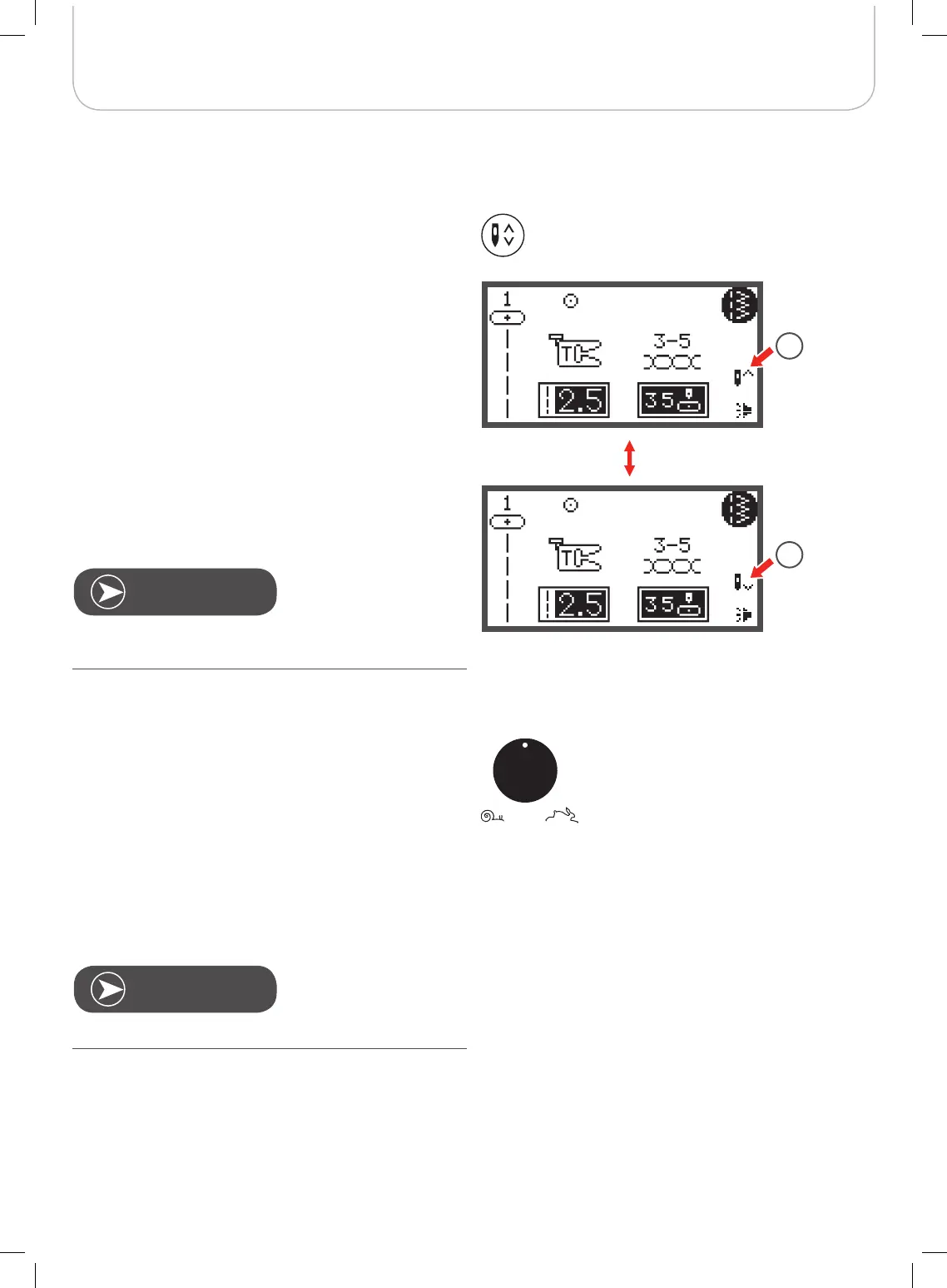
Needle up/down button
• By pressing the needle up/down button
– the needle will either stop in the up position or in the
material when stop sewing.
1 Press the button so the arrow on the LCD points
upward
– the needle moves to the highest position and will
stop there after sewing.
2 Press the button so the arrow on the LCD points
downwards
– the needle moves to the lowest position and will
stop there after sewing.
During sewing, press the needle up/down button, the
machine will stop automatically.
Speed setting is applied exclusively in sewing mode.
1
2



 To Next Page