Sewing preparation
41
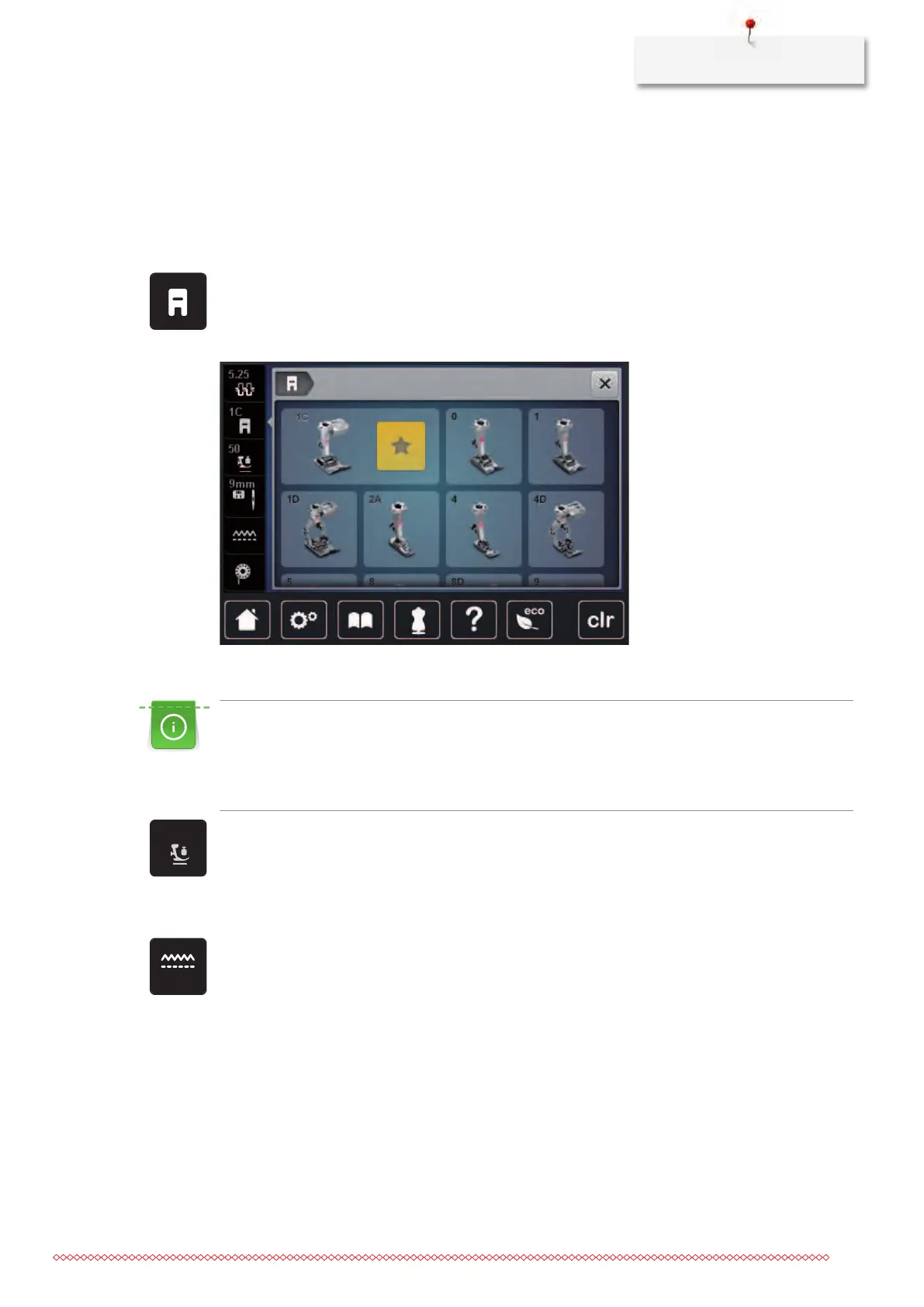
Having the presser foot displayed in the User Interface
The recommended presser foot for the selected stitch is displayed. In addition to that, optional presser feet
can be displayed.
> Switch the machine on.
> Select a stitch pattern.
– In the icon «Presser foot display» the recommended presser foot is indicated with a number.
> Touch the icon «Presser foot display».
> With the touchscreen pen/finger scroll up within the range of presser feet to have optional presser feet
displayed.
> If a presser foot is touched, the description and the application for this presser foot is displayed.
Adjusting the presser foot pressure
The presser foot pressure is designed to adjust the pressure of the presser foot optimally to the fabric
thickness. When working with thick fabrics, it is recommended to reduce the presser foot pressure. This
provides the advantage that the presser foot is slightly lifted so that the fabric can be moved more easily.
When working with thin fabrics, it is recommended to increase the presser foot pressure. This provides
the advantage that the fabric cannot be moved too easily under the presser foot.
> Touch the icon «Presser foot pressure».
> Move the slide with the touchscreen pen/finger to adjust the presser foot pressure.
2.9
Instruction for adjusting the feed dog
> Touch the icon «Feed dog up/down».
> Raise or lower the feed dog according to the animation.



 To Next Page