BestCode Next Series 8 Technical Manual October 2022 Page 73 of 290
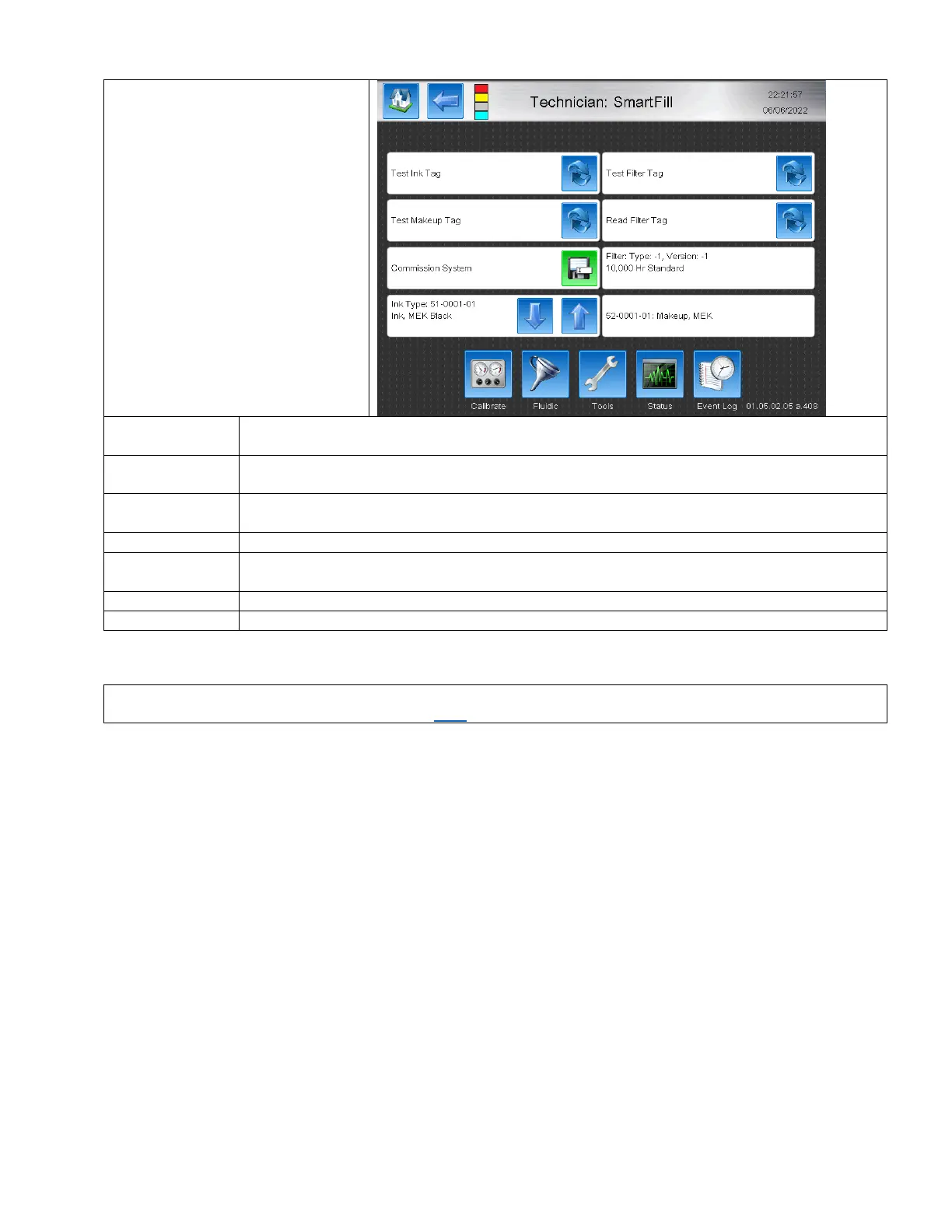
SmartFill
The SmartFill screen is used to Test
SmartFill labels, set system ink type,
and to read in new Ink Filters after
performing Ink Filter Maintenance.
Read the data on an Ink SmartFill label without destroying the label data. Used to test Ink SmartFill
labels, or confirming that the Ink being tested is OK to use in the printer.
Read the data on an Makeup SmartFill label without destroying the label data. Used to test Makeup
SmartFill labels, or confirming that the Makeup being tested is OK to use in the printer.
Read the data on the SmartFilter label without destroying the label data. Used to test that the Filter
is OK to be installed in the Printer.
Reads the SmartFilter label. Resets the Filter life with successful SmartFilter label read.
Save button for setting the ink type for the Printer. Must be pressed or the commission information
will not be saved.
Scroll up and down to match the ink type desired to be used in the machine.
Displays the permissible Makeups to me used with this ink. Most Inks allow for 1 unique Makeup.
These are tools for the automatic BestCode flushing process used in house.
Instructions for manual field flushing can be found here.



 To Next Page