TG 1000 – Digital Diversity Receiver
18
Mode
• Turn the rotary switch to the right and press the rotary switch
to access the “Mode” sub-menu. By pressing and turning the
rotary switch you can select “DHCP” or “Manual”. To confirm
the selection press the rotary switch .
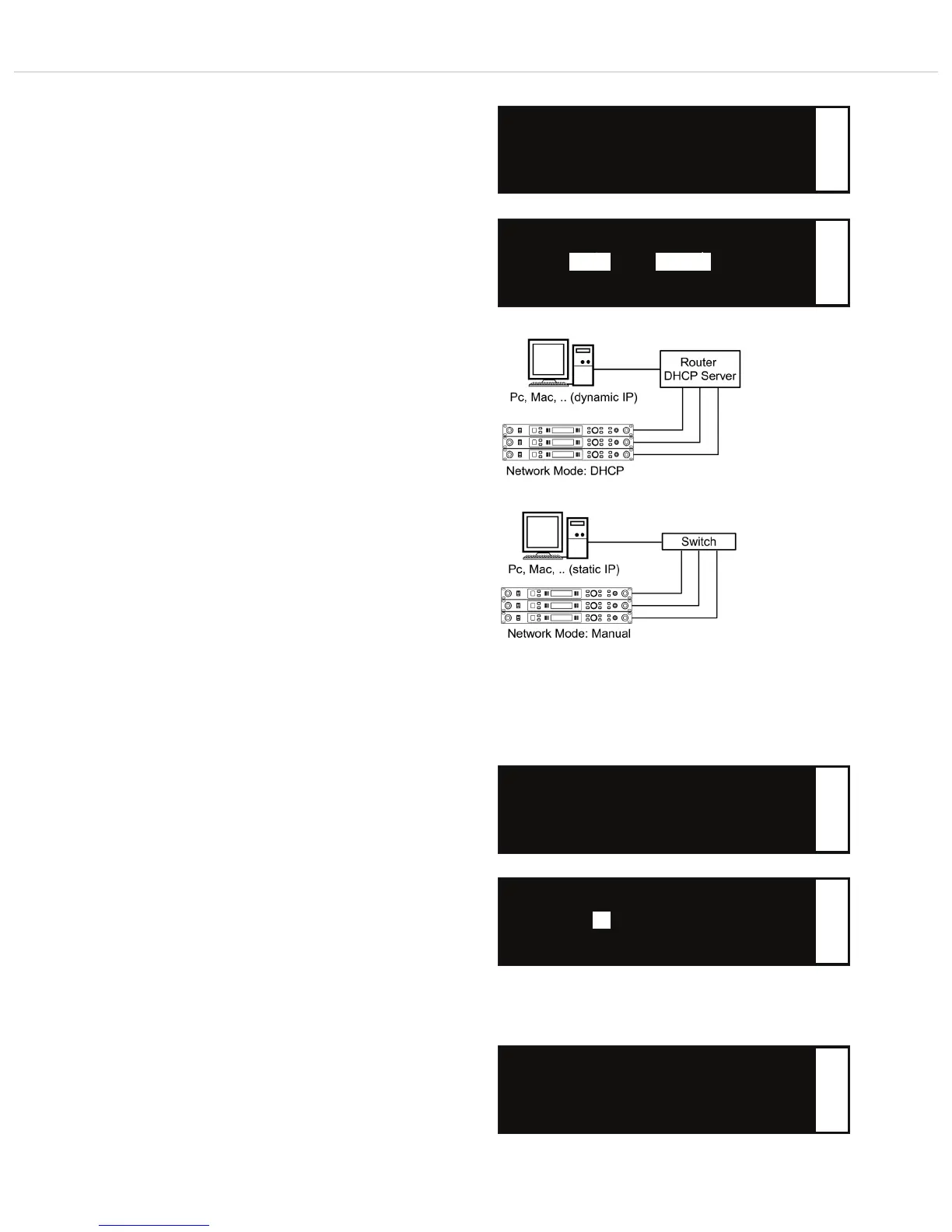
In a network you can use both switches and routers with DHCP
server. Please note that only one DHCP server in the network is
active due to the allocation of IP addresses.
If you use a router with a DHCP server, select “DHCP”. Then the
automatic integration of the receiver to an existing network
without the manual configuration is possible. When starting the
receiver it can get the IP address, the net mask, the gateway, DNS
server and if necessary WINS server from a DHCP server. With the
automatic assignment a range of IP addresses is defined on the
DHCP server. This area is set in a router with DHCP server. If the
address is out of this range allocated to a DHCP client, then it
belongs to, whichever is defined “Lease time” in the DHCP
server (router), which determines the duration of the assignment
between IP address and MAC address.
If you use a switch or router without an active DHCP server,
select “Manual”. You can set the IP address in the “IP” menu
manually.
▲ Mask: 0. 0. 0. 0.
• Mode: DHCP OR Manual
▼ Device ID: xx
f
Select the “Mode” submenu
• Mode: DHCP OR Manual
f
Select “DHCP” or “Manual”
DHCP Manual
Device ID
• Turn the rotary switch to the right and press the rotary switch
to access the “Device ID” sub-menu. Here you can select the
Device ID (1 - 99) of the receiver by pressing and turning the
rotary switch . To confirm press the rotary switch .
The Device ID defines the allocation of the devices in the
“Chameleon” software. In the basic view of the software the
devices are displayed one below the other similar to a rack with
ascending Device ID.
Important: Please note that you can change the Device ID only
on the receiver. Make sure that you do not assign the same
Device ID twice.
Mac
• Turn the rotary switch to the right and read the MAC (Media
Access Control) address in the “Mac” sub-menu of the receiver.
The MAC address is stored in the receiver and cannot be changed.
Each receiver has a different MAC address. This ensures that in a
network with a DHCP server each receiver gets a different IP
address.
▲ Device ID: xx
• Mac: 00:04:A3:3C:FE:93
▲ Mode: DHCP
• Device ID: xx
▼ Mac: 00:04:A3:3C:FE:93
f
f
Select the “Device ID” submenu
• Device ID: xx
f
Set the “Device ID”
Select the “Mac” submenu
xx



 To Next Page