TG 1000 – Digital Diversity Receiver
20
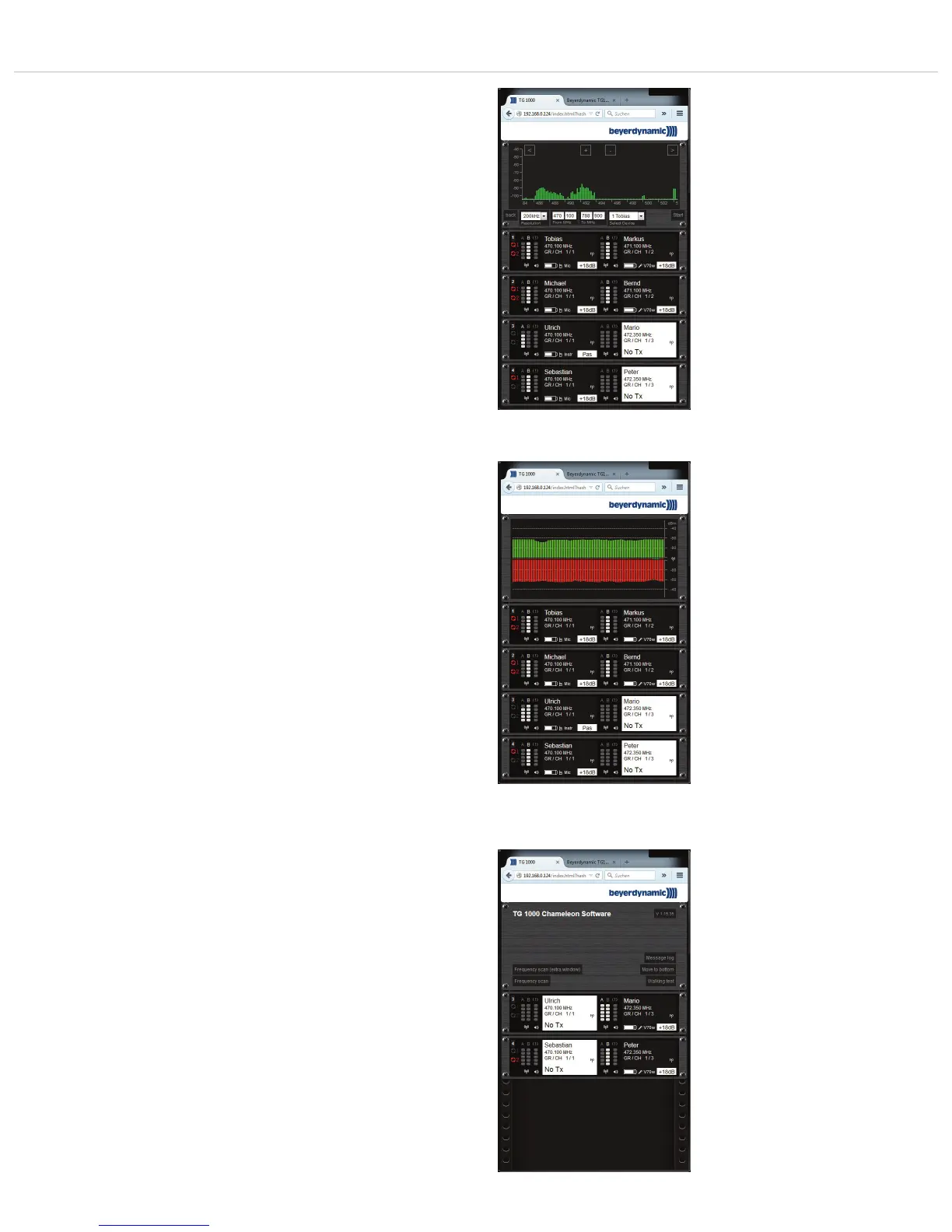
Frequency Scan
• The scan displays the RF signals of the selected frequency range.
These signals can be microphone signals or interferences caused
by DVB-T channels.
The Frequency Scan can be opened in an extra window by
selecting the “Frequency scan (extra window)” button. This
allows a larger view.
Clear Log
• Select the “Clear Log” button to clear messages in the display.
Move to Bottom / Top
• Select the “Move to Bottom” or “Move to Top” button to change
the position of the display.
Walking Test
• The “Walking Test” function is used to find out, using a portable
device, where there are problems with the reception on a stage.
Furthermore, it also possible to recognise problems with the
antennas.
• Select the “Walking Test” button.
• Select the channel under “Select Device”.
• Select the “Start” button. Both antenna signals are displayed over
the time. Places where dead spots occur are indicated by a lower
signal strength.
• The strip in the middle is the so-called diversity information which
indicates the currently active antenna.
Receiver Settings
• With the “Chameleon” software you can change the receiver
settings. The changes are applied directly in the device. Further-
more, all status messages are also displayed on the receiver itself.
The Sync LED lights up red when the transmitter and receiver have
to be synchronised again.
Chameleon-Software - Display of RF signals
Chameleon-Software - “Walking Test”
Chameleon-Software - Settings of receivers



 To Next Page