5-6 BL-E30-0515 - 03-01-2018
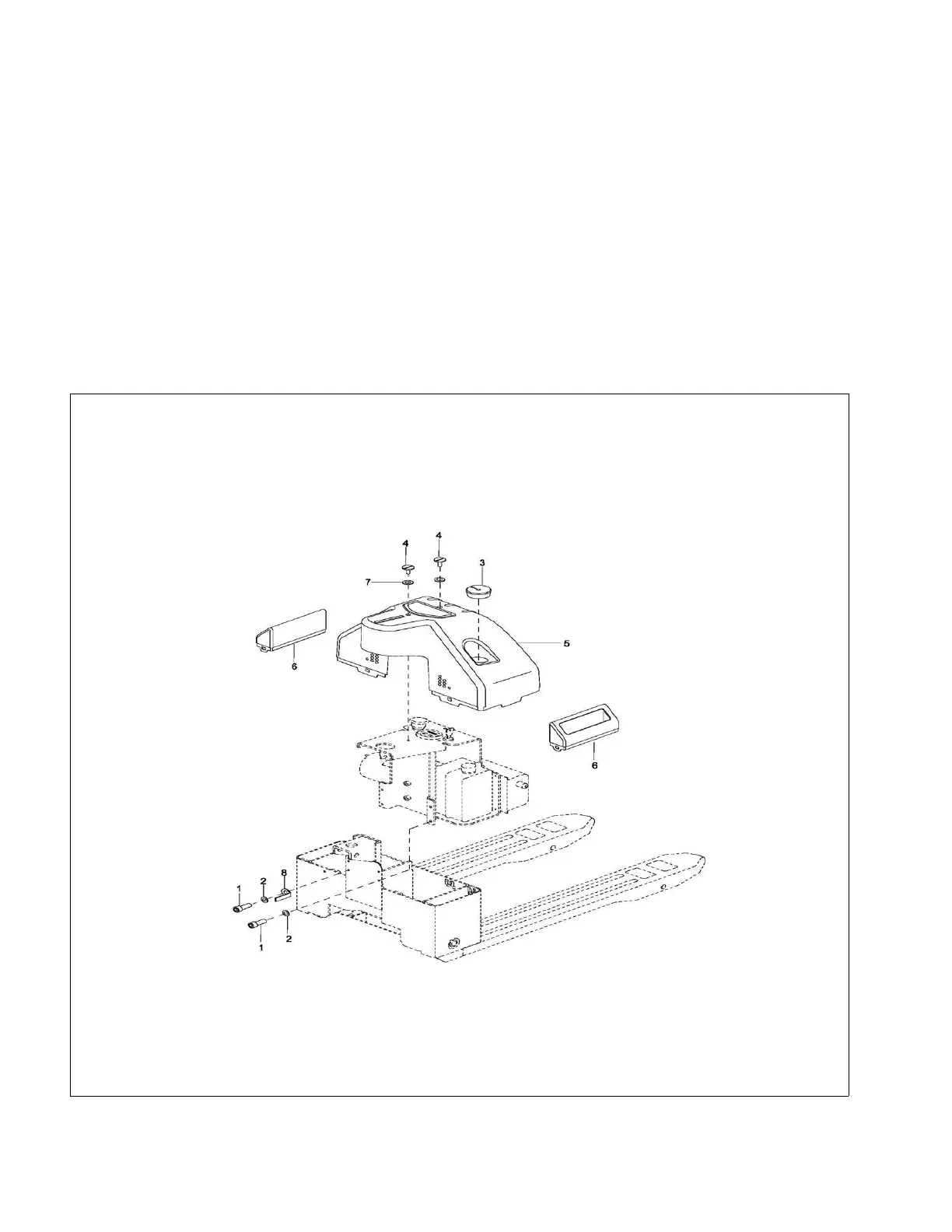
5-2. UPPER COMPARTMENT COVERS
5-2.1. Removal.
1. Turn off the key switch (20, Figure 12-18) and
emergency disconnect (17).
2. Pull cable (9, Figure 12-18) up and remove cap
(3, Figure 5-5) from the cable. Let cable (9, Figure
12-18) back down into cover (5, Figure 5-5).
3. Remove two screws (4) and cover (5).
4. Disconnect cable (9, Figure 12-18) from the bat-
tery charger.
5. Remove two side covers (7, Figure 5-5) if avail-
able.
5-2.2. Installation.
1. Install two side covers (7, Figure 5-5) if available.
2. Reconnect cable (9, Figure 12-18) to the battery
charger.
3. Feed cable (9) through cover (5, Figure 5-5) and
position cover (5) on frame (8, Figure 12-10).
Secure with two screws (4, Figure 5-5).
4. Install cap (3) on cable (9, Figure 12-18) and posi-
tion the cap on cover (5, Figure 5-5).
5. Turn on the key switch (20, Figure 12-18) and
emergency disconnect (17).
Figure 5-5 Compartment Cover



 To Next Page