13
3 OPERATION
OPERATOR CONTROLS
Most of the operator controls for the ESP 19 are located on the upper and lower
control boxes. Other operator controls include the BATTERY ON/OFF switch and
the emergency lowering valve. The BATTERY ON/OFF switch, located on the left
side of the lift base, is the main power disconnect switch for the lift vehicle. The
location and operation of the emergency lowering valve is described in paragraph
3-3.
Lower Control Box
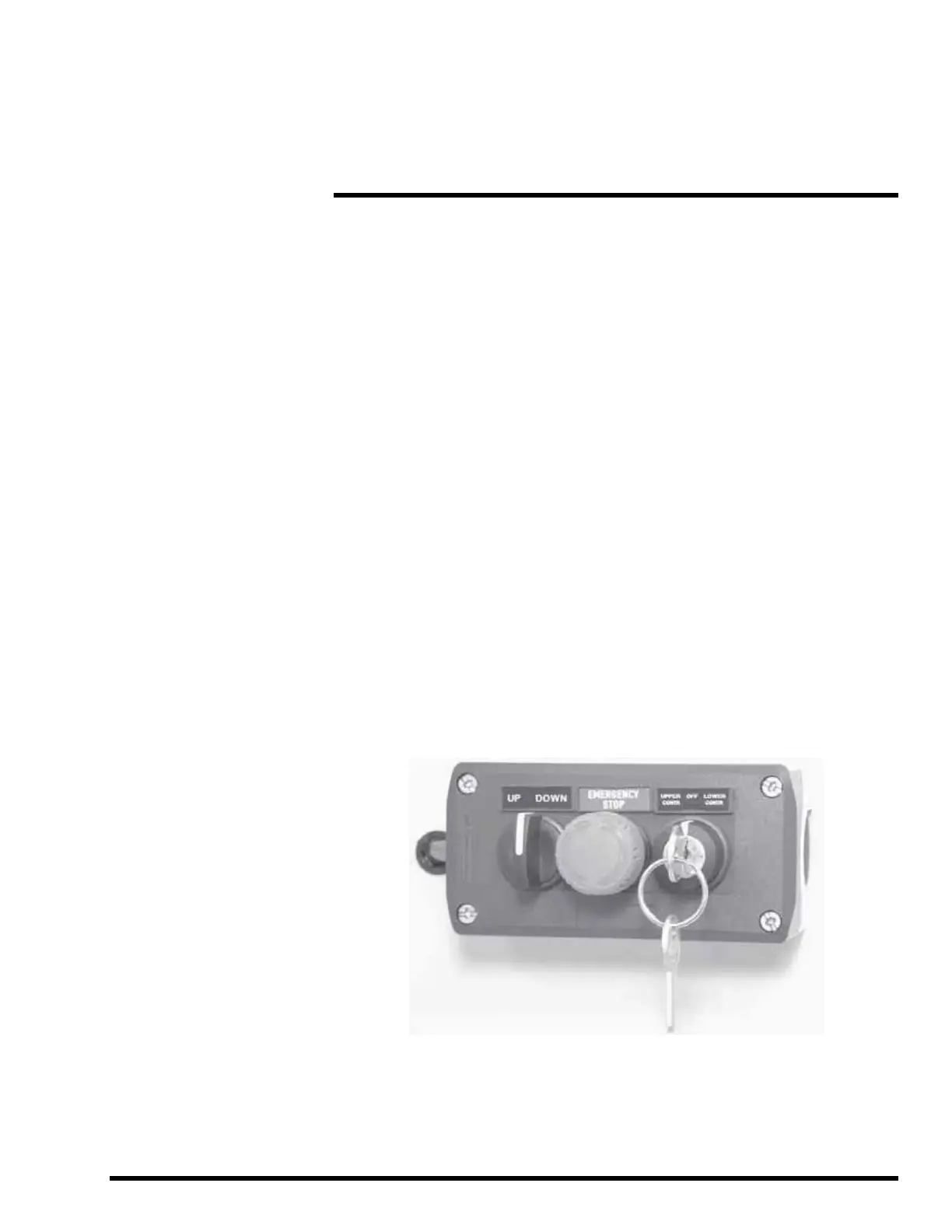
The lower control box, Figure 3-1, is located on the lift base and contains three
controls: UP/DOWN,
EMERGENCY STOP, and UPPER CONTROL/OFF/LOWER
CONTROL. The lower control box enables lift operations from floor level.
The UPPER CONTROL/OFF/LOWER CONTROL key switch selects the active
(upper or lower) control location. To enable an UP or DOWN lift motion from the
floor, turn and hold the key switch in the LOWER CONTROL position. To enable
lift vehicle travel or platform elevation from the upper control box, turn the key
switch to the UPPER CONTROL position. To disable lift vehicle operations, turn
the key switch to the OFF position and remove the key.
Turn the UP/DOWN selector switch to the UP position to raise the lift platform or
to the DOWN position to lower the platform. (The key switch must be held in the
LOWER CONTROL position to enable the UP/DOWN selector switch).
Press the EMERGENCY STOP button to stop all equipment motion. If the lift
vehicle is moving forward or back, pressing the EMERGENCY STOP button
engages the travel brake causing travel to stop quickly. To resume lift vehicle
operation, turn the EMERGENCY STOP button clockwise.
Figure 3-1. Lower Control Box


 To Next Page