7
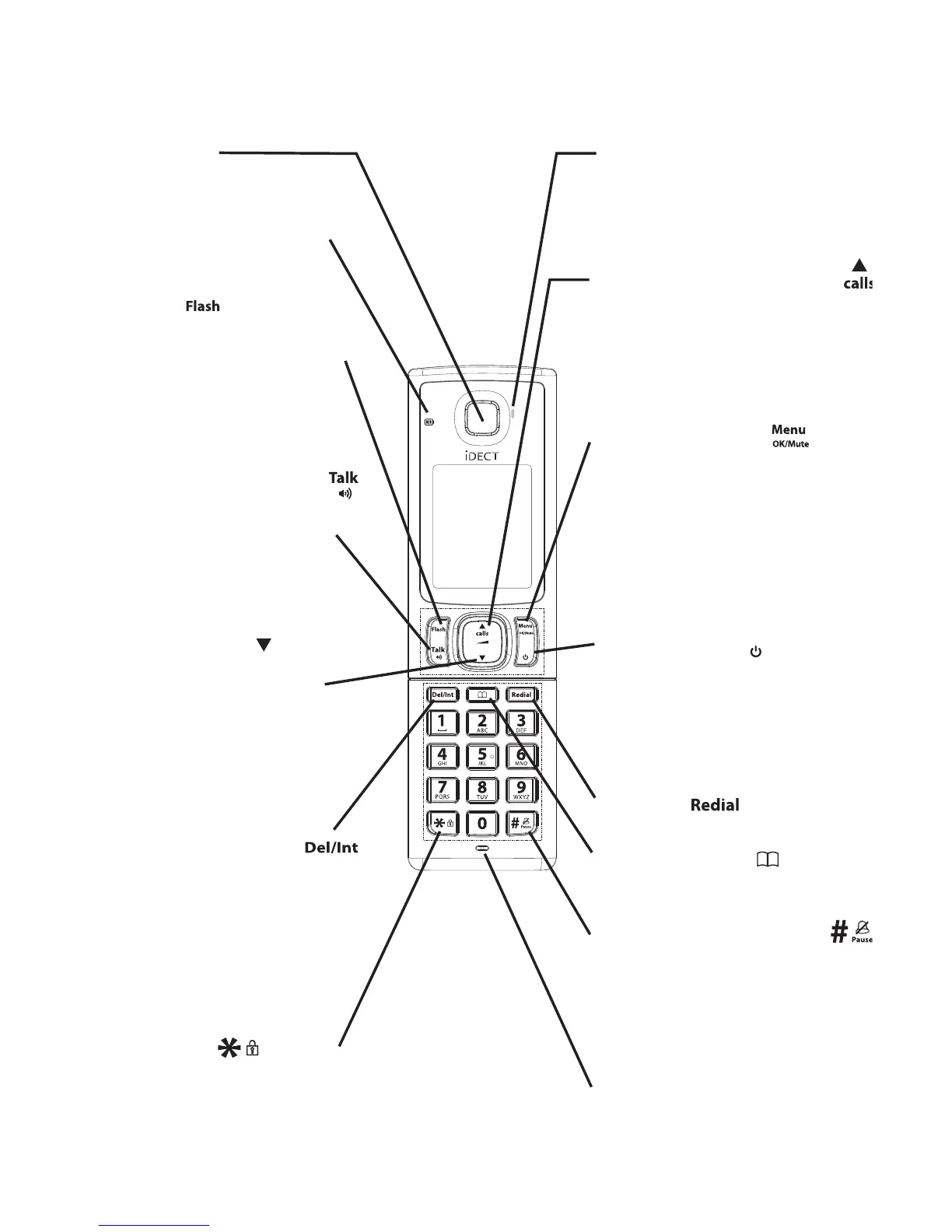
Ringer / Message LED
Flashes when ringing is
received or you have a new
answering machine message
or caller display entry.
RECALL
During a call, press to send
a Recall signal (also called
Flash) for network
services.
In idle mode, press to start
message playback.
Off
VOLUME DOWN
In menu mode, press to
scroll down.
During a call, or message
playback, press to
decrease the volume.
In idle mode, press to
access the call log.
EARPIECE
TALK/SPEAKERPHONE
Press to make or answer a call.
During a call or message
playback, press to switch
between speakerphone
and normal handset use.
DELETE / INTERCOM
During pre-dialling or
programming, press to
delete the last number or
letter entered.
In idle mode or during a
call, press to initiate an
intercom call or transfer a call.
*/KEY LOCK
Press and hold to turn the
key lock on or off.
MICROPHONE
#/PAUSE/RINGER OFF
Press and hold to turn the
handset ringer off
Press and hold to add a
dialling pause when dialling
or entering numbers into the
phonebook.
PHONEBOOK
Press to access the
phonebook list.
REDIAL
Press to access the redial list.
CALL LOG/VOLUME UP
In idle mode, press to
access the call log.
In menu
mode, press to scroll up.
During a call or message
playback, press to increase
the volume.
OFF/CANCEL
During a call, press to hang up.
During programming, press
to cancel and exit without
making changes.
In idle mode, press and hold
to power the handset on/off.
Off
MENU/OK/MUTE
In idle mode, press to enter
the Main Menu list.
Press to select an item, or to
save an entry or setting.
During a call, press to mute
the microphone, and press
again to resume
conversation.
Charging LED
Turns on when the handset
is charging.














 To Next Page