V 1.31
2021. 05 25 / 171 Doc. # : BN-OP-C7
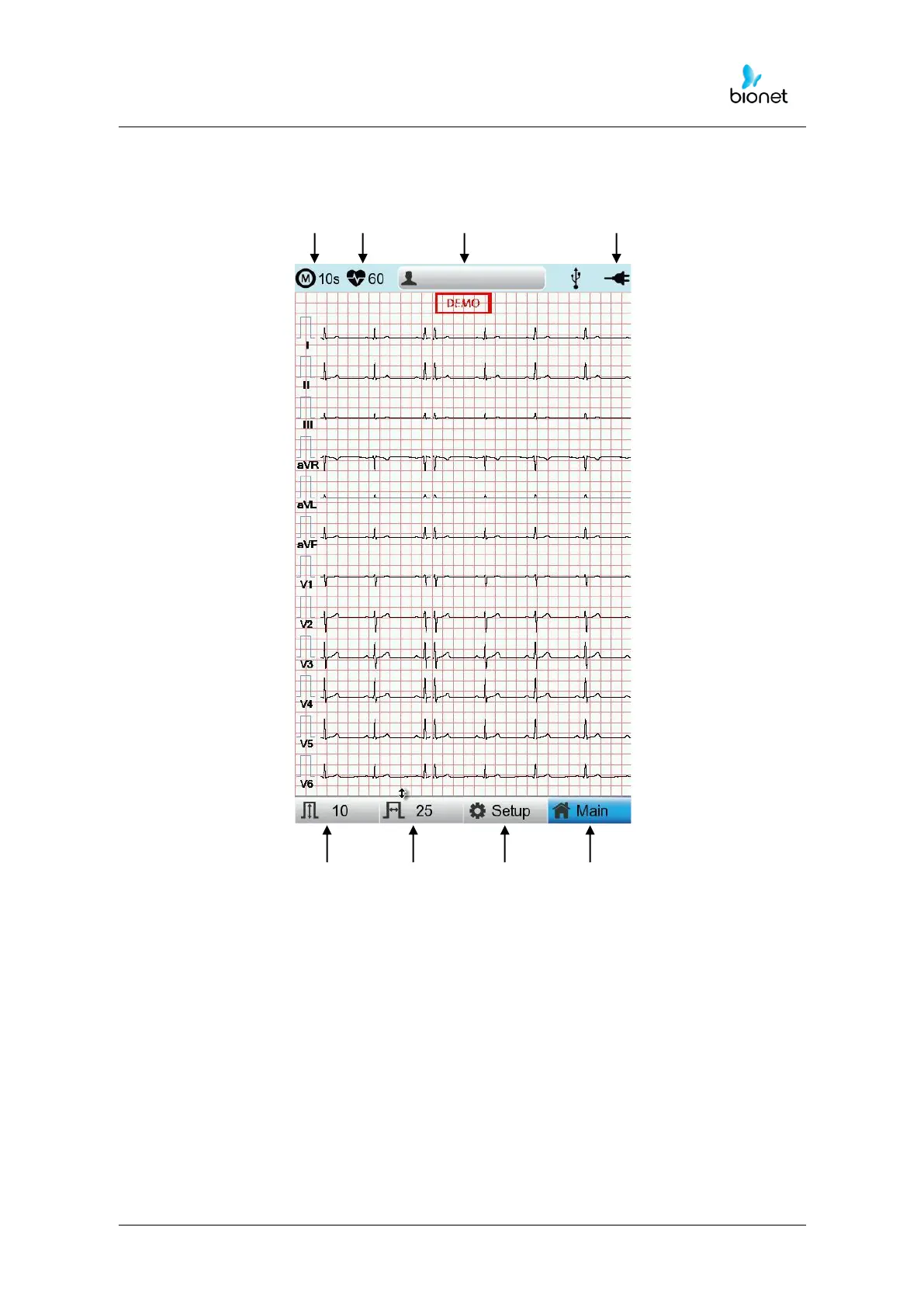
Graphic display LCD
The following descriptions explain data on the graphic LCD.
① ② ③ ④
⑤ ⑥ ⑦ ⑧
①Select one ECG recording mode (10s, 1m, 3m, 5m, or 10m (seconds, minutes))
②Displays the Heart Rate.
③Displays Patient ID.
④ Displays Battery Status or AC Power Connection Status.
⑤Displays ECG Sensitivity with One of 5, 10, 20, and Auto (mm/mV).
⑥Displays Printing Speed with One Of 5, 12.5, 25, 50 And 100 (mm/sec).
⑦Modify the preferences of 6 items, i.e., Basic Setup, Network Setup, Hospital Setup, ECG
Setup, Record Setup and Service Setup
⑧Choose the menu where you want to move (ECG, File, Worklist or Spiro)



 To Next Page