V 1.31
2021. 05 57 / 171 Doc. # : BN-OP-C7
6) Disclosure
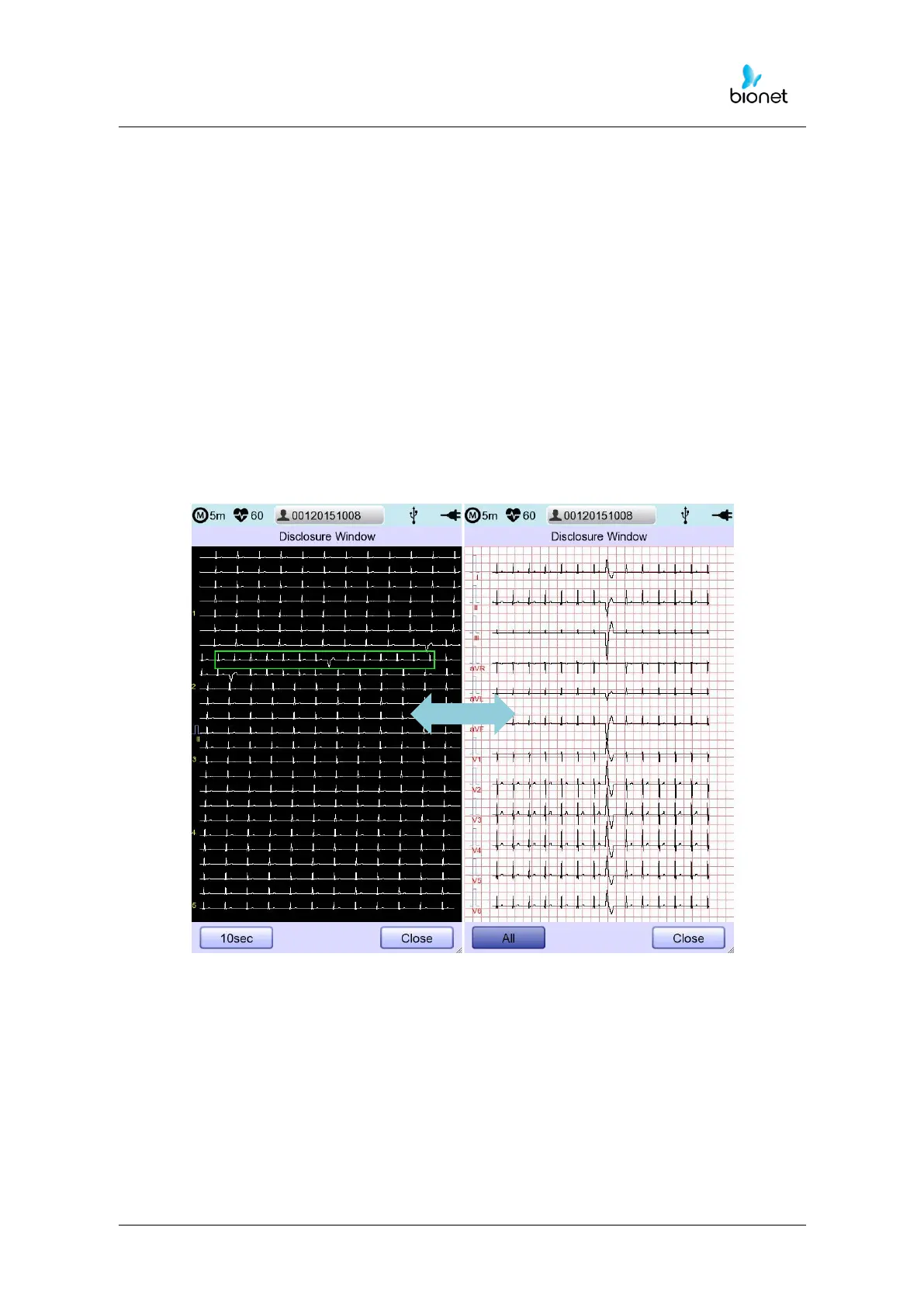
The screen can be shifted to the 'Disclosure’ function by pressing and holding the LCD at
ECG main screen state for 3 seconds. ‘Disclosure’ function means data is buffered in the
Disclosure Buffer, and then is shown when running the Disclosure menu; 5-minute data
which is already saved is fully displayed at 1CH (refer to setting Print -> Rhythm ), and as the
square field for the 10-second section where the user can select it to perform diagnosis
output and data transfer.
The 10-second square field on the ‘Disclosure Window’ can be moved in 1-second
increments by using rotary right/left keys; front and back 5-second section of touch pointer
will be set by touching.
On this ‘Disclosure Window’, designated 10-second ECG data will be shown as 12-
channel 10-second ECG data. If you press the 'All' button again, the screen will be
converted to a 5-minute full ECG screen; if you press the 'Close' bottom, the initial ECG
screen will return.
From the ‘Disclosure Window’, it is possible to output and transfer diagnosis by using
‘Record,’ ‘Auto’ and ‘Net’ key.



 To Next Page