October152009–InstallationGuideDraft–EditPurposesOnly Page38
Installation Guide – October 2009 – Edit Purposes Only
2009
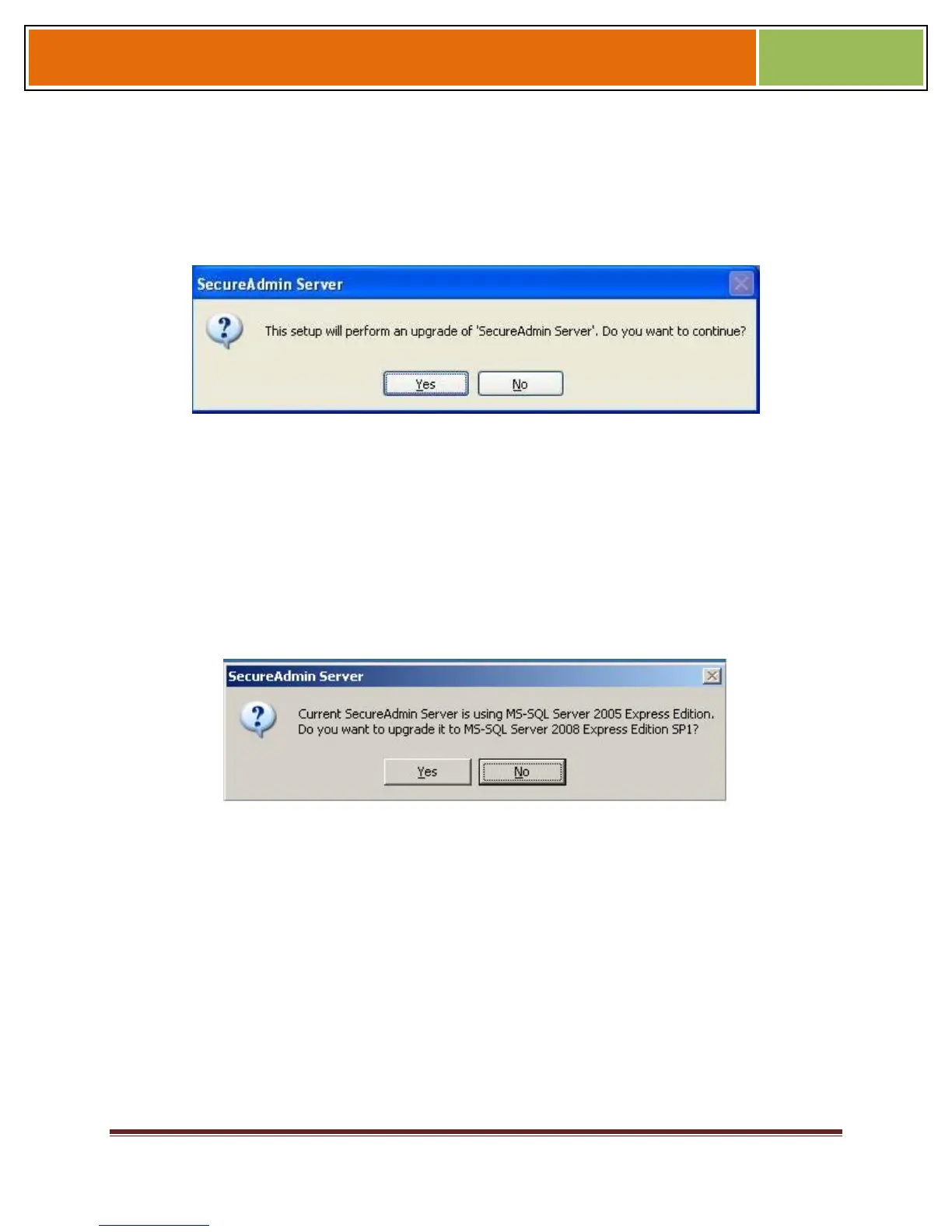
1. When you run the setup of SecureAdmin server, it checks to see if previous version
of SecureAdmin server is already installed on the machine. If yes, it prompts to
upgrade SecureAdmin server. Click Yes to continue with upgrade install.
Figure 3-10 Upgrade Confirmation
If you have installed previous version of SecureAdmin server with SQL Server 2005,
installer prompts to upgrade from SQL Server 2005 to SQL Server 2008. Click Yes if
you intend to migrate to SQL Server 2008.
Clicking Yes will install SQL Server 2008 locally if it is not installed. It will upgrade
existing SQL Server 2005 database catalog and migrate it to SQL Server 2008.
Clicking No will upgrade existing SQL Server 2005 database catalog.
Figure 3-11 Upgrade from MS-SQL Server 2005 Express Edition Confirmation
Click Finish. This completes the SecureAdmin server installation and exits the installer
Figure 3-12 SecureAdmin Server Installation Complete


 To Next Page