October152009–InstallationGuideDraft–EditPurposesOnly Page50
Installation Guide – October 2009 – Edit Purposes Only
2009
4.1.5 CONNECT DEVICE TO POWER SOURCE
The V-Station 4G and V-Flex 4G, and 4G Extreme devices can be powered by 12V-24V
DC power sources, or through a Power Over Ethernet (PoE) injector for V-Station 4G
and V-Flex 4G.
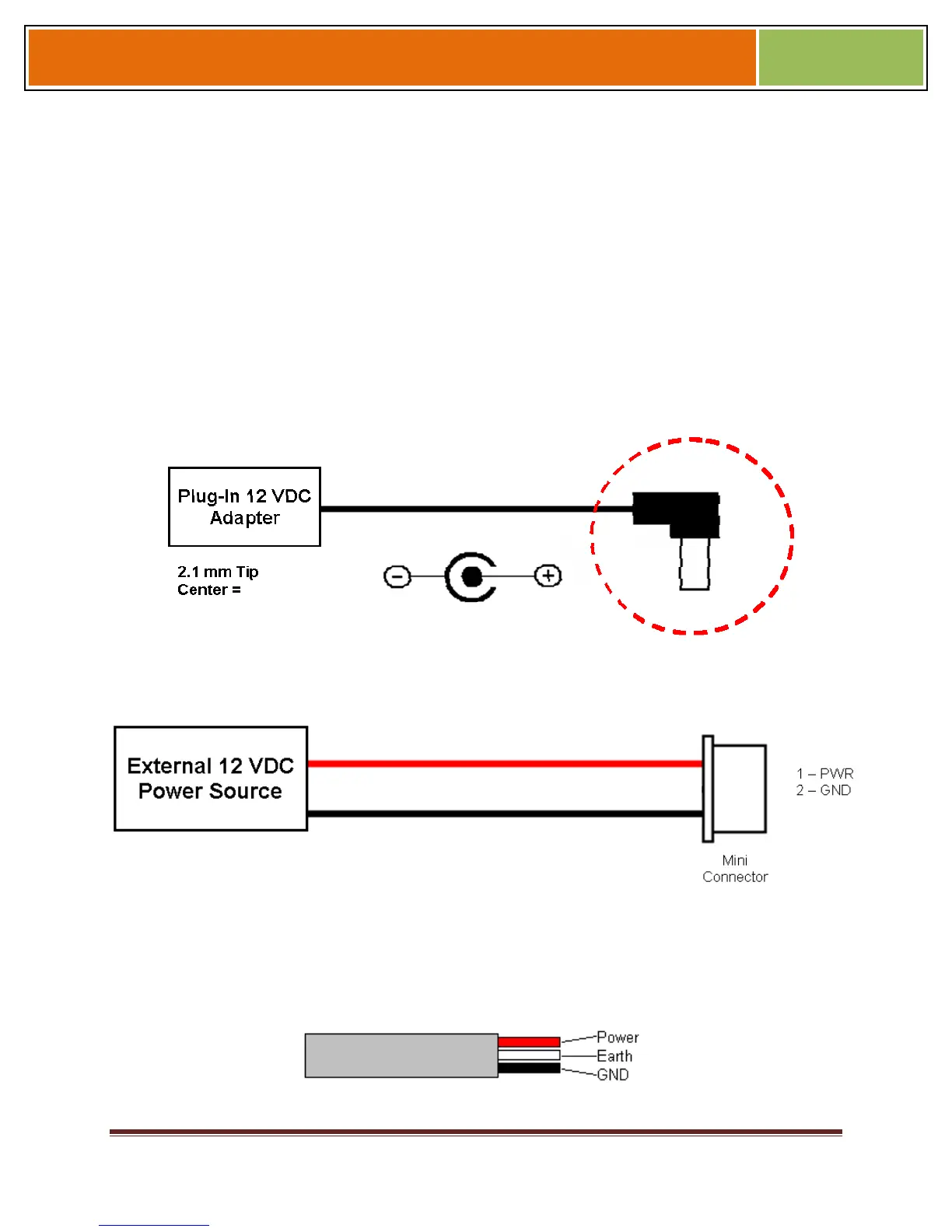
The two options for providing 1 2V power to V-Station 4G and V-Flex 4G devices are by
using an external wall plug-in adapter (Figure 4-7), or through external wiring and a mini
plug (Figure 4-8).
12V power can be provided to 4G Extreme devices only through the 3-Wire back cable
(Figure 4-9).
Figure 4-7 Connections for an External Wall Adapter (4G Indoor)
Figure 4-8 Connections for an External Power Source (4G Indoor)
Figure 4-9 Connections for an External Power Source (4G Extreme)


 To Next Page