October152009–InstallationGuideDraft–EditPurposesOnly Page52
Installation Guide – October 2009 – Edit Purposes Only
2009
Detailed RJ-45 pin assignments for PoE are given in Table PoE Pin Assignments, and
the physical location of the pins in the RJ-45 connector.
Figure 4-12 RJ45 Pin Location
4.1.6 CONNECT DEVICE TO NETWORK
The V-Station 4G and V-Flex 4G devices support both RS-232/RS-485 and Ethernet 1
0baseT and 1 00baseTX network protocols.
4.1.6.1 ETHERNET NETWORK CONNECTIONS
Ethernet connections to the device are made through a standard RJ-45 connector on
the back of the device.
4.1.6.2 RS-232/RS-485 NETWORK CONNECTIONS
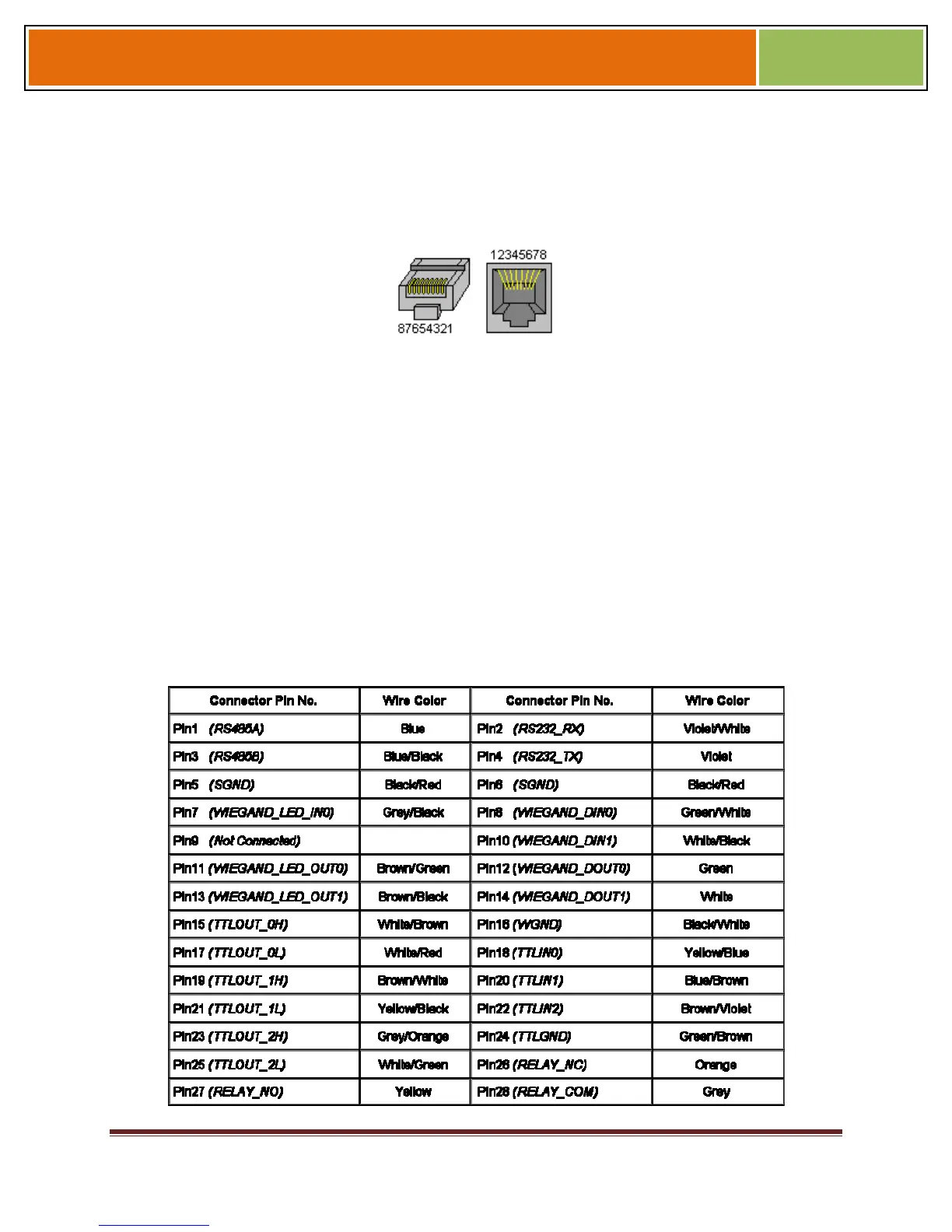
To connect a device to an RS-232 or RS-485 network, connect the appropriate wires to
the provided pigtail in accordance with the pin-out diagram.
Table 4-1 Pin-out Diagram



 To Next Page