Vacuum Filtration for Filter Plate Assays| 65
Create a Vacuum Filtration Protocol
You may want to begin the protocol with a Shake step to suspend the beads.
LHC: Touch screen
1.
Click (or select File>New).
2. Select the plate type.
3. Specify a Protocol Name.
4.
Click
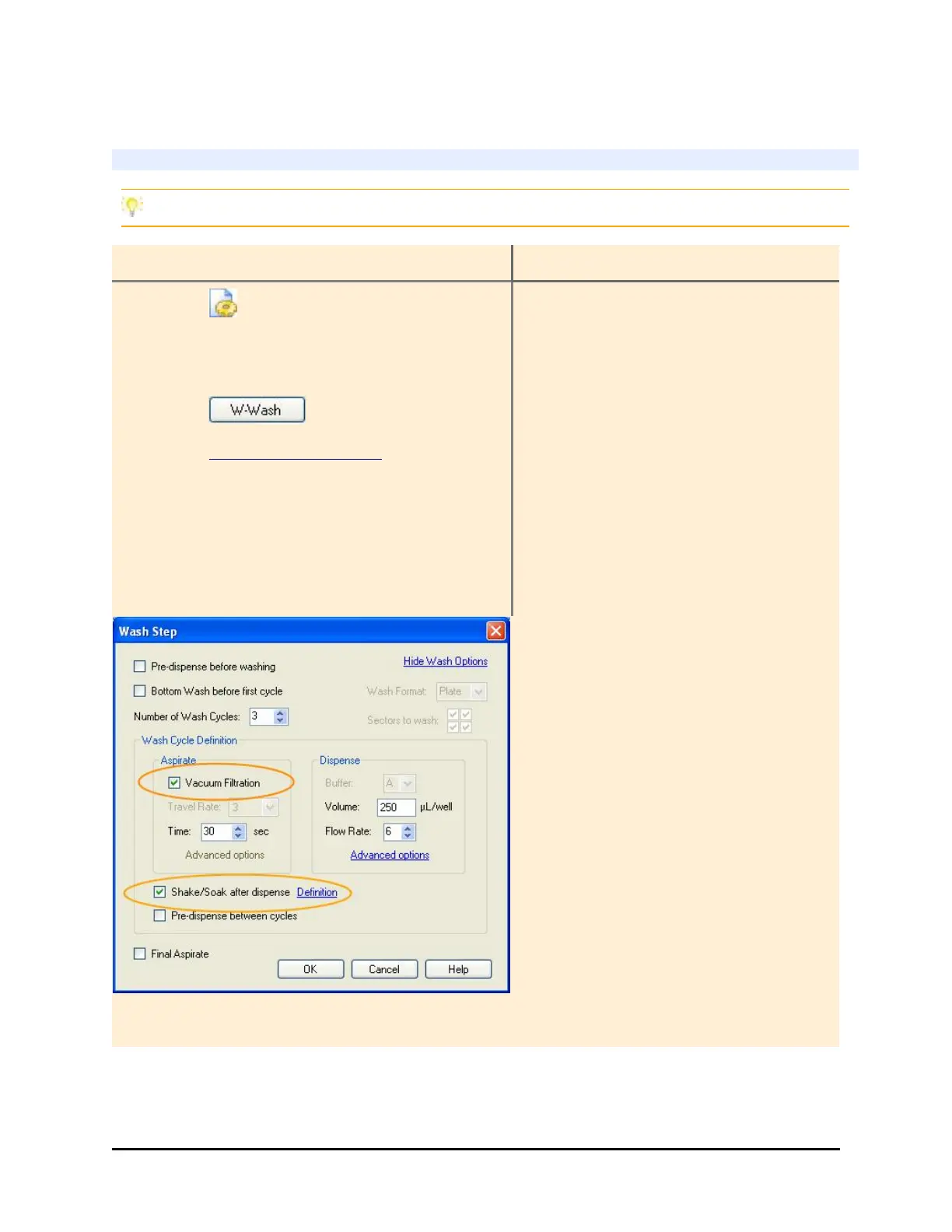
5. Click Show Wash Options
6. Fill the checkbox for Vacuum Filtration
and specify the vacuum duration, Time.
Optionally, do the same for the Final
Aspirate.
1. Select Define>Create.
2. Touch the Name field and enter
a unique protocol name. Press
OK.
3. Press Add and select Wash (or
Soak to begin with a Shake
step).
4. Enable Vacuum Filtration in the
Aspirate step and set the
vacuum duration.
5. Define the Final Aspirate
parameters.
7. Fill the checkbox for Shake/Soak and
specify the shake duration.
Experiment with different settings to determine the optimal parameters to meet your
goals.
BioTek Instruments, Inc.


 To Next Page