Enigma™ M4 Manual - Rev A Page 38 (c) 2020 Blizzard Lighting, LLC
4. Fade out all playbacks when the music is nished, and press the soft key to stop recording. Then press
[conrm] to save.
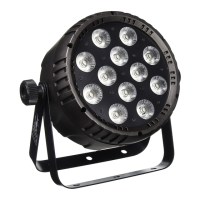
5. After saving, the screen will show all the used playbacks, presets, and operations.
6. The location of macro show and its record mode will be shown on top of the window.
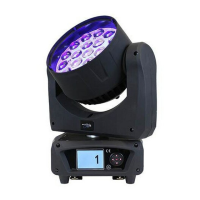
7. You may press the soft key on the record window when the macro show needed to run. You can also press the
Macro key in the Select section to run the macro if you already exited the window. The macro show is in a ready
state after selecting the soft key, and is waiting for the MIDI signal to play (as shown below). At the moment,
the time bar will still show the internal clock.
8. Now you play the music on the external equipment again, and the macro show will run the playbacks or presets
following the time code as when recording. The internal clock will also change into an audio time code when
playing begins, and the operation state will be shown on the record window on the screen.


 To Next Page