Reading
Select display
Switch on operational readi-
ness ( 38).
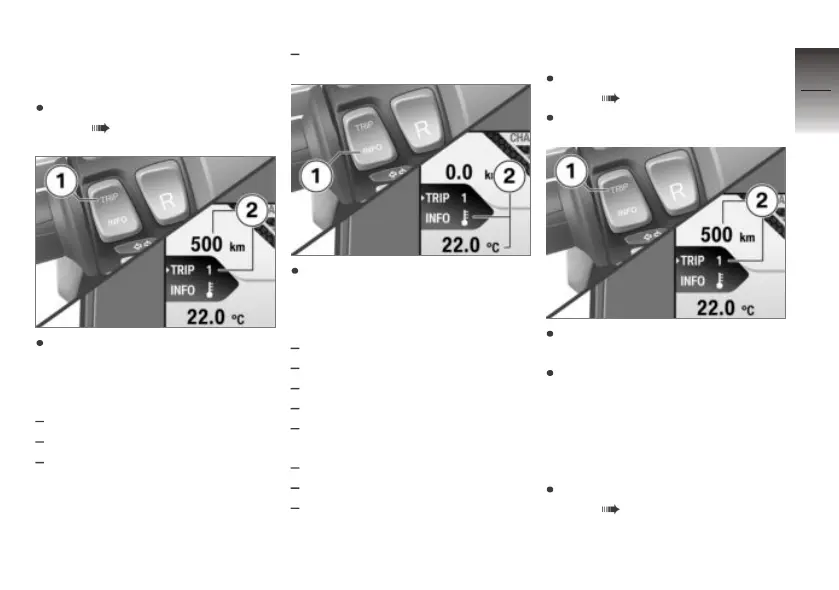
Short-press button 1 to select
the reading in panel 2.
The following values can be dis-
played:
Tripmeter 1 (Trip 1)
Tripmeter 2 (Trip 2)
The automatic tripmeter
(Trip A) resets automatically
when 6 hours elapse after
operational readiness is
switched off.
Setup menu (Setup)
Short-press button 1 to select
the reading in panel 2. The
average values you can reset
are as follows:
Average consumption
Range extension
Overall consumption
Overall energy recovery
Time riding at speed of at least
10 km/h
Operating hours
Average speed
Ecology points
Resetting tripmeter
Switch on operational readi-
ness ( 38).
Select a tripmeter.
Short-press button 1 to select
the tripmeter you want.
Hold down button 1 until the
tripmeter reading in panel 2
has reset.
Resetting the average
values
Switch on operational readi-
ness ( 38).
4
39
z
Operation



 To Next Page