The settings you made are ac-
cepted.
Adjusting display
brightness
Switch on operational readi-
ness ( 38).
Entering Setup menu ( 40).
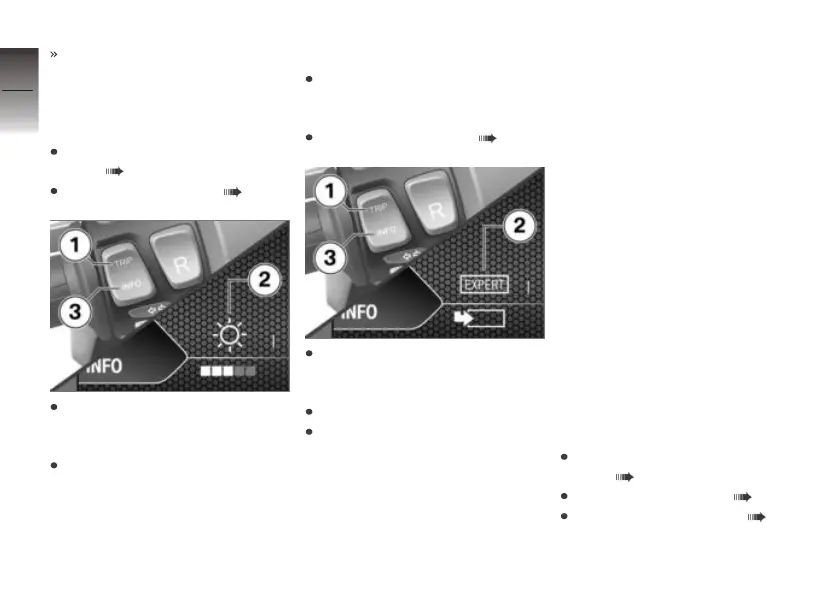
Repeatedly short-press but-
ton 1 until desired symbol 2 is
selected.
Use button 3 to adjust display
brightness.
Calling up Expert menu
Make sure the ground is level
and firm and place the E-
Scooter on its stand.
Entering Setup menu ( 40).
Repeatedly short-press but-
ton 1 until symbol 2 is selec-
ted.
Long-press button 3.
Long-press button 1 to return
to the Setup menu.
Expert menu
Function description
You can switch certain functions
on and off and change formats
and units of measure in the Ex-
pert menu.
All the parameters you set in the
Expert menu have effects on the
multifunction display.
The Expert function is special.
You can use it to reset all the
parameters you have changed to
their factory default settings.
Selecting information
types
The following is an example il-
lustrating how to use the Expert
menu to view general information
in the multifunction display.
Switch on operational readi-
ness ( 38).
Entering Setup menu ( 40).
Calling up Expert menu ( 42).
4
42
z
Operation



 To Next Page