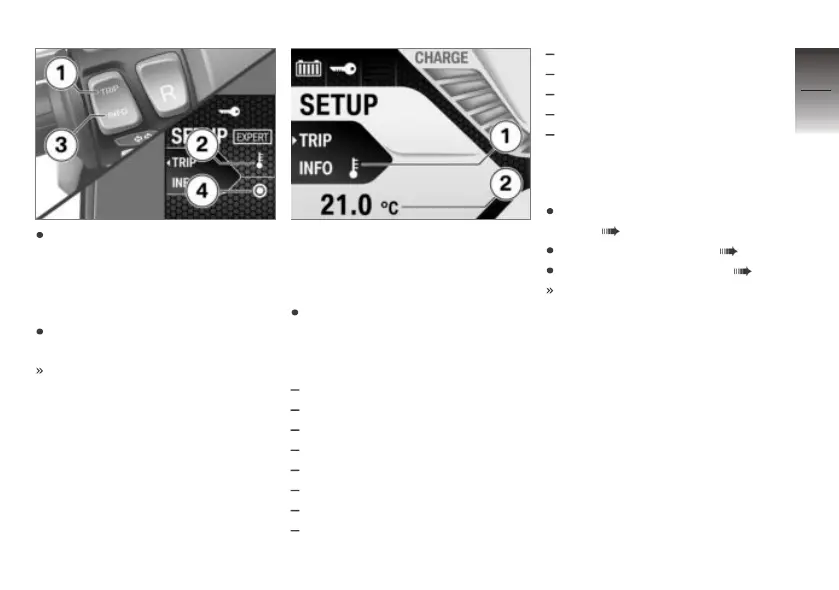
Repeatedly short-press but-
ton 1 until the information type
you want 2 appears; in this ex-
ample the information type is
ambient temperature.
Short-press button 3 to select
this information type.
Option indicator 4 is high-
lighted.
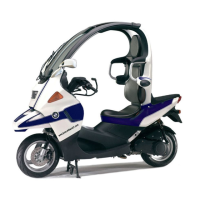
The selected item of informa-
tion appears at position 1 and
the corresponding value at posi-
tion 2.
There are 14 information types
that can be selected in the Ex-
pert menu for viewing in this
part of the display:
Ambient temperature
Time and date
Average speed
Average consumption
Current consumption
Overall consumption
Overall energy recovery
Extended range
Ecology points
High voltage level
On-board electrics voltage level
Operating hours
Time riding at speed of at least
10 km/h
Setting format and unit
Switch on operational readi-
ness ( 38).
Entering Setup menu ( 40).
Calling up Expert menu ( 42).
The Expert menu enables you
to change formats and units;
these changes affect the mul-
tifunction display as shown in
this example.
4
43
z
Operation



 To Next Page