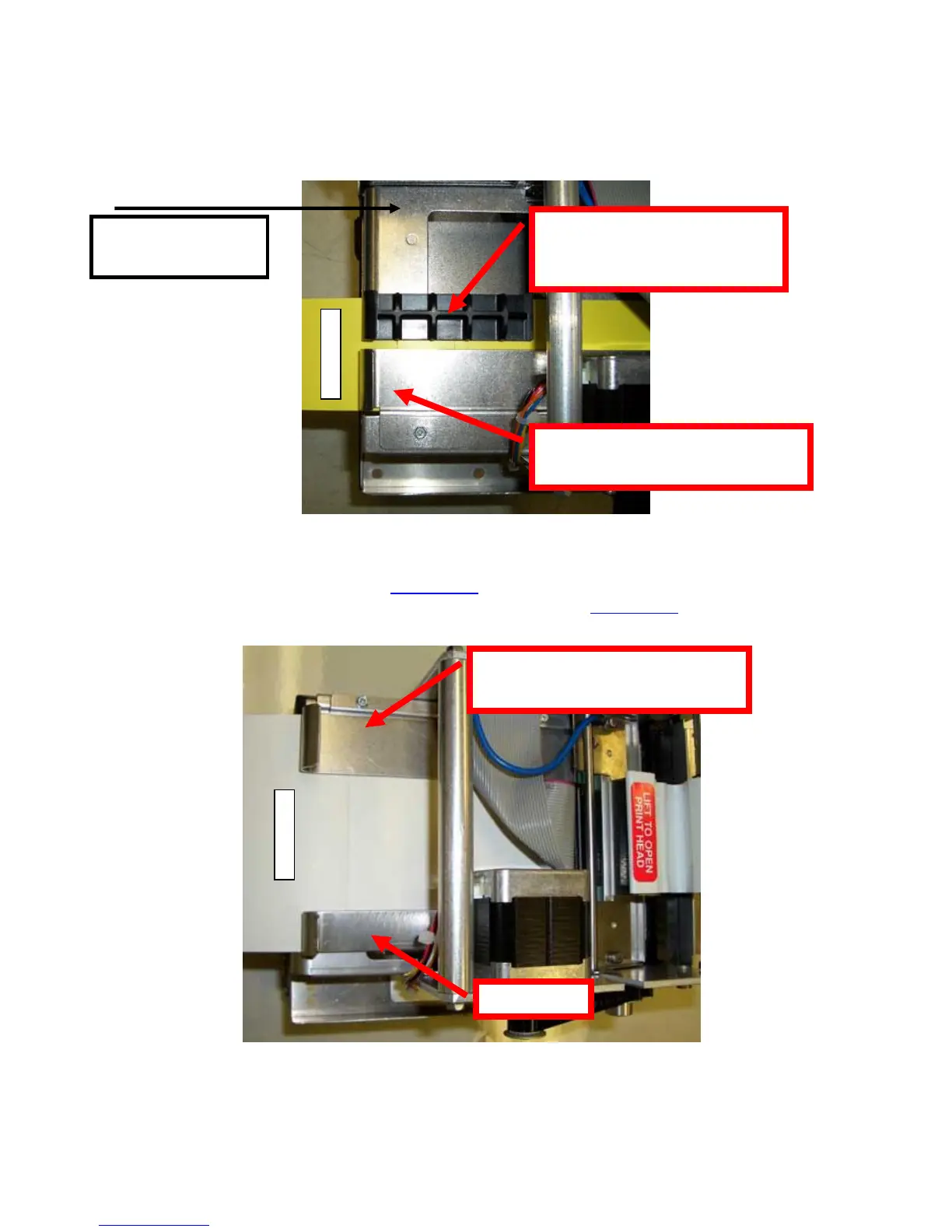
9.1.4 Ticket Width Adjustment
To adjust the paper path for use with a different ticket width, adjust the slider bar to the fully open position.
Insert your ticket stock into the paper guide. Adjust the slider bar down to the proper ticket width, making sure
the bar is not too tight against the ticket. The ticket should move freely in the paper guide.
Above photo is of a RDJW paper path set for 2” wide stock
On reverse adjustable printers (RADJW or RADJ4), the “special head” setting via the control panel must be
changed to match the new ticket width (see Appendix A). If the printer doesn’t have the optional control panel
then the width adjustment can be made via a software command (see Appendix H).
Above photo is of ADJ paper path set for 4” wide stock
No special head setting change is necessary on standard adjustable printers (ADJ4, ADJW or ADJ2).
The slider bar would be
located here for 3.25”
ticket width
Slider Bar, NOTE: stock
must go under the slider
bar.
Load your stock towards this
side and below this metal plate
Load your stock towards this
side and below this metal plate



 To Next Page