28
P073GUI001 - e-Celsius Medical Connect System User Manual.4 - EN
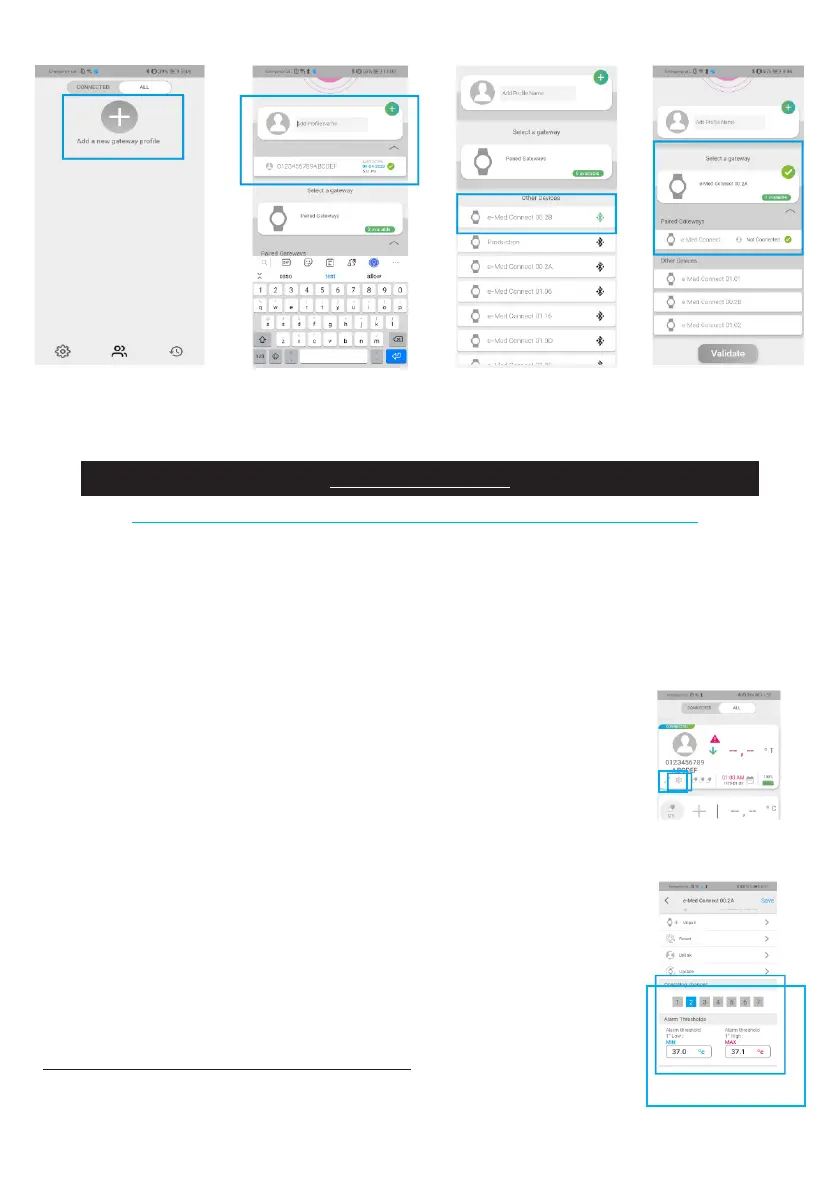
Figure 10: e-Med Connect BLE pairing with e-Celsius Mobile
Before using the watch with a capsule, it is necessary to congure some parameters.
To do this, please go to the watch settings options using the nut located on
the main screen below the concerned prole.
The available parameters are:
• Date and time (automatic)
The date and time of the device (smartphone or tablet) on which the e-Celsius®
Mobile application is installed will be sent to the watch. This time will be used to
date future recordings. It is also displayed on the watch screen.
• The operating channel
This allows you to select the desired operating channel for the next recording. This
is an advanced setting, limiting interference if several watches are in the same
environment.
This setting can no longer be changed once the watch has associated capsules.
• The setting of physiological alarm thresholds
The "Thresholds" setting allows you to congure the Low and High temperature
thresholds for which a visual physiological alert is triggered (LED on the watch &
alarm on the support)
• Add a comment
The application allows you to record a comment for a given prole. In the prole
settings, select comment and enter a note, 64 characters maximum.
Note: All new settings must be saved to be applied.
MAIN FUNCTIONS
e-MED CONNECT CONFIGURATION ON e-CELSIUS MOBILE
Figure 11 - eMed Connect Conguration



 To Next Page