36
P073GUI001 - e-Celsius Medical Connect System User Manual.4 - EN
ARCHIVE MANAGEMENT - FORMER CAPSULES
A deactivated capsule will automatically be placed in the corresponding folder in the application's archives.
It will be led under the name of the prole to which it was associated and sorted by activation date and
serial number.
It is then possible to select the capsule(s) of interest for:
* view them again through the application (Max 3 capsules)
* export them in CSV or PDF
* delete the corresponding data from the phone's memory
The selection can only be made if the capsules are from the same session (prole + watch).
DATA EXPORT
It is possible to export the data:
* During acquisition: simply place in the graphic display window of the desired capsule or the "all"
tab of the application and click on the export button
* A posteriori in the archive area: in the archive, select the capsules of interest and click on the
export button.
The possible export formats of the data are PDF or CSV.
OPTIMIZATION OF THE e-MED CONNECT BATTERY
The e-Med Connect watch is optimized for radio communication with 1 to 3 capsules in parallel. However,
if a capsule is evacuated or if it stays away from the watch (e.g. not swallowed), an alarm light (LED) will be
triggered and the watch will try to re-establish communication with the capsule(s) by activating the radio
functionality more often.
For this reason, it is recommended to deactivate a capsule that has been visualized to be emptied and to
pause a capsule that has not yet been swallowed. This will limit consumption and improve the battery life
of the watch.
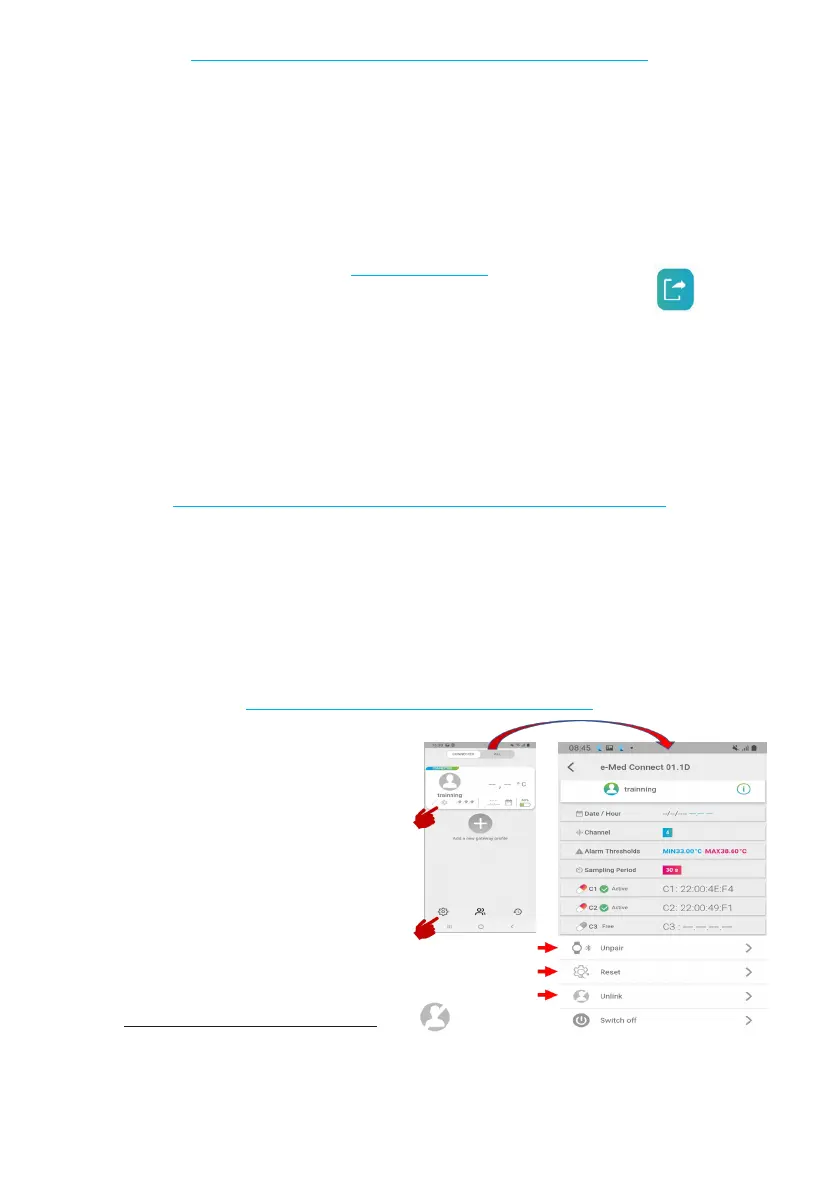
END OF FOLLOW-UP - APPLICATION
When your tracking on e-Celsius Mobile is com-
plete and your capsules are deactivated from the
prole, you have several options to nalize your
session by going to the watch settings:
* separate the prole and the watch:
This action can be carried out:
- at the end of the monitoring to archive the data and allow a new use of the watch with another
prole.
- during the monitoring, if you are no longer required to follow the watch and to allow the monito-
rind by an other mobile object .
Figure 19 - end of follow-up options



 To Next Page