29
P073GUI001 - e-Celsius Medical Connect System User Manual.4 - EN
Figure 11 - eMed Connect Conguration
In order to associate an e-Celsius® Medical capsule, please have all the system elements ready:
* the activator and its cable
* the e-Med Connect watch which is turned on without the watch cable removed
* the e-Celsius Mobile application which is launched and paired with the watch
* a new e-Celsius Medical capsule
Note: the application and the watch must be connected to launch an association.
The operator (nursing staff) is responsible for this action, before giving the capsule to the patient.
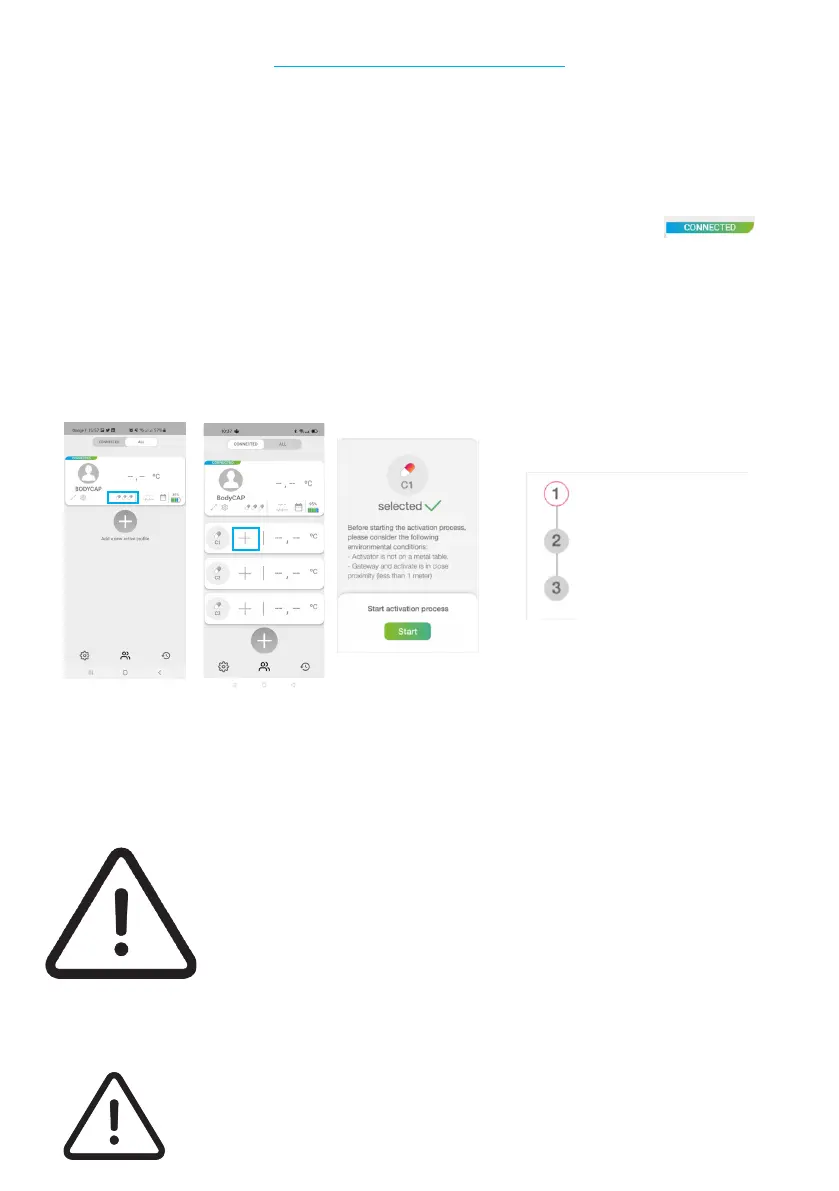
Then go to the e-Celsius Mobile application and select the created prole which is associated with the
dedicated watch. Unfold the prole by clicking on the capsules. The details of each capsule appear. Choose
the location of the capsule to associate by pressing the corresponding + and follow the instructions of the
application.
Connect the activator to a USB Connect the activator to a USB
source and place it near the watchsource and place it near the watch
Place the cap in the hole of thePlace the cap in the hole of the
the activator, red part downwards.the activator, red part downwards.
Press the button of the activator Press the button of the activator
and perform a rotation of the and perform a rotation of the
capsulecapsule
The capsule to be activated should be placed in the dedicated hole of the activator, white end up. If you wish
to maintain the sterility of the capsule, this operation must be performed while preserving the integrity of
the blister. To activate a capsule through the blister, it is necessary to position it vertically in the blister and
it is advisable to hold it by exerting pressure and rotating the capsule. Once the capsule is activated and
associated with the watch, the data can be viewed on the e-Celsius Mobile application.
To activate an additional capsule, repeat the procedure. Up to 3 capsules can be associated in parallel with
the same e-Med Connect watch.
If the activator LED stops ashing and the message "Error! Wish you to restart an Error! Wish you to restart an
associationassociation" appears on the e-Celsius Mobile application screen, please check
that the e-Celsius® Medical capsule is correctly positioned in the activator and/
or move the e-Celsius® Medical capsule slightly in the hole, press the "restart"
button on the e-Celsius Mobile application to restart the association process and
then press the activator button again.
If you wish to maintain the sterile state, the capsule must be removed from its blister
as late as possible before ingestion.
COMBINATION OF A CAPSULE
Figure 12 - association of a capsule



 To Next Page