35
P073GUI001 - e-Celsius Medical Connect System User Manual.4 - EN
Figure 17 - Markers
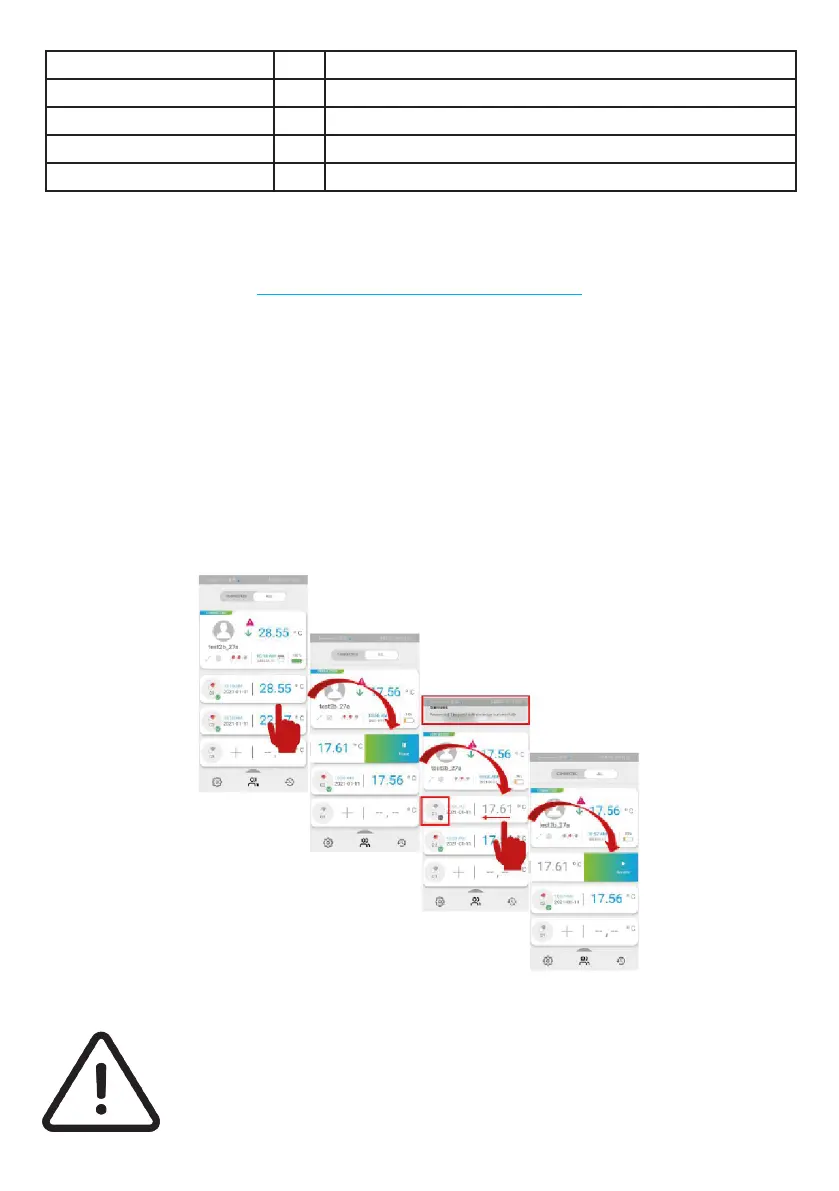
THE PAUSE MODE OF A CAPSULE
It is possible that one or more capsules have been activated at the same time to anticipate a
consequent ingestion. In this case, the non-ingested capsules will trigger the physiological temperature
alarm. In this case, there is a special mode that consists in pausing the capsule that we are not
immediately interested in. The temperature data will not be recorded in the watch and the alarms will
not be triggered on this data. As soon as this mode is deactivated, the watch will communicate with
the capsule again to ask for the last 2000 data before resuming the classic real time communication.
To activate or deactivate the pause mode, simply select an active capsule, click and drag your nger to the
left. This will bring up the option "enable pause" if the capsule is active or "disable pause" if the capsule is
lready in pause mode.
A pause symbol also appears on the watch display as a reminder that at least one capsule is in a pause
state.
Be careful, the pause mode can cause the lost of data if the capsule is swallowed and
the pause is not removed. It is necessary to check on the e-Celsius Mobile application
that you still have access to the data of the capsules in progress.
Low battery alarm yes The watch triggers its low battery alarm
Threshold slot alarm (1/2/3) yes Physiological alarm triggered
Alarm reset yes The physiological alarm is reset for all capsules of this watch
Change of thresholds yes Modication of the alarm thresholds
Change of thresholds yes Watch memory full
Figure 18 - Pausing a capsule



 To Next Page