Interfaces, Ports & Connectors
6–10
1070 073 822-104 (02.06) GB
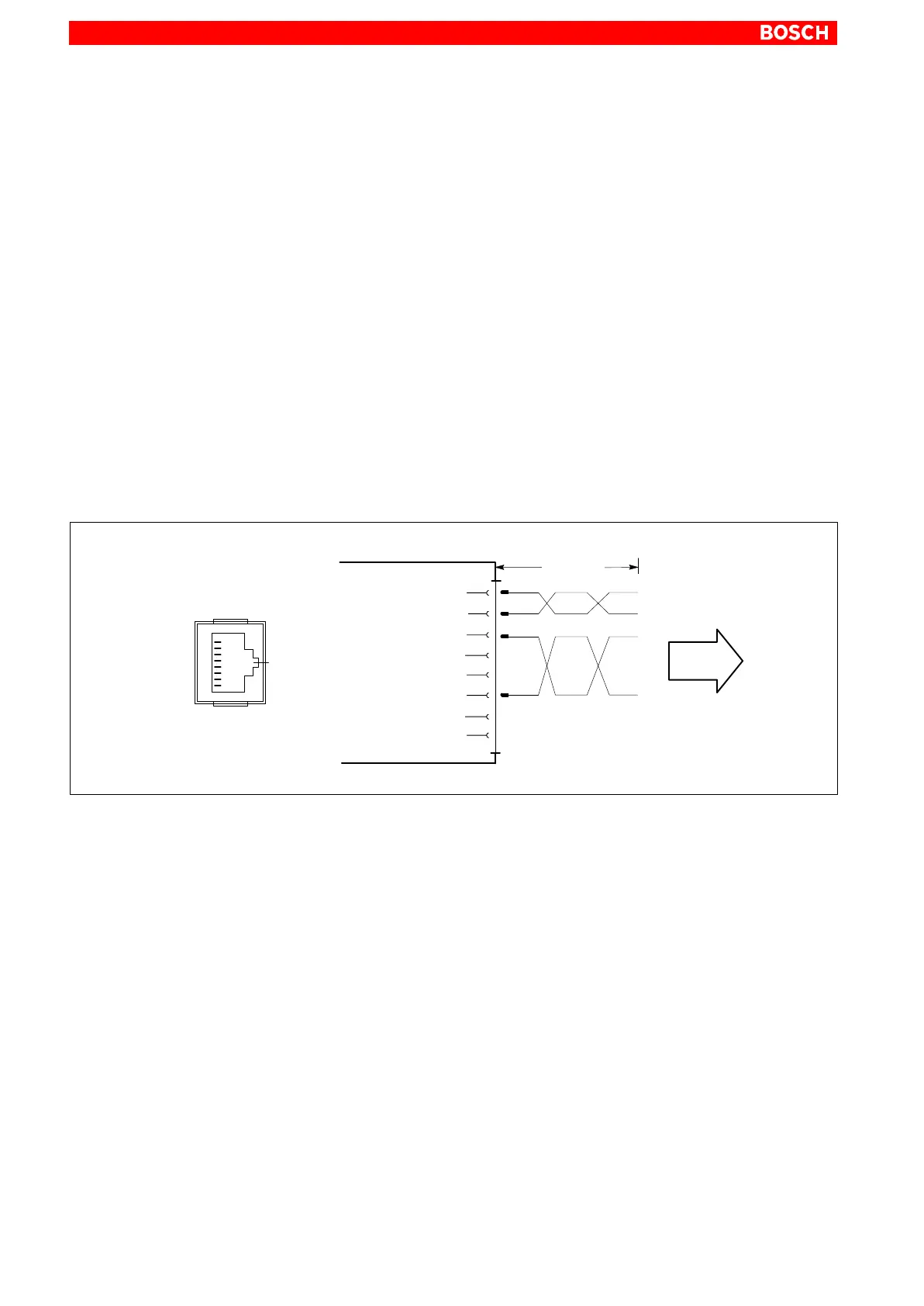
6.4 Ethernet connection
Ethernet Network connection
The Ethernet connection allows the PC to communicate on an Ethernet net-
work. To facilitate data communications, the required network protocols
(e.g., TCP/IP) must be recognized by the operating system and the network
application programs running on the PC.
Female RJ45, 8-pin
Type: IPC: Ethernet 10-Base-T
IPC300: Ethernet 10/100BaseTX
Cable length: Max. 100 m
Cable type: Screened, twisted pair
Transmission rate: 10 Mbit/s and/or 100 Mbit/s
Interrupt (IRQ): 5
I/O address: 340H
1
2
3
TXD+
TXD−
4
Ethernet
5
RXD+
6
RXD−
7
8
max. 100 m
To network
Ethernet RJ45
1
8
The driver configuration functions for the network connection can be ac-
cessed in the task bar or in the Control Panel under the Network Card sym-
bol. A dialog box provides selections of data transmission speed, e.g.,
10 Mbit/s or 100 MBit/s.
. Note that the network card of the remote communication partner must
be able to handle the same data transfer rate.



 To Next Page