80
4.16 Move the XLR Phoenix I/O connectors to the next sequential I/O ports.
4.17 Reset the 'Generator' and 'Analyzer' to the start up settings.
4.18 Repeat steps 4.0 to 4.17 until all I/O ports have been tested. See Addendum C -
Analog Port Mapping.
5.0 Serial Port Verification Test
Note: The purpose of this test is to verify that the RS-232 serial port operates by passing infor-
mation in both directions by receiving a sent command and responding to it with an output on
the terminal emulator screen. Tera Term is used for this test.
5.1 Connect the serial data cable to an open COM port on your PC. You may need to use
a USB to serial port adapter if you do not have a DB9 COM port on your computer.
5.2 Connect the other end of the serial data cable to the DSP card’s RS-232 DB9 conn-
ector on the rear of the ESP-00 II chassis. Note: Do not use an RS232 to TTL level shifter for
this test.
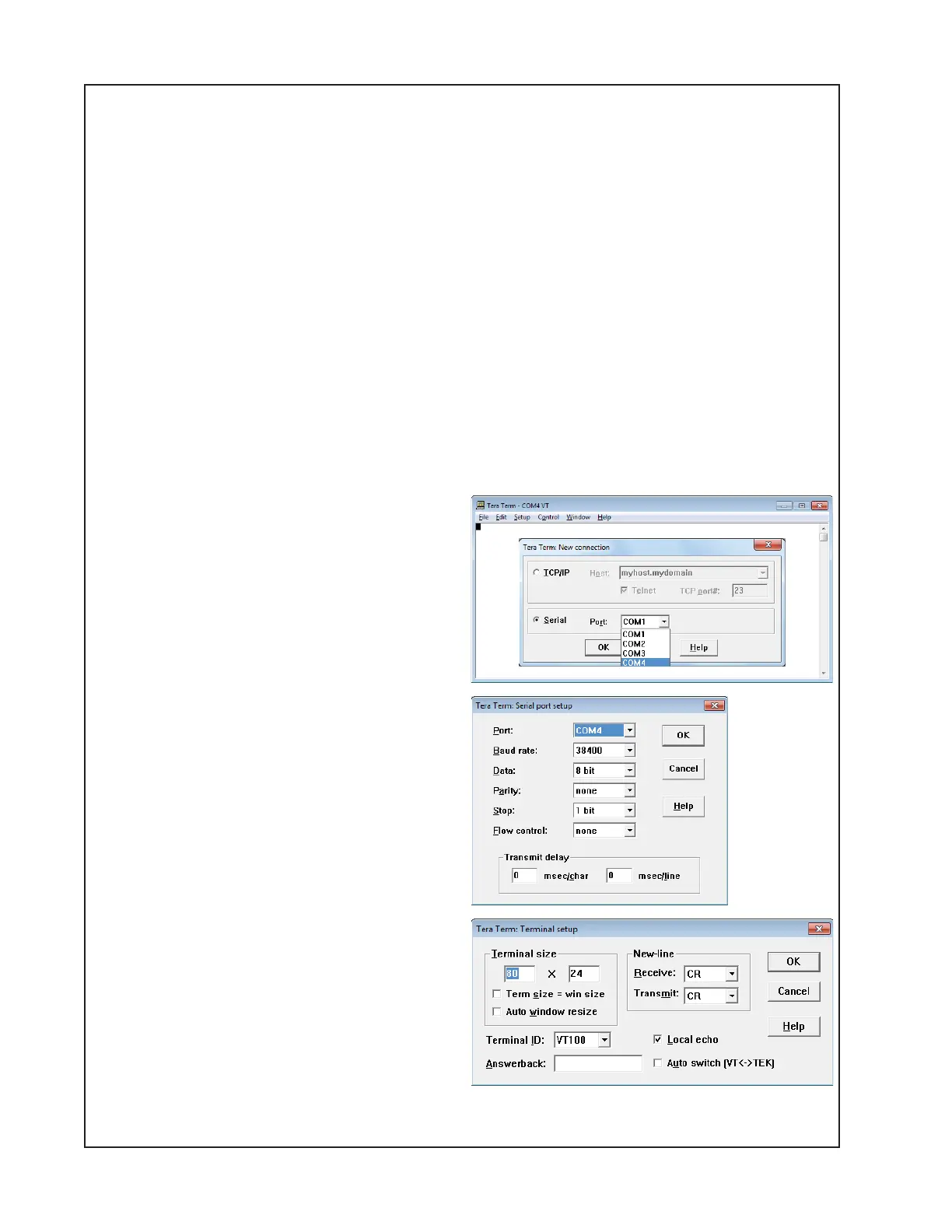
5.3 Open the Tera Term terminal emulator.
Select the serial port you want to use.
Click OK.
5.4 In the Tera Term window, select Setup /
Serial Port. Set to 38400, 8-bit, N, 1. See
figure at right. Click OK.
5.5 In the Tera Term window, select Setup /
Terminal. Set as shown at right. Click the
Local Echo checkbox. Click OK.
See Figure U.
TEST PROCEDURES





 To Next Page