215
Copying and writing waveform data
Section 4
Setting the time until the CD-R/
RW drive stops (CD Hold Time)
Whenever the BR-1600CD’s CD-R/RW drive is used to read
or write data, the drive’s internal motor will continue to spin
for a specific period of time after this process has been
completed. In situations where this becomes a hindrance to
the music making process, you can set a new duration for the
spinning down of the motor.
1. Press [UTILITY].
The Utility Menu screen will appear.
fig.12-12d
2. Move the cursor to the SYSTEM icon and press
[ENTER/YES].
Alternatively, you can press [F1] (SYSTEM) if the
SYSTEM icon is currently displayed.
The System Parameter screen will appear.
fig.10-03d
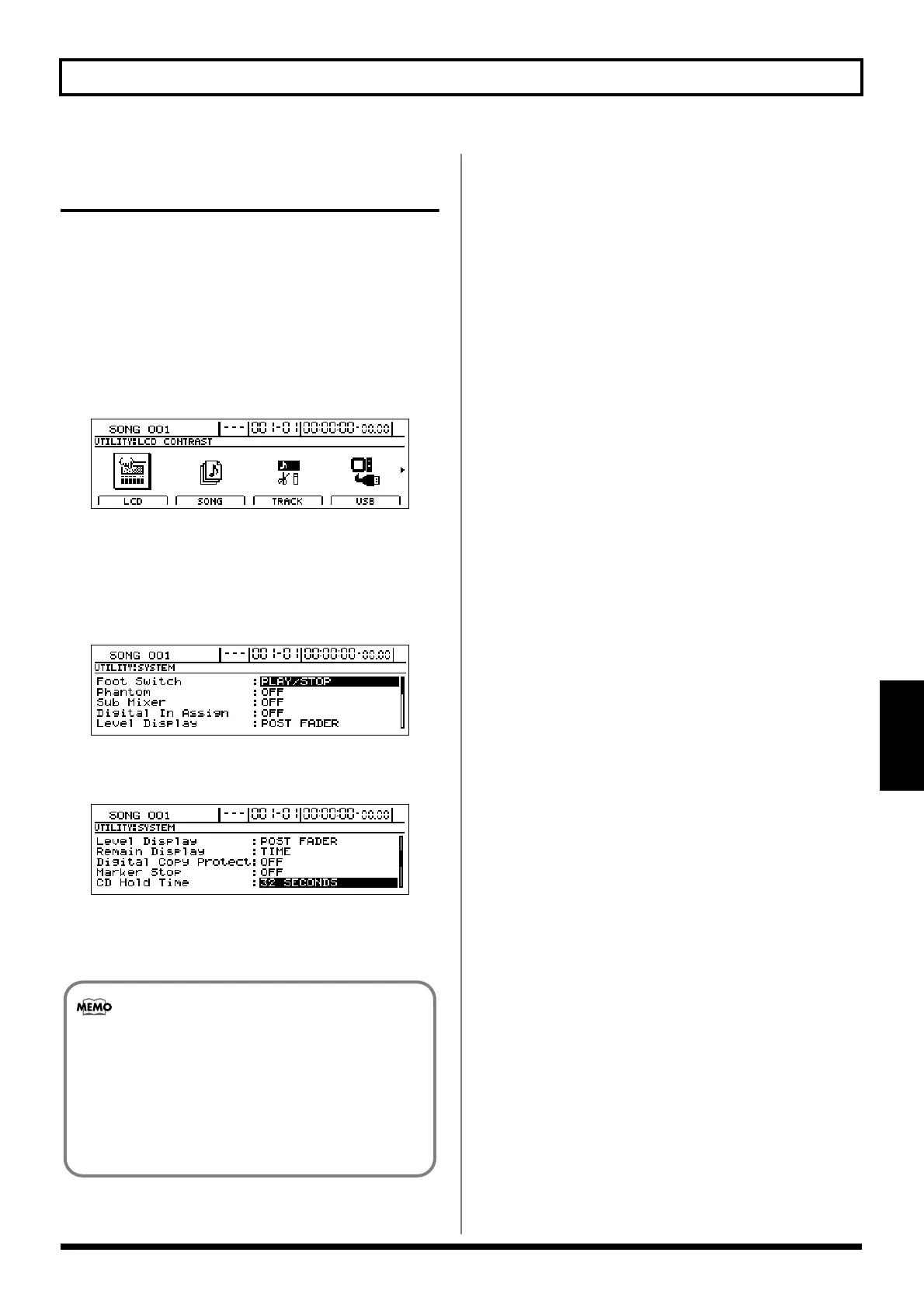
3. Move the cursor to “CD Hold Time” and set a suitable
time using the TIME/VALUE dial.
fig.41-34d
The CD hold time can be set within a range of 1 second
to 32 minutes. At the time of purchase, the hold time will
be set to 32 seconds.
Once the CD-R/RW drive’s motor has stopped, a
certain amount of time will be required for it to
reach a stable operating speed the next time data
needs to be read or written. If the reading and
writing of data will be carried out frequently, you
should set a longer hold time to ensure that the
drive’s motor does not stop between each operation.




 To Next Page