18
Parameter List
CONTROL
You can specify the functions of the [TAP/CTL] switch and of a footswitch or expression pedal
connected to the CTL 1,2/EXP jack.
5 “Using the [TAP/CTL] Switch to Control the Eect” (p. 7)
5 “Assigning a Function to an External Pedal” (p. 25)
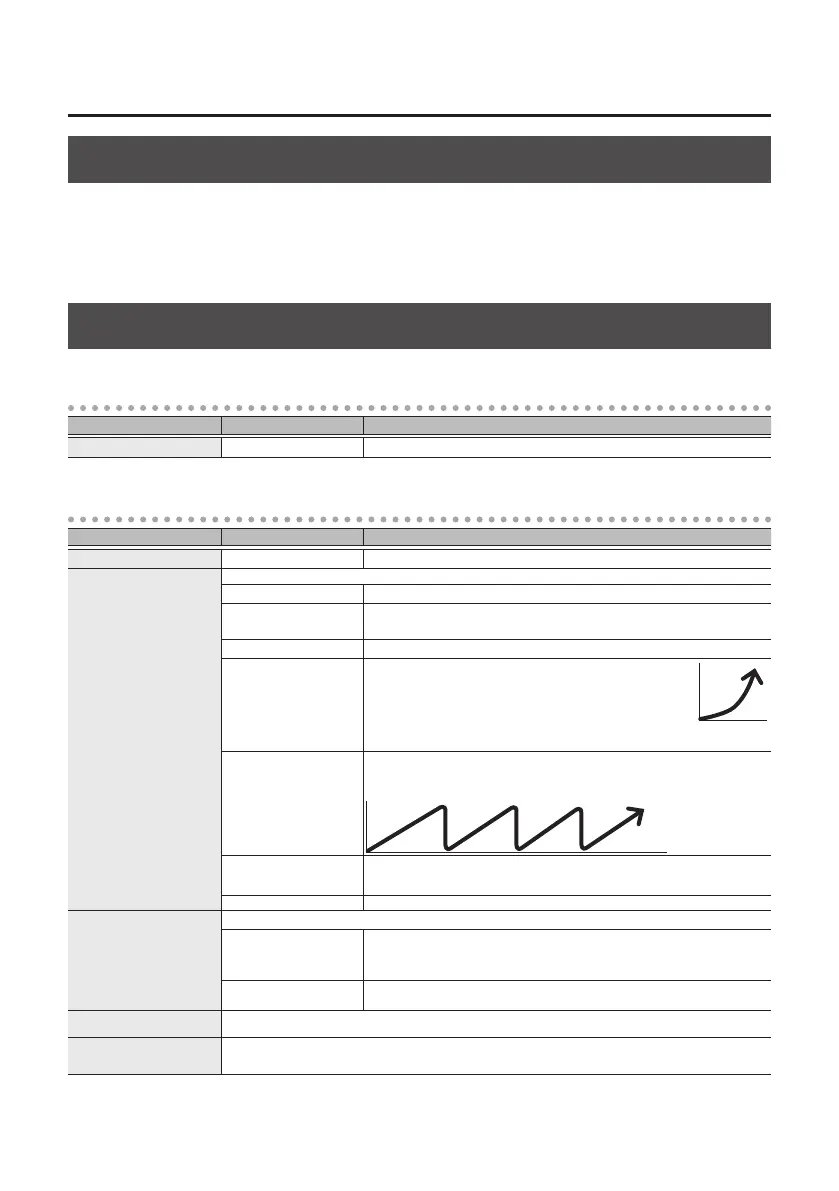
ASSIGN
ASSIGN INPUT SENS
Parameter Value Explanation
ASGN INPUT SENS 0–100 Adjusts the input sensitivity when “INPUT” is selected for SRC.
ASSIGN 1–8
Parameter Value Explanation
SW OFF, ON Turns the ASSIGN 1–8 on/o.
SRC (SOURCE)
Species the controller (source).
TAP/CTL [TAP/CTL] switch.
EXP PDL
(EXP PEDAL)
External expression pedal (EV-30, EV-5 etc.; sold separately) connected to the
CTL 1,2/EXP jack.
CTL1, 2 PDL External footswitch connected to the CTL 1,2/EXP jack.
INT PDL
Internal pedal
The virtual expression pedal will begin operating when started
by the specied trigger (TRIGGER), modifying the parameter
specied by “TARGET.”
For details on the parameters that can be assigned to the internal
pedal, refer to “TIME” and “CURVE” (p. 19)
WAVE PDL
Wave pedal
The virtual expression pedal will cyclically modify the parameter specied by
“TARGET” in a xed wave form.
INPUT
(INPUT LEVEL)
The assigned target parameter will change according to the input level.
* If you want to adjust the input sensitivity, set the SENS (INPUT SENS).
CC#1–31, CC#64–95 Controller number from an external MIDI device
MODE (SOURCE MODE)
Species the operation of the controller.
MOMENT
The value will normally be OFF (minimum value), and will be ON
(maximum value) only while the control is being operated.
* If you want to use the internal pedal or wave pedal, set to “MOMENT.”
TOGGLE
The value will toggle between OFF (minimum) and ON (maximum) each time the
control is operated.
TRG (TARGET) This selects the parameter to be changed.
MIN (TARGET MIN)
MAX (TARGET MAX)
Species the range of change for the parameter. The values will depend on the parameter that’s assigned by
“TARGET.”



 To Next Page