10
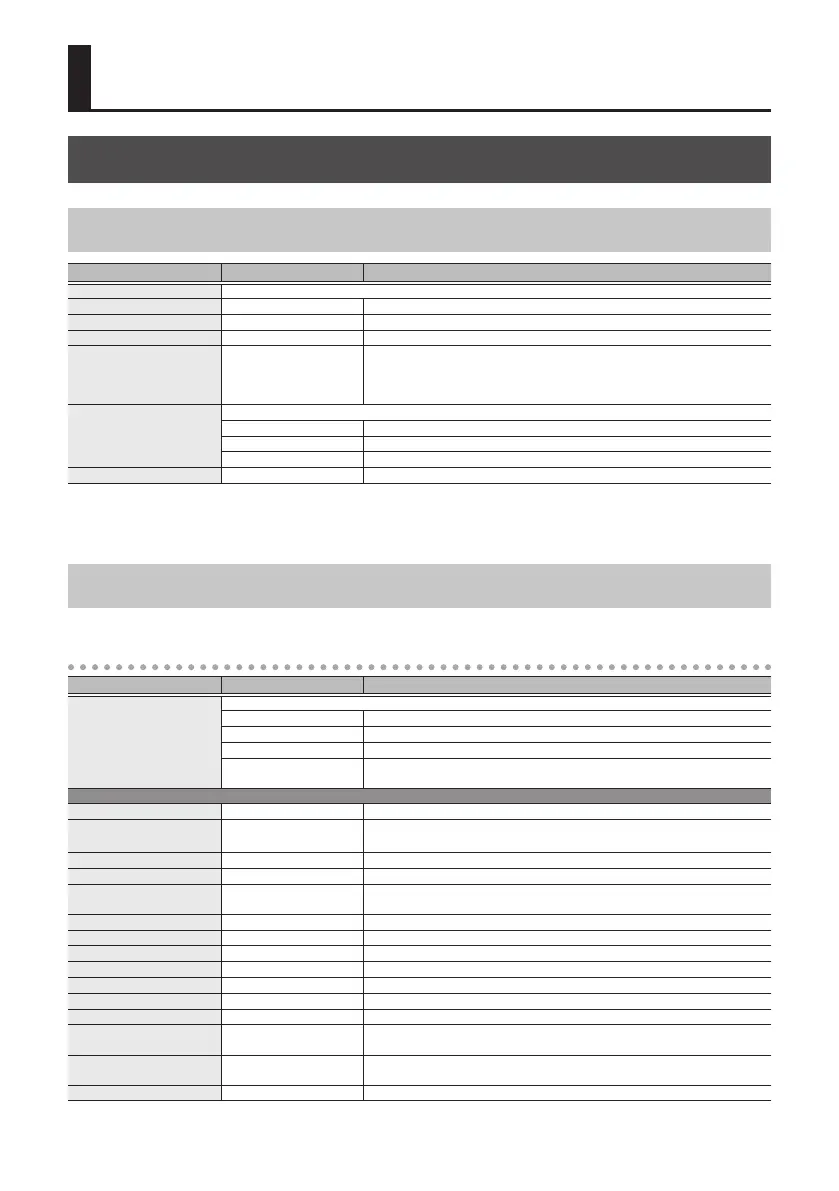
Parameter List
PATCH
Parameters Common to All Modes
Parameter Value Explanation
MODE Selects the type of eect (p. 4). The same function as the [MODE] knob.
EFFECT LEVEL (*1) 0–100 Adjusts the volume of the eect sound.
DIRECT LEVEL 0–100 Adjusts the volume of the direct sound.
INIT PHASE (*2) 0–345 deg Adjusts the LFO’s phase.
TEMPO HOLD (*3) OFF, ON
Species whether the tempo (BPM) changes or is maintained when you switch
patches. Maintaining the tempo lets you maintain the RATE setting. However,
if the NOTE setting (such as
¸
or
˙
) of the newly selected patch is dierent, the
RATE also changes.
INSERT SW
Species the insert position when using the insert loop function with an external eect unit (p. 24).
OFF The insert loop function is not used.
PRE The insert loop is connected before the patch.
POST The insert loop is connected after the patch.
OUTPUT GAIN -6–+6 dB Adjusts the output level.
*1: Except when MODE is “OVERTONE”
*2: Except when MODE is “DIMENSION,” “FILTER (T-WAH G/B, PATTERN FILTER),” “SLICER” or “OVERTONE”
*3: Except when MODE is “DIMENSION,” “RING MOD,” “FILTER (T-WAH G/B),” or “OVERTONE”
Parameters for Each Mode
CHORUS
Parameter Value Explanation
TYPE
Selects the type of chorus.
PRIME A chorus sound unique to the MD-500.
CE-1 CHORUS The chorus sound of the CE-1.
CE-1 VIBRATO The vibrato sound of the CE-1.
TRI-CHO
Models the SONGBIRD TSC-1380S, a three-phase chorus unit that took the world
by storm in the ‘80s.
PRIME
RATE 0.01–20.00 Hz Adjusts the rate of the chorus.
BPM 6.0–600.0
Species the tempo.
The range of this setting depends on the RATE or NOTE value.
NOTE
`
–
Œ
Adjusts the rate of the chorus, specied as a note value relative to BPM.
DEPTH 0–100 Adjusts the depth of the chorus.
PRE-DELAY 0.0–40.0 ms
Adjusts the time from when the direct sound is output until when the eect
sound is output.
WAVEFORM 1–10 Adjusts the sense of modulation for the chorus.
SWEETNESS 0–100 Higher values produce a more enveloping sound.
BELL 0–100 Higher values produce a more brilliant sound.
LOW LEVEL -50–+50 Adjusts the low frequency range tone.
LOW FREQ 20.0–800 Hz Species the frequency adjusted by the LOW LEVEL setting.
HIGH LEVEL -50–+50 Adjusts the high frequency range tone.
HIGH FREQ 630–16.0 kHz Species the frequency adjusted by the HIGH LEVEL setting.
LOW CUT FLAT, 20–800 Hz
This sets the frequency at which the low cut lter begins to take eect. When
FLAT is selected, the low cut lter will have no eect.
HIGH CUT 630 Hz–16.0 kHz, FLAT
This sets the frequency at which the high cut lter begins to take eect. When
FLAT is selected, the high cut lter will have no eect.
OUTPUT MODE MONO, STEREO Species whether the output is mono (MONO) or stereo (STEREO).



 To Next Page