23
Convenient Functions
Using Two Patches Simultaneously (Simul Mode)
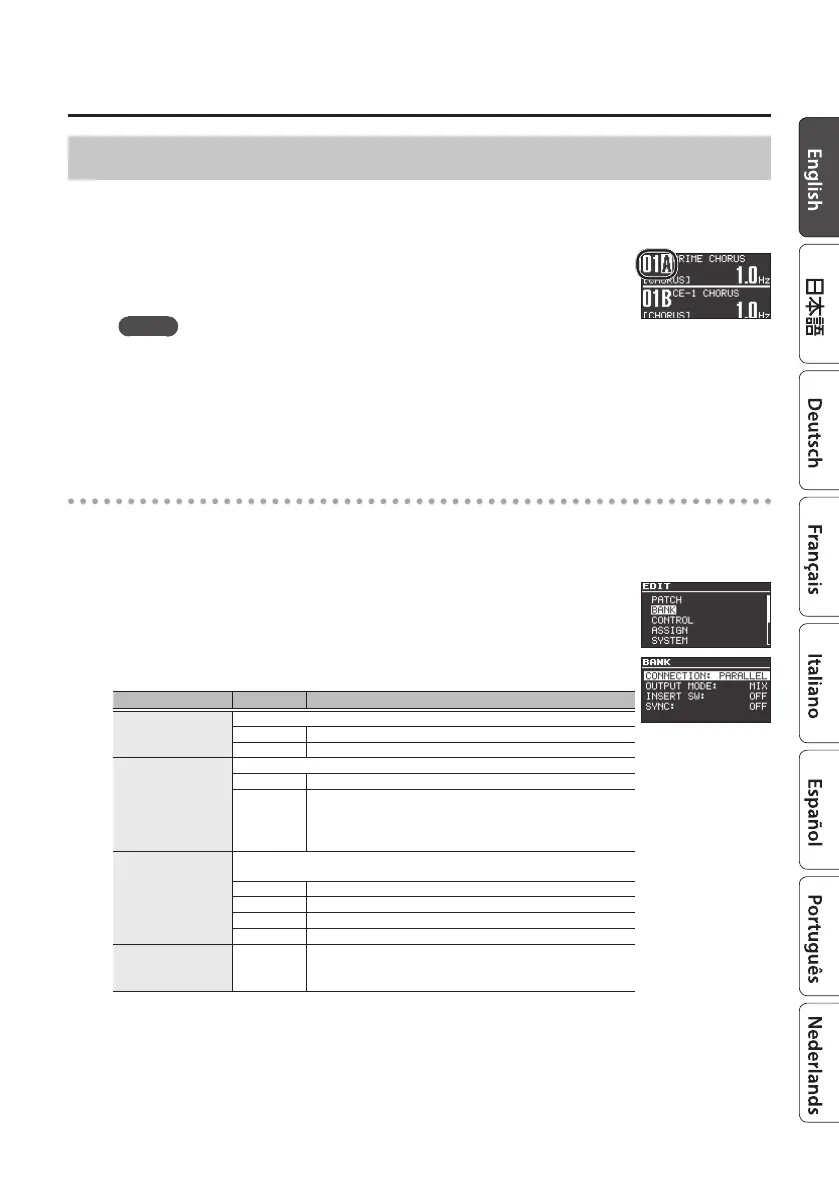
If FSW MODE is set to “A/B SIMUL,” you can use two patches A and B simultaneously (simul mode).
1. Set FSW MODE to “A/B SIMUL” (p. 22).
2. Press the unlit [A] or [B] switch to make them both light.
Now you can use two patches simultaneously.
MEMO
5 The patch that’s selected in the screen (selected by the [
I
] [
H
] buttons) is the patch that
your editing will aect.
5 The TAP/CTL (p. 7) and external footswitch setting (p. 25) apply to both patches A and B.
The lit/blinking state of the [TAP/CTL] switch follows the setting of the patch that’s selected
in the screen.
Simul mode settings (BANK)
Here’s how to specify how patches A and B are connected and output when in simul mode.
1. Press the [EDIT] button.
2. Use the [
H
] [
I
] buttons to select “BANK,” and then press the [EDIT]
button.
3. Use the [
H
] [
I
] buttons to select a parameter, and use the [RATE/
VALUE] knob to edit the value.
Parameter Value Explanation
CONNECTION
Species how patches A and B are connected.
SERIES
Patches A and B are connected in series, in the order A
0
B.
PARALLEL Patches A and B are connected in parallel.
OUTPUT MODE (*1)
Species how sound is output from the OUTPUT A/MONO and B jacks.
MIX Patches A and B are mixed and output.
A/B
Sound that is input to the INPUT A/MONO jack passes through
patch A and is output to the OUTPUT A/MONO jack.
Sound that is input to the INPUT B jack passes through patch B
and is output to the OUTPUT B jack.
INSERT SW
Species the connection position at which an external eect unit is inserted by
the insert loop function (p. 24).
OFF Not connected.
PRE Connected before patches A and B.
POST Connected after patches A and B.
MIDDLE (*2) Connected between patches A and B.
SYNC (*3) OFF, ON
Selects whether the tempo of patch B is synchronized to the
tempo of patch A (ON) or is not synchronized (OFF).
NOTE can be adjusted for each patch.
*1: Shown if CONNECTION is “PARALLEL”
*2: Shown if CONNECTION is “SERIES”
*3: Not available for modes that do not have RATE or BPM
4. Press the [EXIT] button to return to the top screen.
Selected patch



 To Next Page