4
Basic Operation
Adjusting the Eect
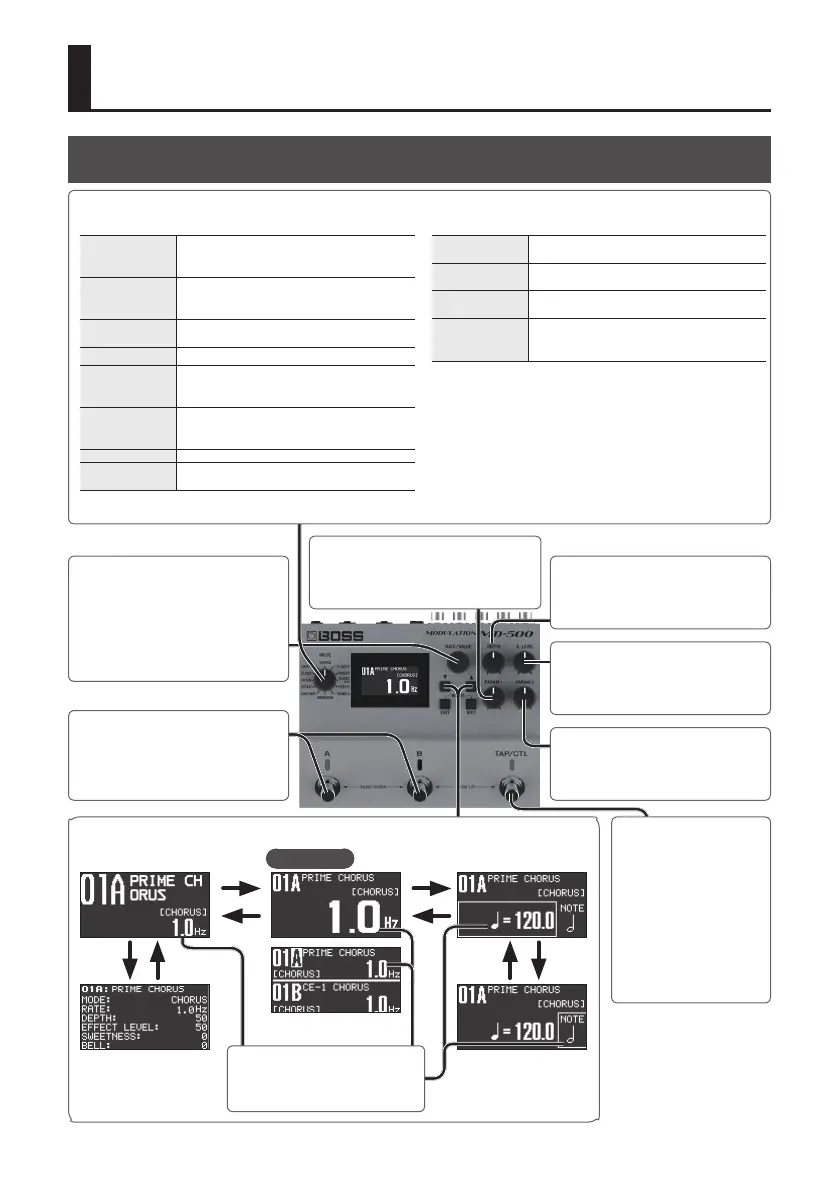
[E. LEVEL] knob
Adjusts the volume of the eect sound.
[TAP/CTL] switch
You can press this switch
to vary the way in which
the eect is applied (p. 7).
By pressing this switch in
time with the tempo of
the song you’re playing
(tap input), you can easily
set the modulation rate to
match your song.
In simul mode (p. 23)
[
H
] [
I
]
[
H
]
[
I
]
[
H
] [
I
]
Tempo
Note
Note length relative to
the tempo
[
H
]
[
I
]
Top screen
[
I
] [
H
] buttons
Switch screens.
Turn the [RATE/VALUE] knob to
adjust the value.
[PARAM 2] knob
Adjusts a parameter that is assigned to
each mode.
[DEPTH] knob
Adjusts the depth to which the eect
sound is modulated.
[A] [B] switches
Switch banks/patches (p. 6).
[MODE] knob
Selects the type of eect.
CHORUS
A chorus unit that can simulate anything
from a vintage chorus unit to a chorus eect
powered by BOSS’s cutting-edge technology.
FLANGER
Generates a anging eect. Turn the TURBO
SW “ON” to create an even more intense
sound.
PHASER
Generates a phase eect. This can also give
you the light sound of a vintage phaser.
CLASSIC-VIBE Models a Uni-vibe.
VIBRATO
A vibrato with a unique eect. This can also
simulate the scanner vibrato of a tonewheel
organ.
TREMOLO
An eect that cyclically varies the volume.
This can also simulate the tremolo of a vintage
guitar amp.
DIMENSION Models the Roland DIMENSION D (SDD-320).
RING MOD
Produces an unpitched sound with a metallic
character.
ROTARY
A realistic simulation of a rotary speaker's
sound.
FILTER
Lets you use the input to control the lter, or
program the lter's modulation cycle.
SLICER
Repeatedly cuts the sound to produce a
variety of slice patterns.
OVERTONE
Adds new overtones to create resonance and
depth that was not present in the original
sound.
[RATE/VALUE] knob
Adjusts the rate at which the eect
sound is modulated.
To make larger changes in the value,
turn the knob while pressing it.
[PARAM 1] knob
Adjusts a parameter that is assigned to
each mode.



 To Next Page