3
Getting Ready
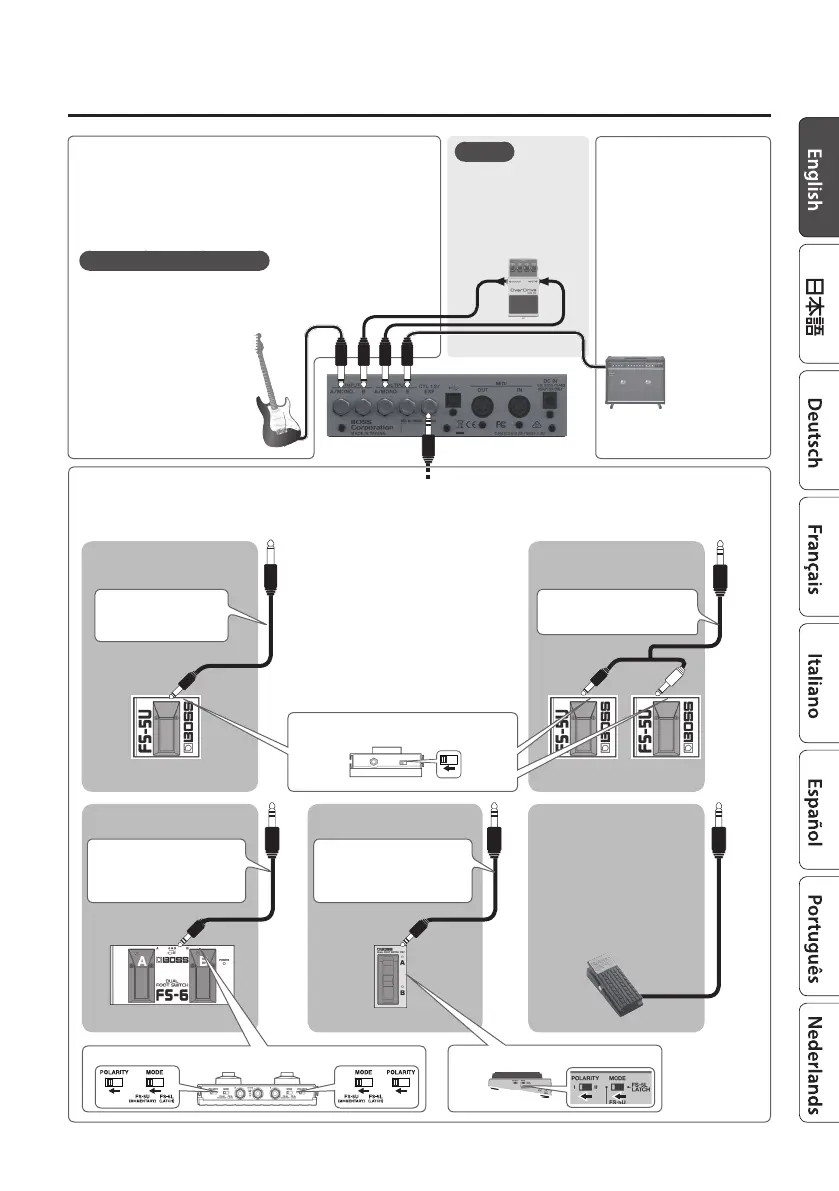
CTL 1, 2/EXP jack
You can control various parameters by connecting a footswitch (FS-5U, FS-5L, FS-6, FS-7: sold separately) or an expression pedal (such as
the EV-30, Roland EV-5; sold separately) to the CTL 1, 2/EXP jack (p. 25).
When connecting expression
pedal
EXP
* Use only the specied
expression pedal (EV-30,
Roland EV-5; sold separately).
By connecting any other
expression pedals, you risk
causing malfunction and/or
damage to the unit.
When Connecting an FS-7When Connecting an FS-6
MODE/POLARITY switch
CTL 2 CTL 1
Stereo 1/4” phone type
,
Stereo 1/4” phone type
MODE/POLARITY switch
When Connecting an FS-5U
(or FS-5L)
When Connecting Two FS-5Us
(or FS-5Ls)
1/4” phone type
,
1/4”
phone type
CTL 1 CTL 2 CTL 1
POLARITY switch
Stereo 1/4” phone type
,
1/4” phone type x 2
Stereo 1/4” phone type
,
Stereo 1/4” phone type
OUTPUT A/MONO, B jacks
Connect these jacks to your
amp or monitor speakers.
If you’re using a mono setup,
use only the OUTPUT A/
MONO jack.
* Do not connect
headphones to the
OUTPUT A/MONO, B jacks.
Doing so may damage the
headphones.
INPUT A/MONO, B jacks
Connect your electric guitar, or another instrument or eect unit, to
these jacks.
* Use the INPUT A/MONO jack and B jack when connecting a stereo-
output eects unit. Use only the INPUT A/MONO jack if you’re
using a mono source.
Turning the power on/o
The INPUT A/MONO jack doubles as the power switch. Power to the
unit is turned on when you plug into the INPUT A/MONO jack; the
power is turned o when the cable is unplugged.
When powering up:
Turn on the power to your amp
last.
When powering down:
Turn o the power to your amp
rst.
MEMO
You can connect an
external eect unit and
use it in conjunction
with the MD-500’s
eects (p. 24).
INPUTOUTPUT



 To Next Page