24
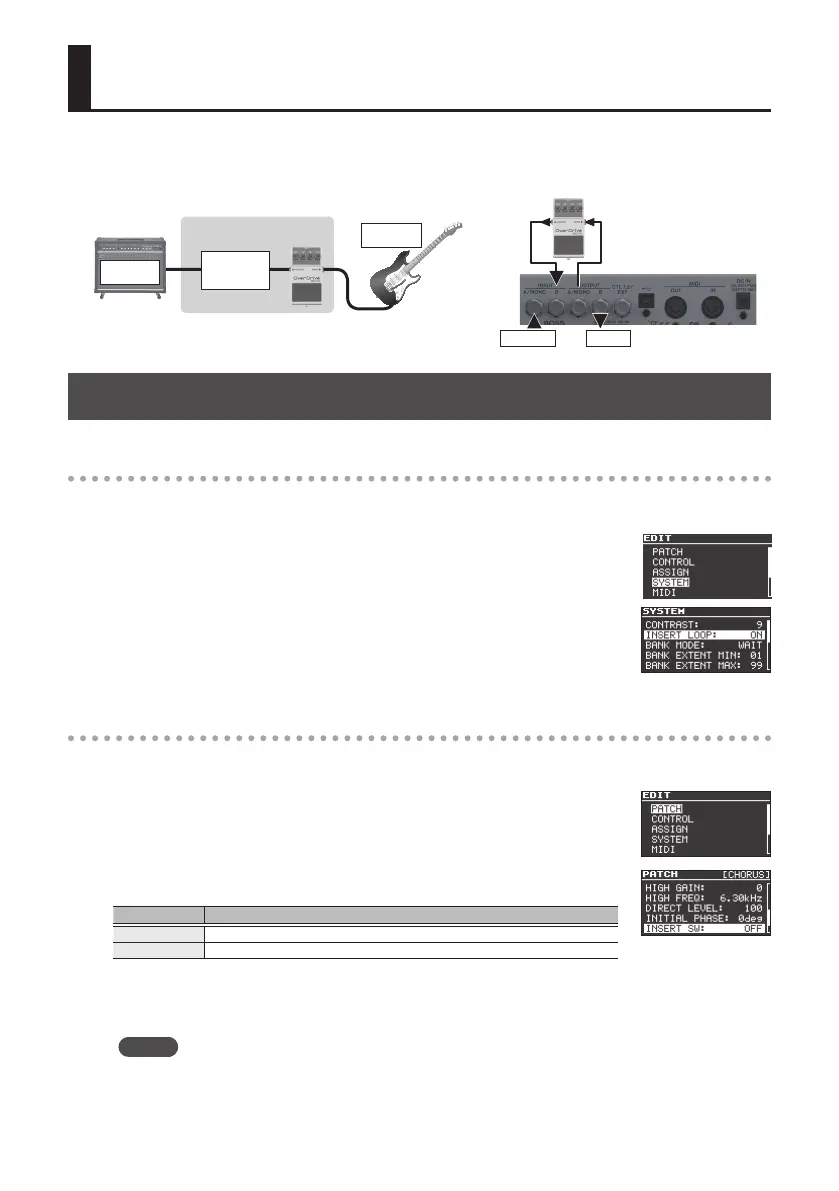
Inserting an External Eect Unit
You can connect an external eect unit between the OUTPUT A jack and INPUT B jack, and use it in conjunction with the MD-500’s eect
(insert loop function).
You can also change the connection order of the eects.
AMP
Guitar
INPUTOUTPUT
MD-500
Guitar
AMP
[MODE]
CHORUS
(Example)
Setting the Insert Loop Function
Turning the insert loop function on
1. Press the [EDIT] button.
2. Use the [
H
] [
I
] buttons to select “SYSTEM,” and then press the
[EDIT] button.
3. Use the [
H
] [
I
] buttons to select “INSERT LOOP,” and use the
[RATE/VALUE] knob to turn the setting “ON.”
4. Press the [EXIT] button to return to the top screen.
Specifying the connection position of the external eect unit
1. Press the [EDIT] button.
2. Use the [
H
] [
I
] buttons to select “PATCH,” and then press the
[EDIT] button.
3. Use the [
H
] [
I
] buttons to select “INSERT SW,” and use the [RATE/
VALUE] knob to edit the value.
Value Explanation
PRE Connect before the MD-500's eect.
POST Connect after the MD-500's eect.
4. Press the [EXIT] button to return to the top screen.
* Save the edited patch as described in “Saving a Patch” (p. 9).
MEMO
You can also use the insert loop function in simul mode (p. 23).



 To Next Page