Multi-DM™ User Manual Section 9 - DMShapes Software Overview
BMC Document Number: DOC-0009 Rev. 5.2 Page 30
9.1 The DMShapes Window
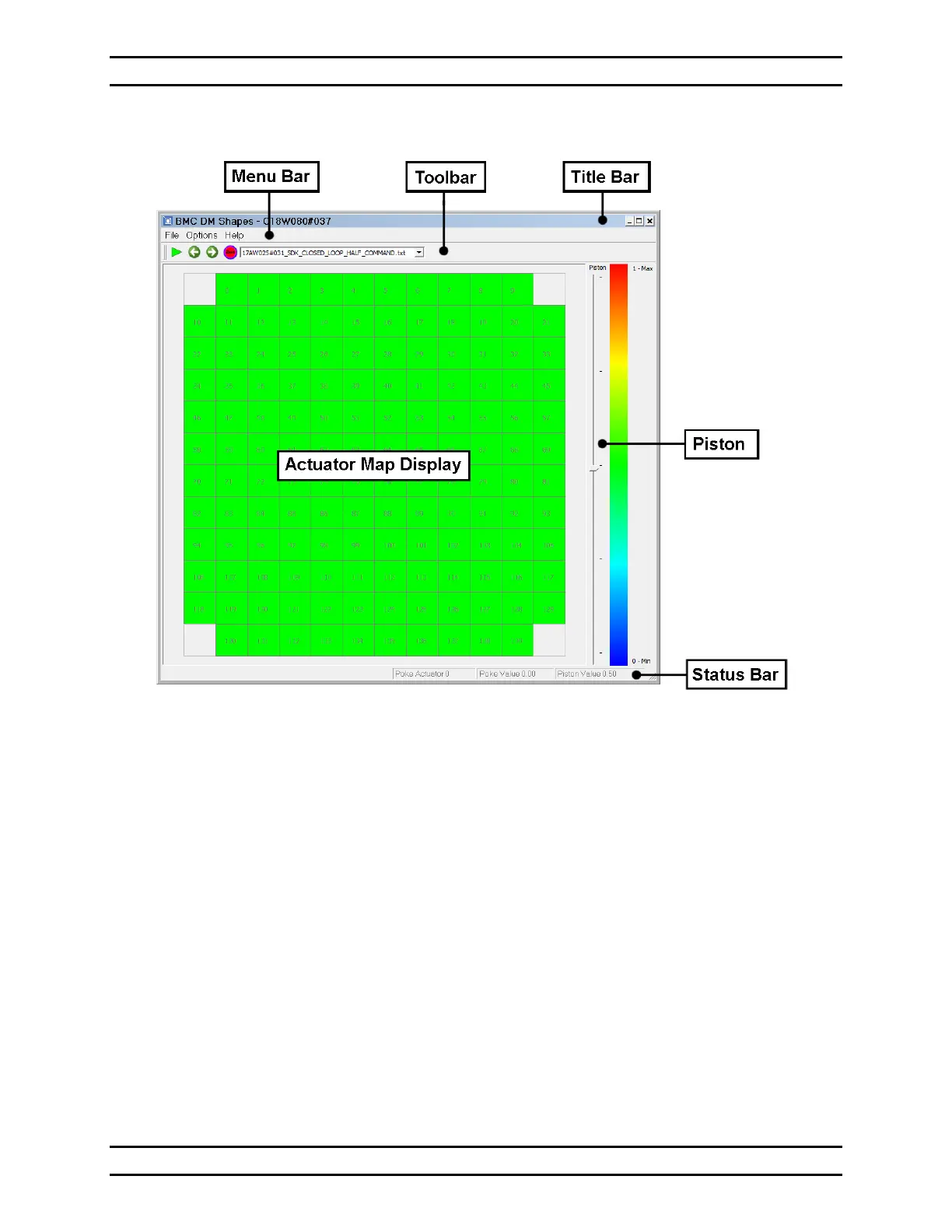
Figure 7- DMShapes Window
Title Bar
Displays the program name and the serial number of the DM specified by the currently
loaded Profile. This is the file name of the currently loaded Profile.
Menu Bar
Contains commands for loading and saving Command maps and setting program options.
For detailed information see Section 9.1.1, The DMShapes Menu Bar.
Toolbar
Contains commands to poke and reset individual actuators and a menu to select a
Command Map to apply. For detailed information see Section 9.1.2, The DMShapes
Toolbar.
Actuator Map Display
Displays the actuator grid with the color-coded value currently being applied to each
actuator and allows changes to individual actuators. For detailed information see Section
9.1.3, The DMShapes Actuator Map Display.


 To Next Page