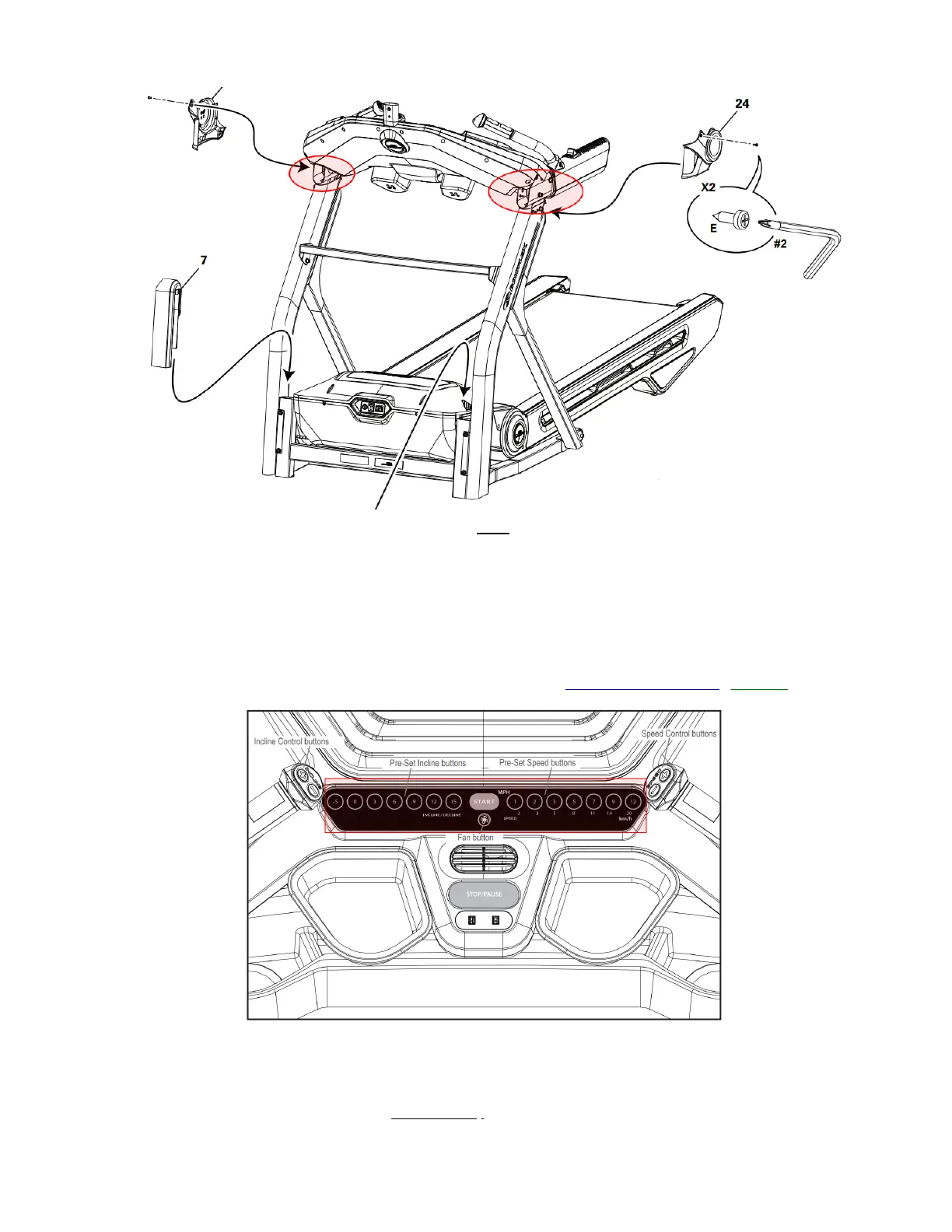
b. Use a Phillips head screwdriver to remove the 4 screws (2 on each side) at the top of the left and right uprights.
Remove the covers and expose the cable connection.
c. Disconnect the 3-pin and 4-pin connectors from both sides. Leave the remaining wire on both sides connected.
This disables the arm and ergo speed and incline buttons for testing the console base pre-set buttons.
d. Plug your treadmill back in and power it on.
e. Start a workout.
f. Attempt to adjust both the speed and incline up and down using all pre-set speed and incline buttons on the
console base.
g. If all buttons on the console base respond, proceed to the next step to check the upper (ergo) handlebars.
h. If there is no response from the buttons on the console base, order a Console Base [15099.B].
2. Check the Upper (Ergonomic) Handlebar buttons:
a. Disconnect the power cord from your machine.
b. Plug the 4-pin connector back in on one side only.
c. Plug your treadmill back in and power it on.
d. Start a workout.













 To Next Page