Note: the System Name field does not allow spaces or special characters,
only alphanumeric characters.
SNMP: This hyperlink provides quick access to the SNMP configuration
page.
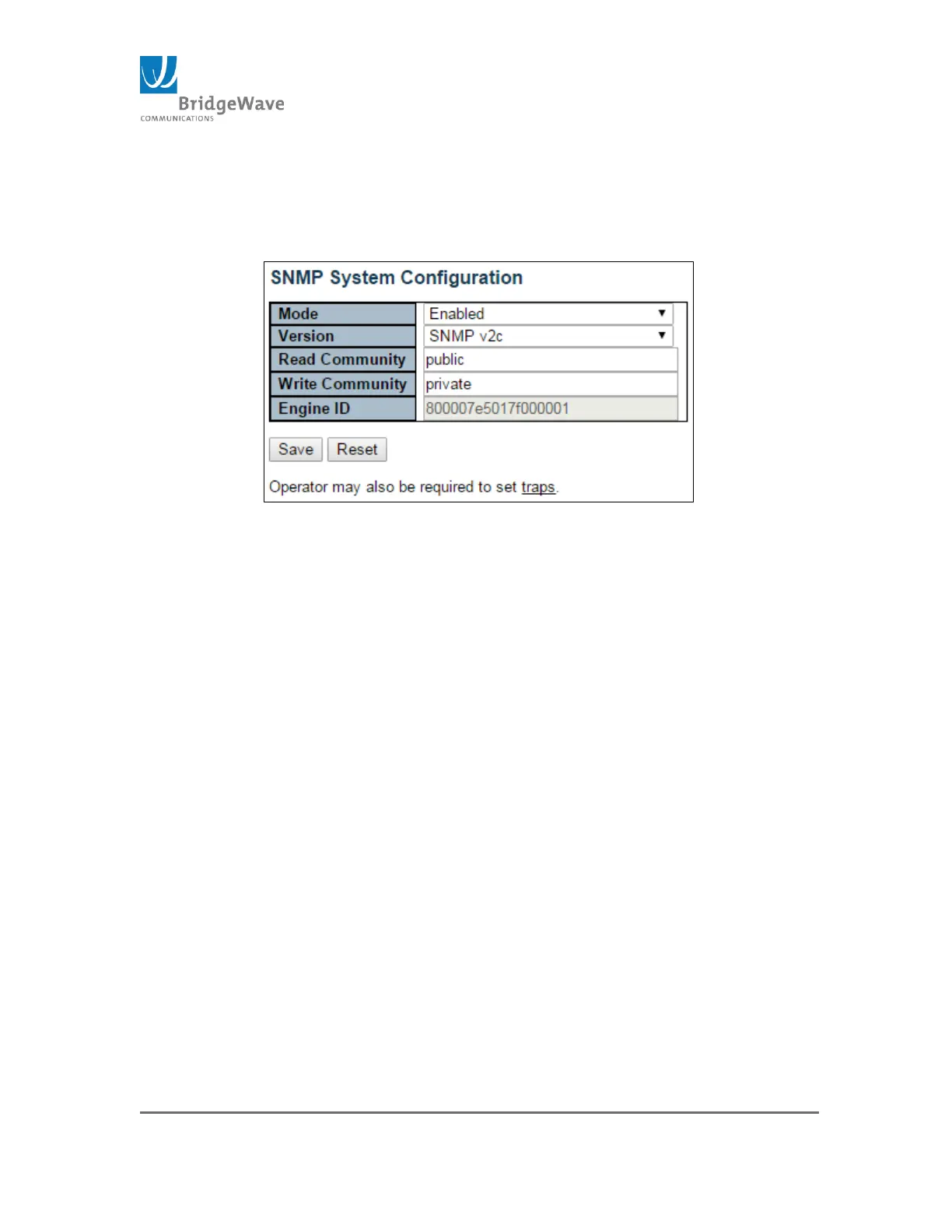
Figure 12: SNMP System Configuration
This page allows the configuration of SNMP.
Mode: Enable/Disable
Version: SNMPv1/SNMPv2c/SNMPv3
Read Community: Indicates read string to permit access to SNMP
agent. The allowed string length is 0 to 255 characters, and the
allowed content is the ASCII characters from 33 to 126.
NOTE: The field is applicable only when SNMP version v1 and v2c.
SNMPv3’s community string will be associated with the communities
table. If provides more flexibility to configure security name than version
v1 and v2c community string. In addition to community string, a
particular range of source addresses can be used to restrict source
subnet.
Wire Community: Indicates write string to permit access to SNMP
agent. The allowed string length is 0 to 255 characters, and the
allowed content is the ASCII characters from 33 to 126.
NOTE: The field is applicable only when SNMP version v1 and v2c.
SNMPv3’s community string will be associated with the communities
table. If provides more flexibility to configure security name than version
v1 and v2c community string. In addition to community string, a
particular range of source addresses can be used to restrict source
subnet.



 To Next Page