Ports
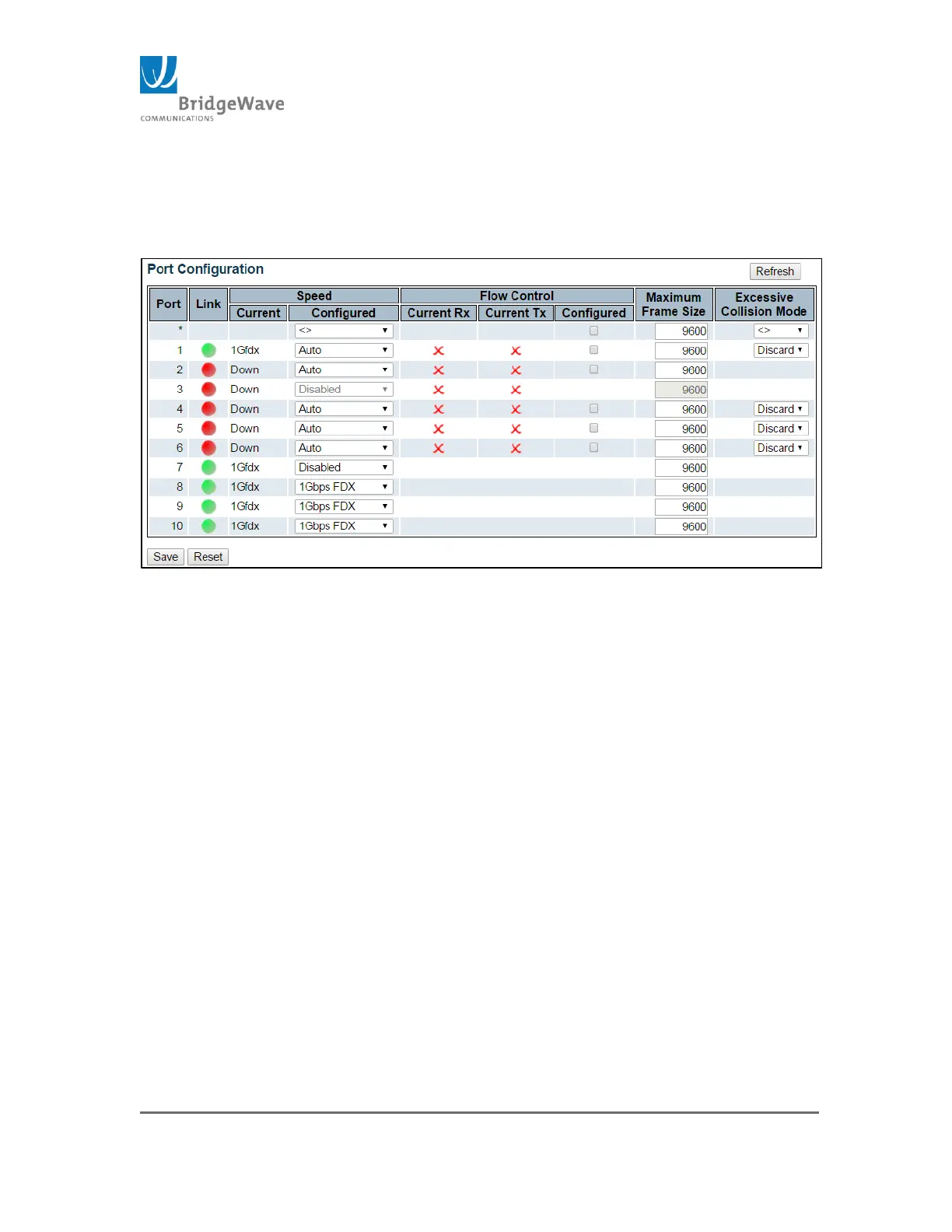
Selecting from the navigation pane Switch>Configuration>Ports will open the
following screen:
Figure 33: Port Configuration Page
This page allow port configuration as well as it displays current port settings.
Port: This is the logical port number for this row.
Link: The current port state is graphically displayed on this row. Green
indicates the link is up. While red, indicates the link is down.
Speed, Current : Provides the current link speed of the port
Speed, Configured: Selects any available link speed for the given
switch port. Only speeds supported by the specific port are shown.
Possible speeds are:
o Disabled – Turns port off
o Auto – Port auto negotiating speed with the link partner and
selects the highest speed that is compatible with the link partner.
o 10Mbps HDX – Forces the copper port to 10Mbps half-duplex
mode.
o 10Mbps FDX - Forces the copper port to 10Mbps full-duplex
mode.
o 100Mbps HDX - Forces the copper port to 100Mbps half-duplex
mode.
o 100Mbps FDX - Forces the copper port to 100Mbps full-duplex
mode.



 To Next Page