2-9
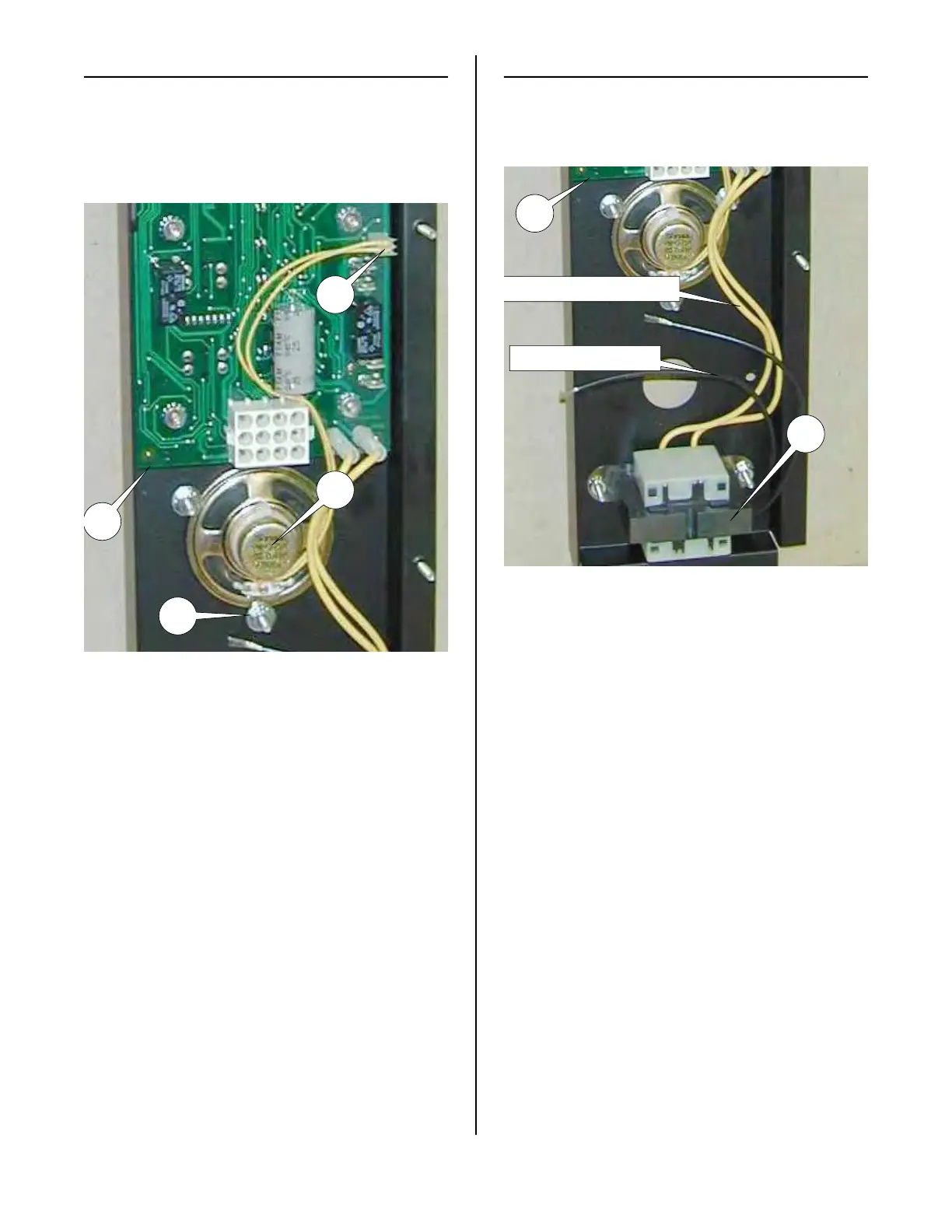
SPEAKER
1. See ACCESS FOR SERVICE.
2. Unplug speaker wire 13 from control
board (6).
3. Check across the terminals in speaker
wire receptacle with an ohmmeter.
Meter should indicate a closed cir-
cuit. If not, speaker is faulty.
Replacement:
1. See ACCESS FOR SERVICE.
2. Unplug speaker wire (13) from control
board (6).
3. Loosen, but do not remove, the three
hex nuts holding speaker (8) to the
back of the control panel until speaker
(8) can be slipped out from under
washers (9).
4. Install new speaker in reverse order.
TRANSFORMER
The Transformer (7) supplies power to the
Control Board (6) and Display board (3).
1. See ACCESS FOR SEVICE.
2. Disconnect both primary (black) wires
of transformer (7) and unplug the sec-
ondary (yellow) wires from Control
Board (6).
3. Check between the two primary
(black) wires with an ohmmeter. Meter
should indicate a closed circuit, If not,
transformer is faulty.
4. Check between the two secondary
(yellow) wires with an ohmmeter. Meter
should indicate a closed circuit. If not,
transformer is faulty.
6
Primary (black) Wires
7
13
6
8
9
broaster.com Manual #16501 8/06 Rev 10/20



 To Next Page