5-3
SWITCHES
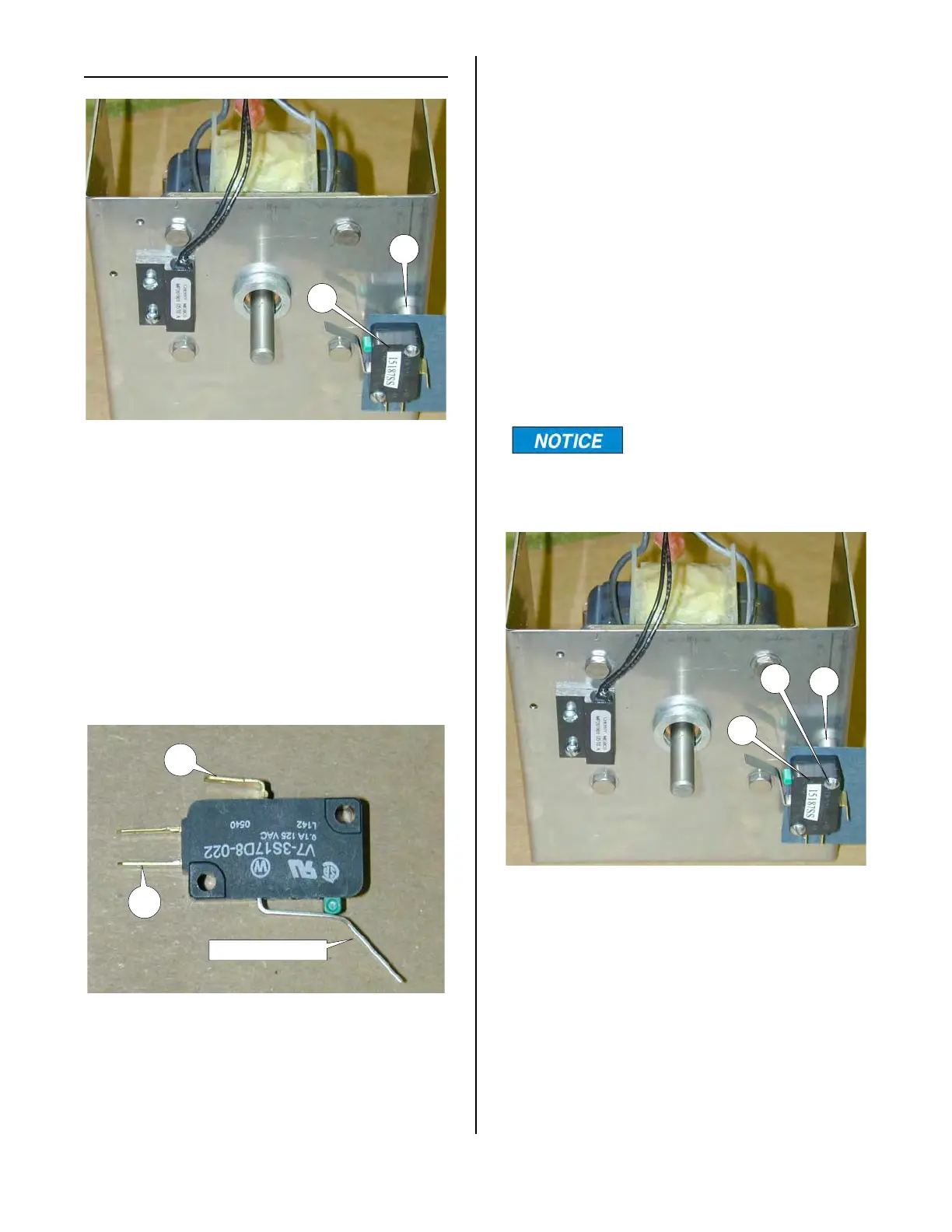
Motor Stop Switch:
1. See Access For Service.
2. With needle nose pliers, disconnect
both wires from switch (8).
3. With the switch in its unactuated (free)
position, check across terminals (16)
and (17) with an ohmmeter. Meter
should indicate an open circuit. If not
switch is faulty.
8
15
17
16
PUSH TO ACTIVATE
4. With the switch in its actuated position
check across terminals (16) and (17)
with an ohmmeter. Meter should indi-
cate a closed circuit. If not, switch is
faulty.
Motor Stop Switch Replacement
1. See Motor Replacement, steps 1-6.
2. With needle nose pliers, disconnect
both wires from switch (8).
3. Note mounting orientation of switch.
4. Remove mounting screws (18).
Motor Stop Switch has
spacers (15) placed
between the motor mounting bracket
and the switch.
5. Reassemble in reverse order.
6. Check to be sure cam properly actu-
ates the switch after assembly.
8
15
18
broaster.com Manual #16501 7/06 rev 2/15



 To Next Page