Setting Up Passwords (PASSWRD)
The Password menu is used to program a five-digit password to prevent unauthorized changes to the
programmed parameter settings, to restrict the ability to reset the total and grand total, and to
permanently lockout the ability to reset the grand total and any grand total related parameters.
The lock symbol is displayed to indicate that settings are password protected.
Record all passwords for future reference. If appropriate, it may be
recorded in the space provided.
Model:
Serial Number:
Setting Lockout
Password (PASS):
__ __ __ __ __
Total Reset
Password (PASS
T):
__ __ __ __ __
Grand Total Reset
Password (PASS
GT)
__ __ __ __ __
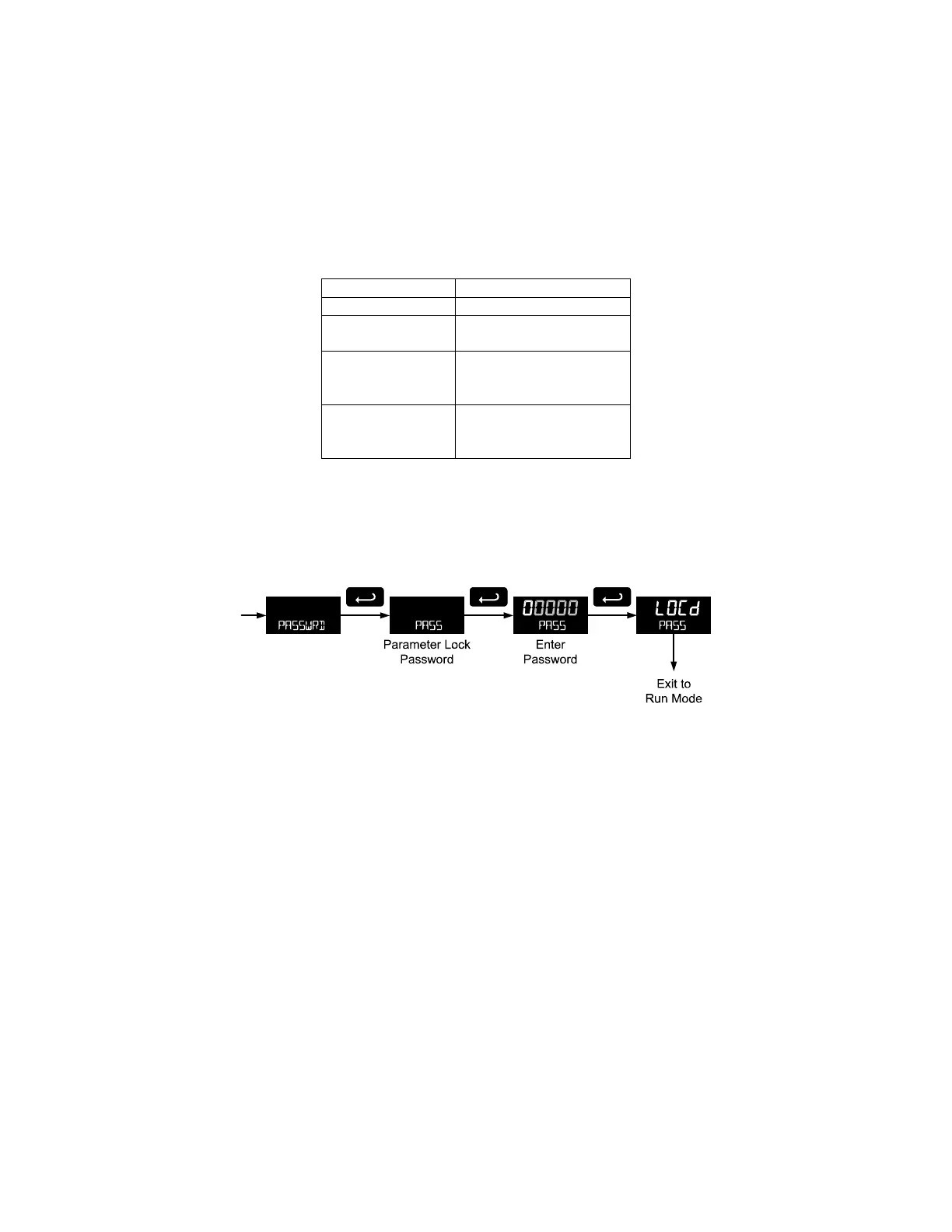
Locking Meter Setup Parameters
Enter the Password menu, select Pass, and program a five-digit password. The meter will return to Run
mode after locking any of the passwords.
For instructions programming numeric values see Setting Numeric Values, page 19.
Making Changes to a Password Protected Meter
If the meter is password protected, the meter will display the message PASS LOCKED when an attempt
is made to enter the Setup menu or Advanced menu. Press the Enter button while the message is being
displayed and input the correct password followed by the Enter button to gain access to the menu. After
exiting the programming mode, the meter returns to its password protected condition.
Password Restricting Total & Grand Total Reset
To restrict resetting of the total, enter the Password menu, select Pass T, and program a five-digit
password. This will deactivate the remote reset connections. Total will only be able to be reset through
the Through-Glass Buttons or mechanical pushbuttons, if the appropriate password is entered.
To restrict resetting of the grand total, enter the Password menu, select Pass GT, and program a five-
digit password.
Resetting Total & Grand Total on a Password Protected Meter
If the meter is password protected for total or grand total reset, the meter will display the message PASS
T or PASS GT when an attempt is made to enter the password protected total or grand total Reset
menus. Input the password and press the Enter button to reset the total or grand total.
The password requirement may be disabled by entering the password in the Password menu for total
(Pass T) or grand total (Pass GT).



 To Next Page