Section 1: Introduction
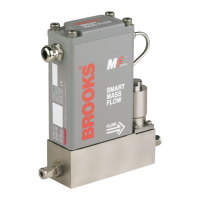
MASS FLOW CONTROLLER
Standard features include:
• The supplied inlet adapter has a built-in, upstream inlet lter for ow
straightening. Besides reducing the effects of changes in upstream piping,
this also protects the measuring element from occasional debris in the ow
stream. In addition, it eliminates the need for extra (expensive) inlet ltering.
• Each MF-series Smart Mass Flow Controller is provided with an adaptive
valve-control algorithm for the maintenance of stable ow control, even
under varying process conditions (pressure/temperature).
• Setpoint source selectable: Setpoint signal source for the Mass Flow
Controller can be selected from: (not for Probus)
communication (RS232 / RS485) or
0-5 Vdc or
1-5 Vdc or
0-20 mA or
4-20 mA.
• Fast Response Control provides rapid gas settling times with minimal over/
undershoot. Standard factory setting: 1 sec. for MF50/51 and meter models,
3 sec. for MF53.
• Valve Override (VOR, available at pin 12) allows the user to fully open or
close the control valve independently of the set-point.
• Low ow cutoff prevents the valve from opening whenever the Set point is
less than 1% of full scale.
ALL MODELS
Digital communication features
Digital communication, via RS485 or RS232, provides access to all of the
Smart TMF’s functions, including:
• Accurate mass ow measurement and Set point regulation (controller only),
as a percentage of full scale and in selectable engineering units
• Flow totalizer
• Ambient temperature
• Operational settings
⇒ Calibration (storage of up to 10 calibration curves)
⇒ Controller settings (controller only)
- PID settings
- Selectable soft start
- Adaptive valve control
⇒ Adaptive ltering for signal ow component
• Alarms
⇒ Self-diagnostic
EEPROM error
- Database error
- Analogue output error
⇒ Out-of-range indications for
- Analogue set points higher than 100% (controller only)
- Flow
- Valve (controller only)
- Analogue output


 To Next Page