Using your LinkStation
LinkStation User Manual 73
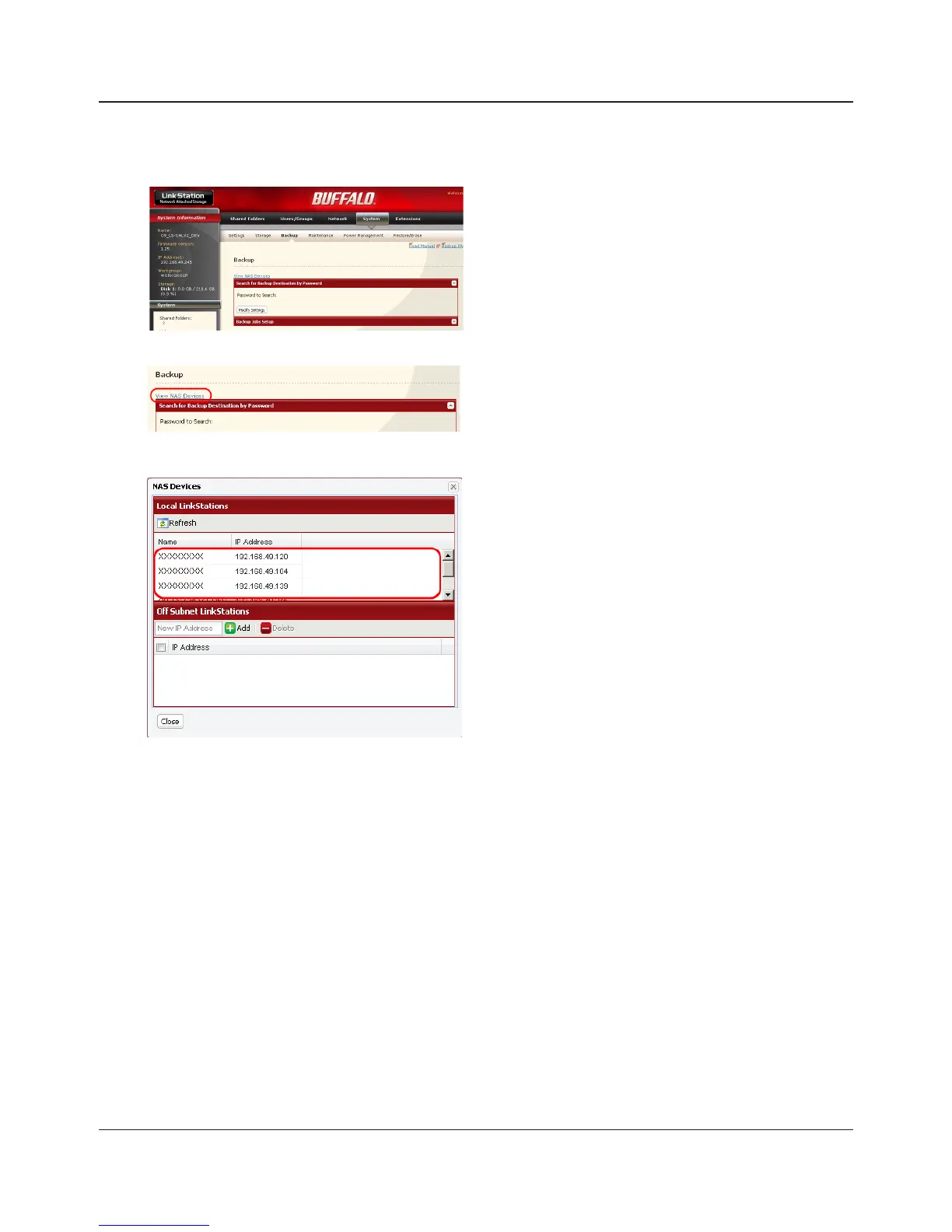
4 Conguring LinkStation # 2 to use LinkStation # 1 as a backup destination
1
2
3
In the Web Admin interface, navigate to [System] -
[Backup].
Click [View NAS Devices].
1 Check the [IP Address] of the LinkStation you
want to specify as a backup destination from
[Local LinkStations].
2 Enter IP address of the LinkStation you want to
specify as a backup to [O Subnet LinkStations]
and click [Add].
Notes:
If LinkStation # 2 (backing up) and LinkStation # 1 (with the destination folder) are on dierent
networks, you must create a VPN connection between the two networks before the LinkStations will
be able to see or back up to each other.
If you are using Jumbo Frame and back up data from one LinkStation or TeraStation to another
LinkStation or TeraStation, set the Ethernet frame sizes of the LinkStations/TeraStations to the same
settings (or the closest available). If the Ethernet frame sizes are signicantly dierent, the backup
job may fail. If you have problems with backup jobs, select the default frame size (1518 bytes).















 To Next Page