31
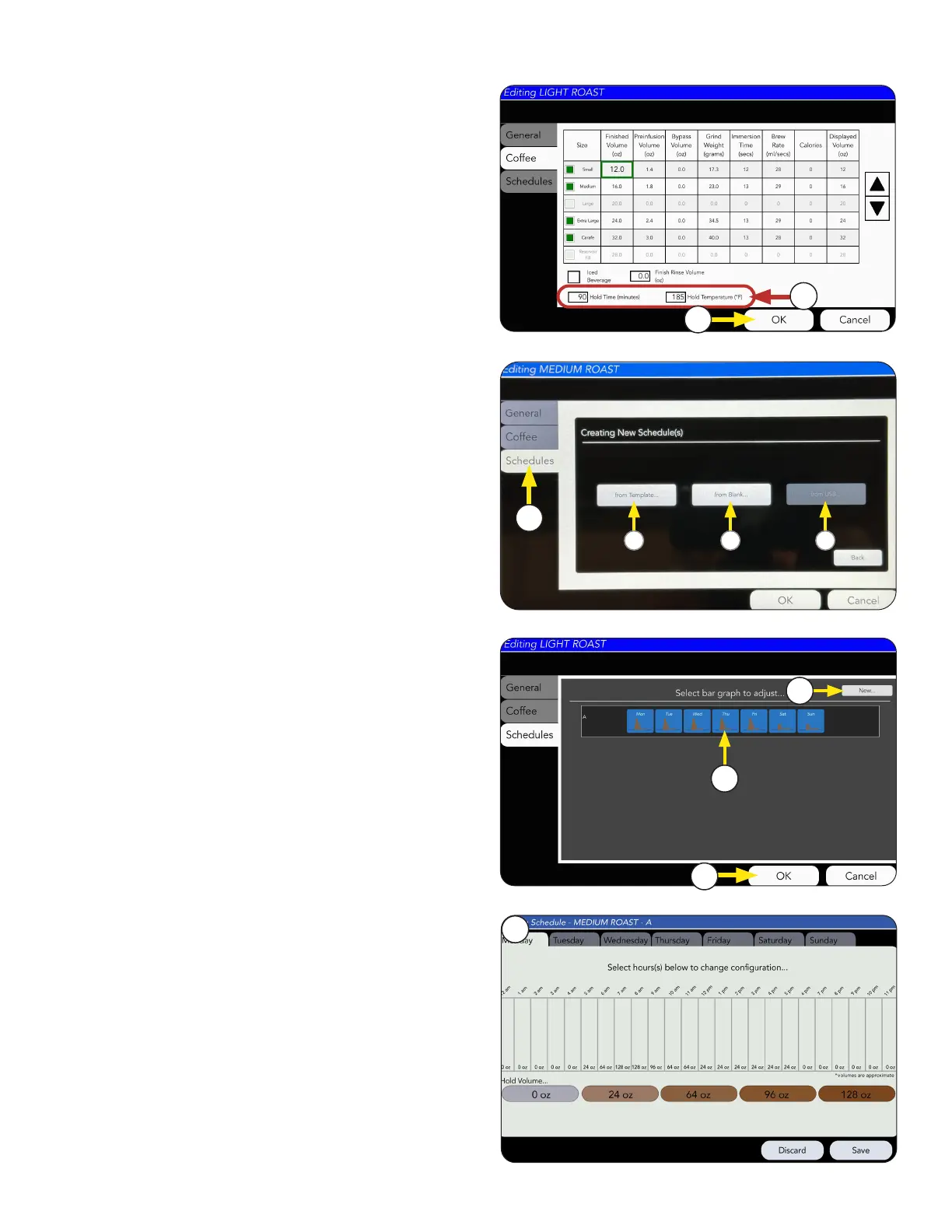
5. The SCHEDULES Tab allows you to adjust hold
volume for different times of each day. This
is useful when trying to conserve energy and
waste during down times as well as keep up with
high volume peak times.
1. Choose the SCHEDULES tab to edit the recipe
hold volumes for each hour/day.
4. Select OK if changes are made.
2. Select Schedule window to see more daily
adjustments.
3. Select New button to create a new schedule.
RECIPE AND PRODUCT SETUP
Recipe Setup
Select an option:
a. Use an existing template to edit by selecting
"from Template" to open schedule window.
b. Create a new schedule by pressing "from Blank"
button.
c. Upload an existing schedule from a saved file
using a USB stick.
See "Importing Custom Configuration Files" for
more information.
4
2
3
5
6. Press OK if changes are made.
5. You can also adjust the hold time and hold
temperature for the recipe.
6
5
1
continued >
a
b
c



 To Next Page