14
Operating states
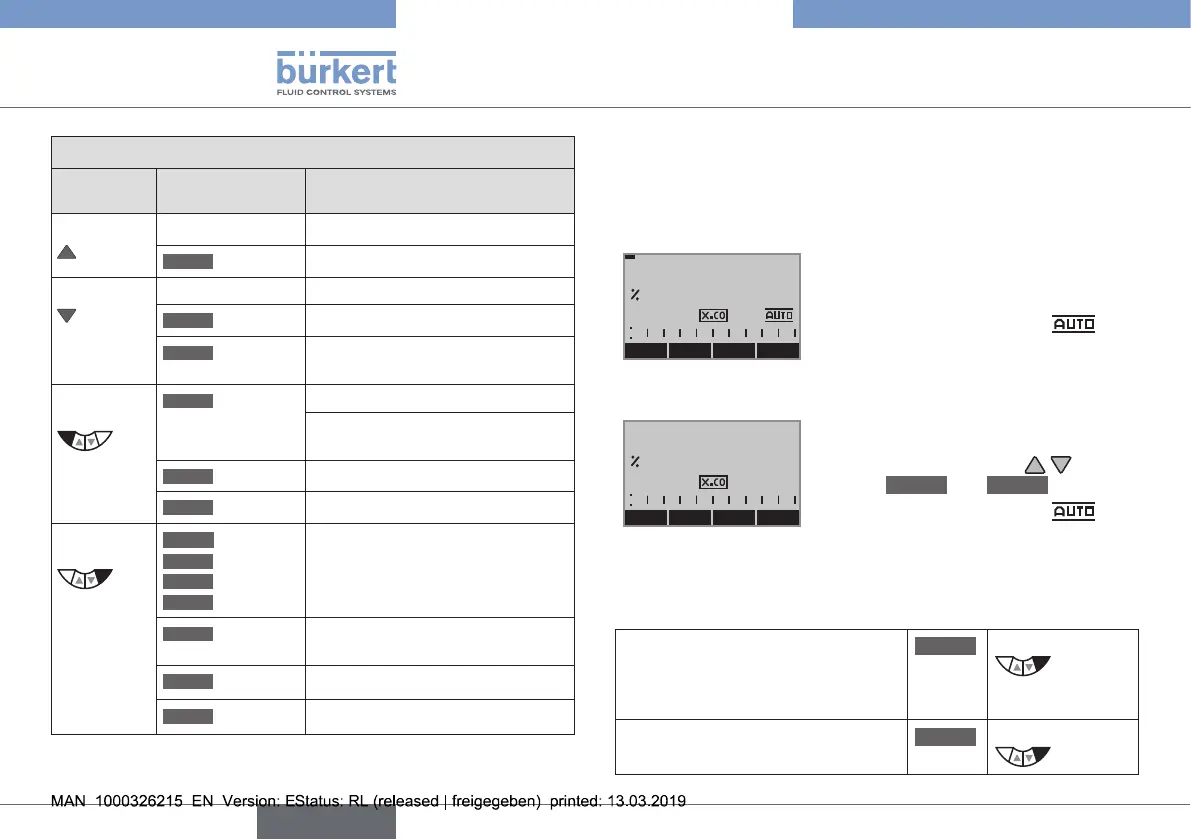
Function of the keys on the setting level:
Key
Function of the
keys
Description of the function
Arrowkey Scrollupinthemenus
MENU
+
Increasenumericalvalues
Arrowkey Scrolldowninthemenus
MENU
–
Decreasenumericalvalues
MENU
←
Changebyonedigittotheleft;
whenenteringnumericalvalues
Selection
key
MENU
EXIT
(BACK)
Returntotheprocesslevel
Graduallyreturnfromasubmenu
option
MENU
ESC
Leaveamenu
MENU
STOP
Stopasequence
Selection
key
MENU
ENTER
MENU
SELEC
MENU
OK
MENU
INPUT
Select,activateordeactivatea
menuoption
MENU
EXIT
(BACK)
Graduallyreturnfromasubmenu
option
MENU
RUN
Startasequence
MENU
STOP
Stopasequence
Tab. 1: Function of the keys
8 OPERATING STATES
Type8692/8693has2operatingstates:
AUTOMATICandMANUAL.
AUTOMATIC
MENU CMD POS MANU
POS
0.0
IntheAUTOMATICoperatingstate
normalcontrolledoperationis
implemented.
(ThesymbolforAUTOMATIC
isshownonthedisplay.(Abarruns
alongtheupperedgeofthedisplay).
MANUAL
MENU OPN CLS AUTO
POS
0.0
IntheMANUALoperatingstatethe
valvecanbemanuallyopenedor
closedviathearrowkeys (key
function
OPN
and
CLS
).
(ThesymbolforAUTOMATIC
ishidden.Nobarrunningalongthe
upperedgeofthedisplay).
8.1 Changing the operating state
ChangetoMANUALoperating
state
(onlyavailableforprocessvalue
display:POS, CMD, PV, SP)
MANU
Press
ReturntoAUTOMATICoperating
state
AUTO
Press
english
Type 8692, 8693 REV.2



 To Next Page