32
EtherNet/IP, PROFINET and ModbusTCP
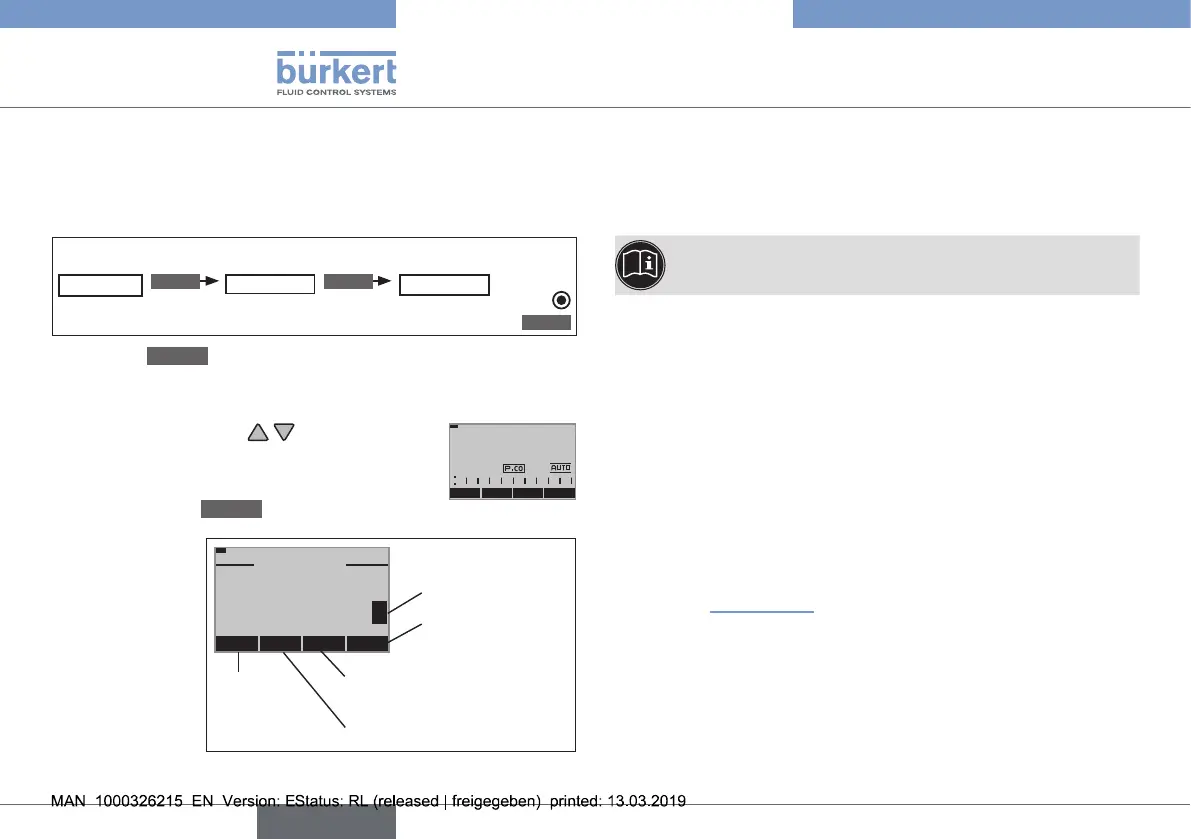
12.3.2 Manually changing the process set-point
value
Procedure:
1. Set the set-point value default on the setting level:
Inthemainmenu(MAIN),selecttheP.CONTROLfunction
P.CONTROL
ENTER
SETUP
ENTER
SP-INPUT
internal
SELEC
→ Usethe
EXIT
key(press4x)toreturntotheprocesslevel.
2. On the process level, manually change the process set-point
value:
→ Usethearrowkeys toselectthe
displayfortheprocessset-pointvalue
(SP).
MENU PV PV
(t)
INPUT
SP
30.0
m3/min
→ Pressthekey
INPUT
.
→ Insert
process
set-point
value(as
shownonthe
right-hand
image)
ESC
+ <
-
OK
SETVALUE
SP:
[m3/min]
70.0
+
070.
0
Acceptsetvalue
Return
without
change
Changebyonepositionto
theleft
Increasenumber
Changeablenumber
Enter values:
Fig. 15: Enter values
13 ETHERNET/IP, PROFINET AND
MODBUSTCP
Thequickstartdescribesonlytheelectricalinstallationoftype
8692,8693andthespecicationofthebasicsettings.
ThesettingsforthebuscommunicationviatheBUS.
COMMmenuaredescribedintheoperatinginstructions
oftype8692,8693.
13.1 Electrical installation
Procedure:
→ Connecttype8692,8693accordingtothetables.
Asetscrewwithnutislocatedontheelectricalconnection
housingforconnectionofthetechnicalground.
→ Connectsetscrewtoasuitablegroundingpoint.Toguarantee
electromagneticcompatibility(EMC),ensurethatthecableis
asshortaspossible(max.30cm,Ø1.5mm
2
).
Whentheoperatingvoltageisapplied,type8692,8693is
operating.
→ Nowmaketherequiredbasicsettingsandadjustmentsfor
thepositioncontroller/processcontroller.See
chapter“12Start-up”.
english
Type 8692, 8693 REV.2



 To Next Page