31
Start-up
Parameterizetheprocesscontrollerasfollows:
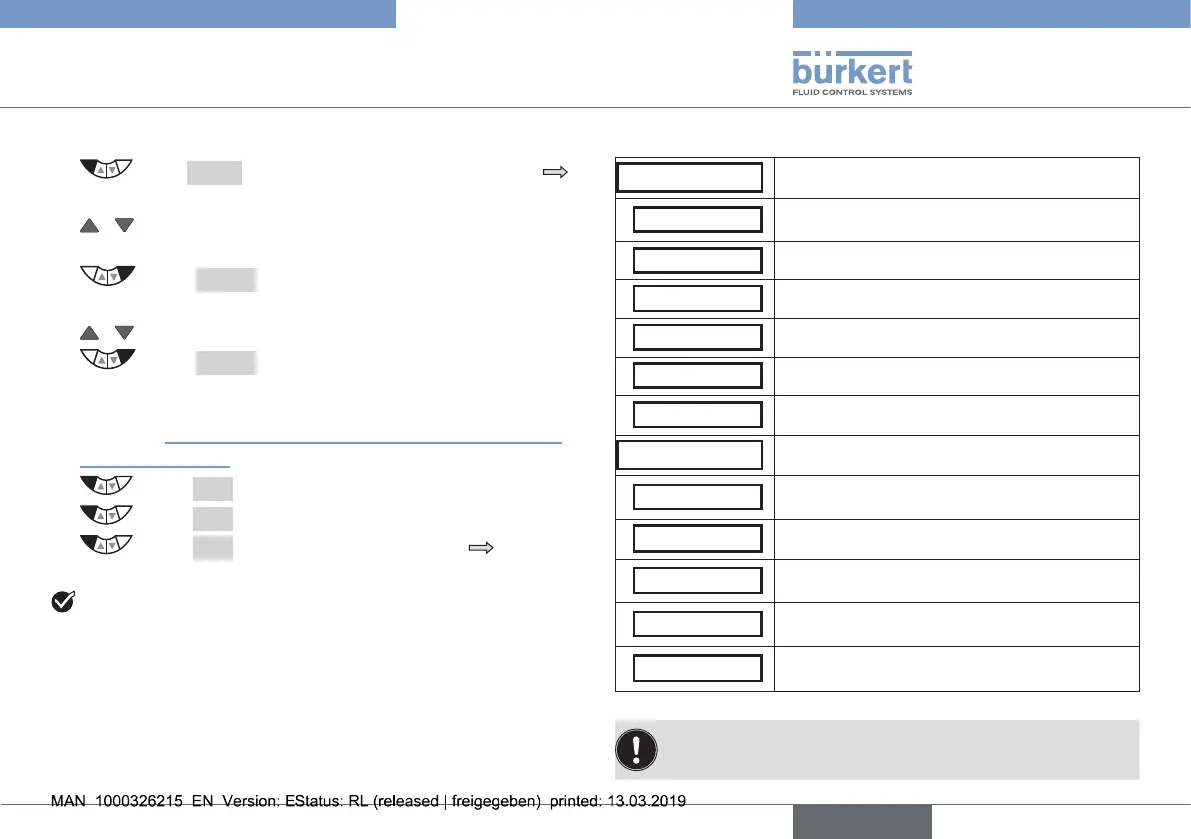
→ Press MENUfor3s.Switchingfromprocesslevel
settinglevel.
→ / SelectP.CONTROL.Selectioninthemainmenu
(MAIN).
→ Select ENTER.Thesubmenuoptionsforthebasic
setting are displayed.
→ / Select PID.PARAMETER.
→ Select ENTER.Themenuforparameterizingthe
process controller is displayed.
Parameterizationisdescribedintheoperatinginstructions
inchapter“15.3PID.PARAMETER–Parameterizationofthe
processcontroller”.
→ Select EXIT. Return to P.CONTROL.
→ Select EXIT.Returntothemainmenu(MAIN).
→ Select EXIT.Switchingfromsettinglevel process
level.
Youhaveparameterizedtheprocesscontroller.
P.CONTROL - settings:
PID.PARAMETER
Parameterization of the process controller
DBND 0,1 %
Insensitivityrange(deadband)ofthePID
process controller
KP 0,00 Amplicationfactoroftheprocesscontroller
TN 0,5 Resettime
TV 0,0 Hold-backtime
X0 0,0 % Operating point
FILTER 0 Filteringoftheprocessactualvalueinput
SETUP Setting up the process controller
PV-INPUT
Indicationofthesignaltypeforprocess
actualvalue
PV-SCALE Scalingtheprocesscontroller
SP-INPUT
Typeoftheset-pointvaluedefault
(internalorexternal)
SP-SCALE*
Scalingthepositioncontroller
(forexternalset-pointvaluedefaultonly)
P.CO-INIT
Enablesasmoothswitchoverbetweenoper-
atingstatesAUTOMATICandMANUAL
Tab. 12: Basic settings of the process controller
Theparametersettingscanbecreatedautomaticallywith
thehelpoftheP.TUNEfunction(descriptionsee“operating
instructionsfortype8692/8693”).
english
Type 8692, 8693 REV.2



 To Next Page