33
EtherNet/IP, PROFINET and ModbusTCP
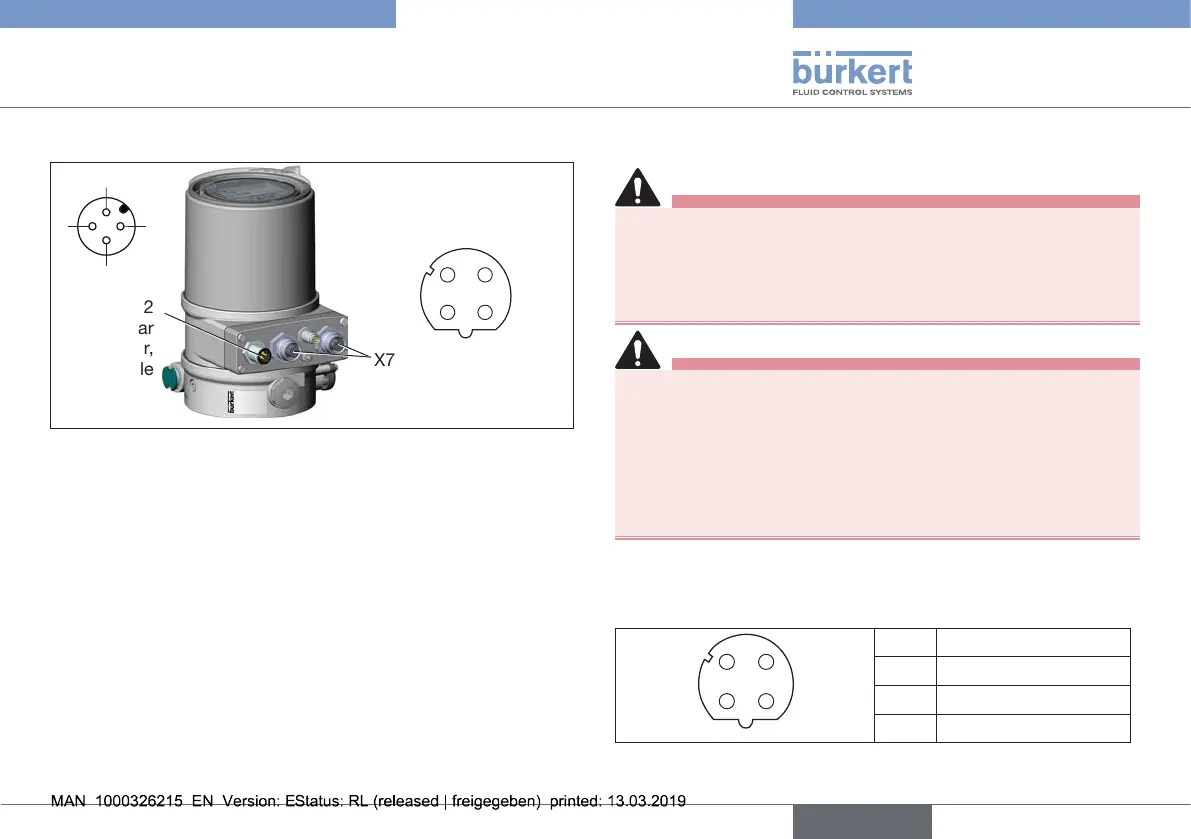
13.2 View Field bus connection
X7-eldbus
connection M12
(2portEthernetswitch)
X6-M12
circular
connector,
4-pole
(operating
voltage)
1
2
3
4
43
12
Fig. 16: Field bus connection
13.3 Technical data
Networkspeed 10/100mbps
Autonegotiation Yes
Switchfunction Yes
Networkdiagnostics Yes,viafaulttelegram
MAC-ID Individualidenticationnumber,stored
inthemoduleandontheoutsideofthe
device(seetypelabel)
DevicenameEthernet
(factorysettings)
Positioner/processcontroller(namecan
bechanged)
13.4 Electrical connection
DANGER
Risk of injury due to electric shock.
▶ Beforereachingintothesystem,switchothepowersupply
andsecuretopreventreactivation.
▶ Observetheapplicableaccidentpreventionregulationsand
safetyregulationsforelectricalequipment.
WARNING
Risk of injury from improper installation.
▶ Installationmaybecarriedoutbyauthorizedtechnicians
onlyandwiththeappropriatetools.
Risk of injury from unintentional activation of the system and
uncontrolled restart.
▶ Securesystemagainstunintentionalactivation.
▶ Followinginstallation,ensureacontrolledrestart.
TheEtherNet/IPisconnectedwithanM12circularplug-incon-
nector,4-poleD-coded.
X7-M12eldbusconnectionD-coded:
43
12
Pin 1 Transmit+
Pin 2 Receive+
Pin 3 Transmit–
Pin 4 Receive–
Tab. 13: Electrical assignment EtherNet/IP
english
Type 8692, 8693 REV.2



 To Next Page