100
D. User Interface (continued)
3. Help Screens
XII. Operation (continued)
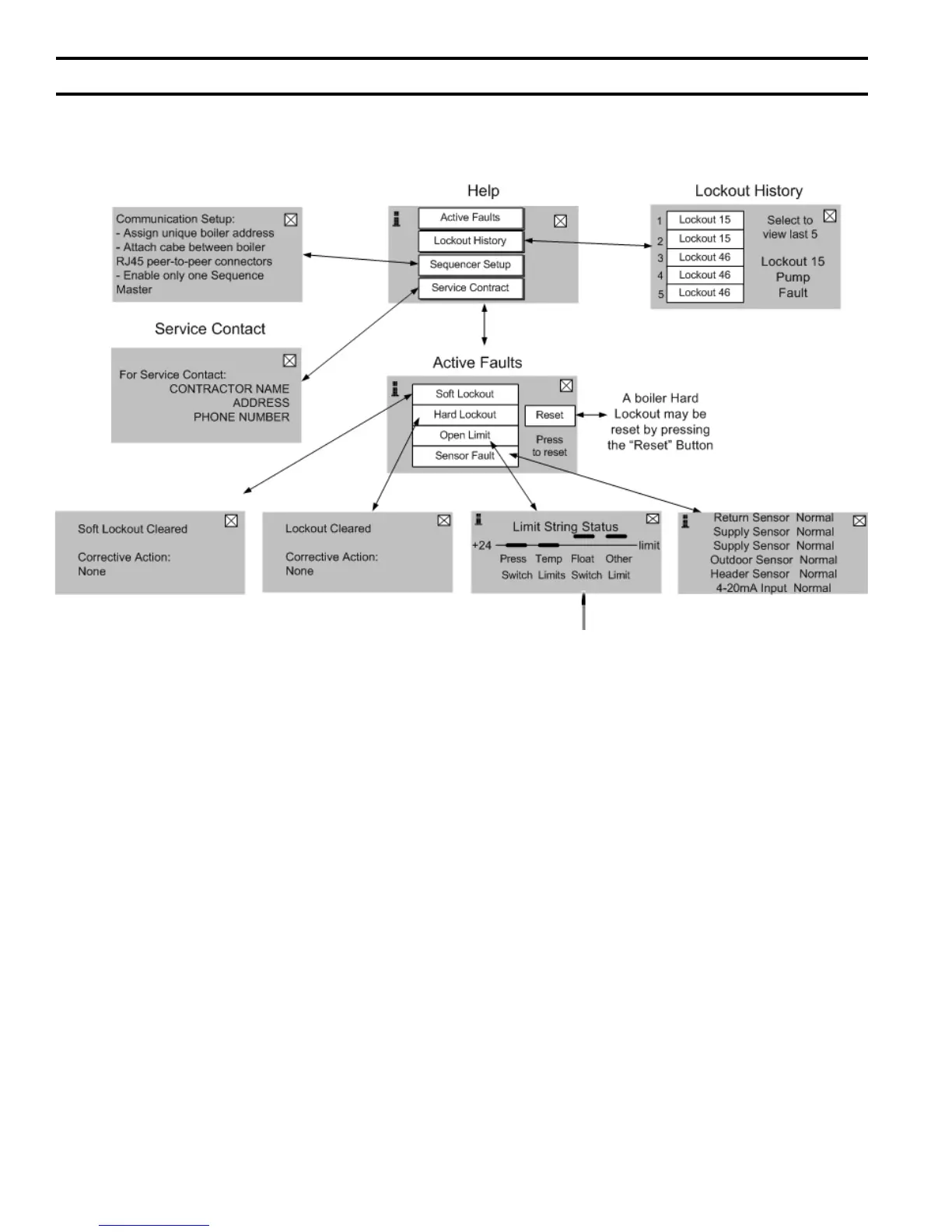
The “Help” screen provides access to active faults,
lockout history, the service contact and the boiler
reset button. The “Help” screen is accessed from
the “Home” screen.
Limit String Status Display
This display is provided to identify the cause of an
Interlock input “open” contact (refer to Figure 36
Ladder Diagram, Interlock input terminal J5-1). For
example, this illustration depicts the “Float Switch”
contact as “open.” This indicates that boiler’s
condensate oat switch has detected high water level
and it’s contact is “open” causing the boiler to stop.
Note, Interlock input limit items are wired in series.
Items down stream of the open limit will also appear as
“open” (measure zero volts). When the rst item in the
string is resolved (repaired, or xed) the down stream
items will also be xed.


 To Next Page