99
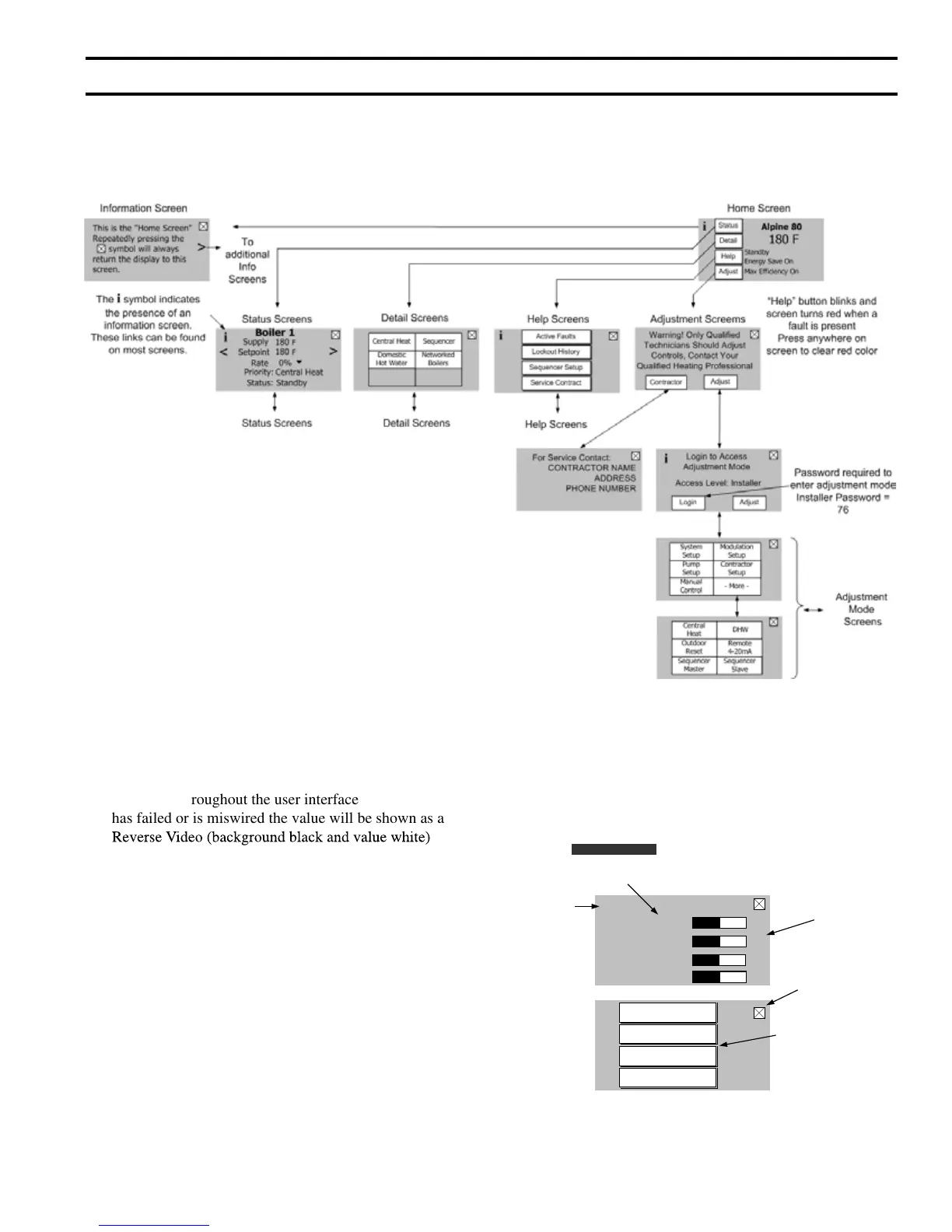
Figure 56: Display Arrangement Overview
Note: The “Home Screen” is the default screen. Any screen left untouched for more than four minutes will revert to the home
screen.
2. Selecting View Mode options
XII. Operation (continued)
D. User Interface
1. Using The Display
The Sage2.1 uses a state-of-the-art touch screen display. The following is a display arrangement overview:
Dynamic Value (live data): Measured temperatures
are shown throughout the user interface. If the sensor
has failed or is miswired the value will be shown as a
Reverse Video (background black and value white) to
indicate that there is a problem with the sensor.
Screen Links:
“Information”: The “
i” screen link symbol indicates
the presence of an Information screen.
These screens explain screen content
and provide other helpful information.
Next screen: The “<” or “>” screen link symbol
indicates the presence of additional
screens.
Back to Previous: This button selects the previous
screen or allows the user to leave
this display level and return to the
previous level. Repeatedly pressing
button will return you to the
“Home” screen.
i
Next screen
Page Link
“Information”
Page Link
Go To Button
Page Link
Dynamic value
(live data)
(turns Reverse Video
when sensor
miswired or failed)
Back to previous
Page Link
i
>
<
Status
Stack
180 F
180 F
Return
Supply
180 F
Reverse Video
Rate
100%
Sequencer Setup
Service Contract
Active Faults
Lockout History


 To Next Page