98
XII. Operation (continued)
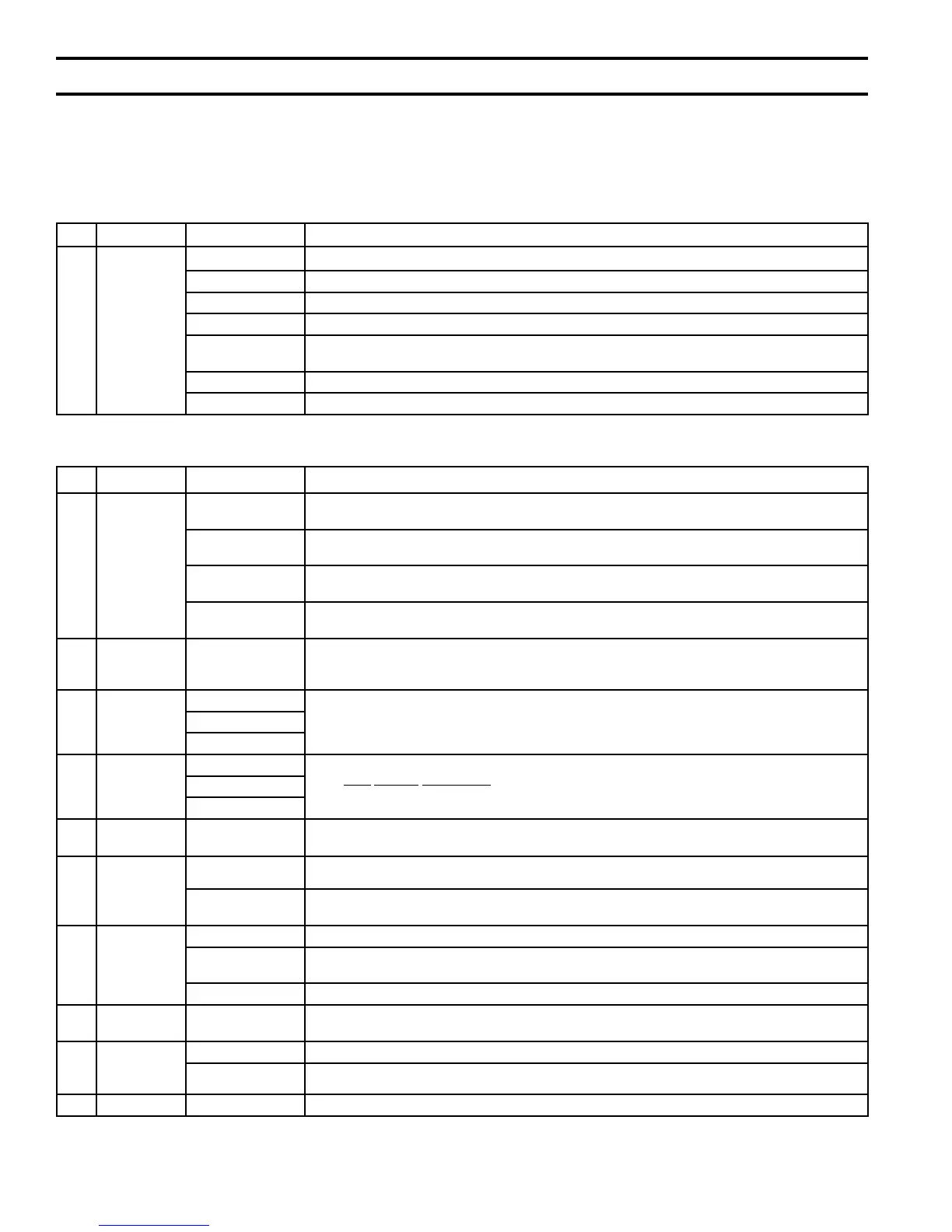
No. Title Terminal Description
1 Check Wiring
1 & 2
Is the heating thermostat connected? Insure this is “dry”, non-powered input.
2 & 3 Is an IWH providing a boiler heat demand?
5 & 6 Is an Outdoor Air sensor used? If yes, refer to step 2 and 9 to activate outdoor air reset.
7 & 8 Is a header sensor used? If yes, refer to step 11 below to activate this feature.
9 & 10
Is a Remote 4-20mA required for a building management system or external multiple boiler control?
If used see step 10 below to activate this input.
11 & 12 Is an External Limit used? Remember to remove factory-installed jumper.
LWCO Plug Is a LWCO required? Check installation of the LWCO.
From the Home Screen press the Adjust button and login to access the adjust mode screens (if required, refer to “Entering Adjustment Mode”
Paragraph D, 4 for login instructions). The following parameters should be reviewed:
No. Menu Parameter Description
2
System
Setup
Outdoor
Air Sensor
If an outdoor air temperature sensor is installed, press “Installed” otherwise leave as “Not Installed”.
Frost Protection
Selecting “Enable” will cause the boiler and boiler connected pumps to run for low temperature
events.
Warm Weather
Shutdown
Selecting “Enable” will restrict boiler start during warm weather (only if an outdoor air temperature
sensor is installed).
Warm Weather
Shutdown Setpoint
Use this setting to adjust the temperature that the WWSD function will prevent a boiler start.
3
Modulation
Setup
Boiler Type
WAR
NING
Conrm that the correct boiler model is shown. Stop installation and contact factory if the wrong
boiler model is shown.
4
Pump
Setup
System Pump
Ensure that the pump parameter selections are correct for your heating system. Refer to Section E.
Adjusting Parameters, Pump Setup Menu for additional information.
Boiler Pump
Domestic Pump
5
Contractor
Setup
Contractor Name
Enter your contact information, name, address, and phone number on this screen. In the event of
a fault or the need to adjust a setting the display will direct the homeowner to you.
Address
Phone
6
Manual
Control
Manual Speed
Control
Use the “High and “Low” options to force the boiler to high re and low re for combustion testing.
7
Central
Heat
Setpoint Ensure Setpoint, (ring rate target temperature) is correct for you type of radiation.
Setback Setpoint
Check the setting for the central heat setpoint when the T-Stat “Sleep” or “Away” Setback mode is
entered (if EnviraCOM Setback thermostat is used).
8 DHW
Setpoint Ensure Setpoint, (ring rate target temperature) is suitable for the IWH requirements.
Setback Setpoint
Check the setting for the DHW setpoint when the T-Stat “Sleep” or “Away” Setback mode is entered
(if EnviraCOM Setback thermostat is used).
Priority Select “Enable” to give domestic hot water demand priority over central heat demand.
9
Outdoor
Reset
Outdoor Reset
Enable/Disable
Ensure the Outdoor Air Reset settings are correct for this site.
10
Remote
4-20mA
Modulation Source Set to 4-20mA when an external multiple boiler controller is connected to the system.
Setpoint Source
Set to 4-20mA when a Energy Management system is sending a “remote” setpoint.
11 Sequencer Master Slave Refer to Sequencer Master Setup Section X, G if multiple boilers are installed at this site.
C. Controls Startup Check List
The Sage2.1 Control is factory programmed with default parameters. Before operating the boiler, these parameters must
be checked and adjusted as necessary to conform to the site requirements. Follow the steps below, making selections and
adjustments as necessary to ensure optimal boiler operation.


 To Next Page