101
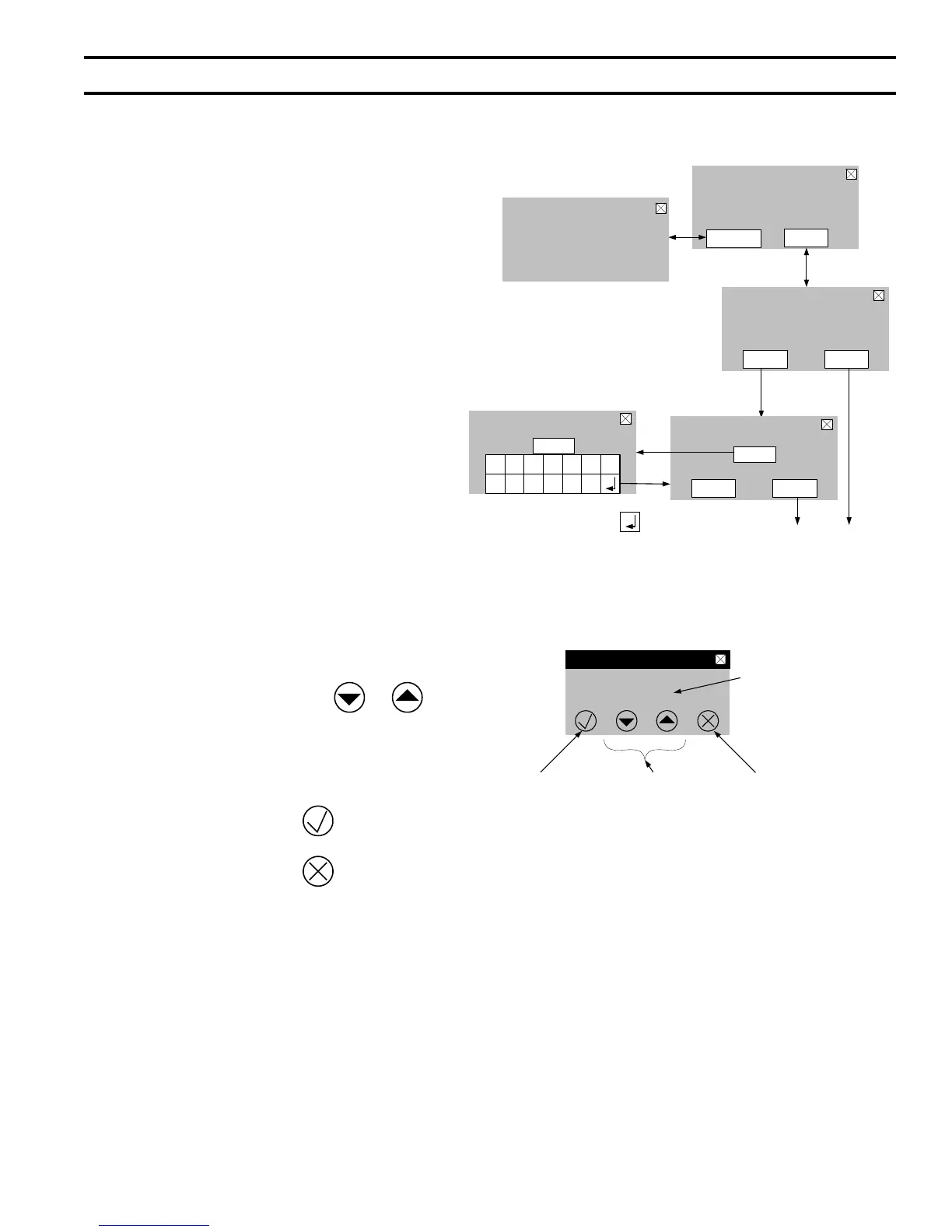
Value to be edited
(blinks while editing)
Increase &
Decrease
Value
buttons
Cancel Edit
Accept Edit
Note: the value modified
with the increase and
decrease buttons is not
accepted unless this
button is also pressed
CH Setpoint
Central Heat
<
>
180
F
i
XII. Operation (continued)
4. Entering Adjust Mode
The “Adjust mode” screen is accessed from the
“Home” screen. The “Adjust Mode” provides
contractors access to view and adjust additional
information.
a. Entering Adjustment Mode
The Sage2.1 is factory programmed to include
basic modulating boiler functionality. These
settings are password protected to discourage
unauthorized or accidental changes to settings.
User login is required to view or adjust these
settings:
i. Press the “Adjust” button on the Home
screen.
ii. Press the “Adjust” button on the Adjust
Mode screen or Press Contractor for service
provider contact information.
iii. Press “Login” button to access password
screen.
iv. Press 3-digit display to open a keypad.
Enter the password (Installer Password is
76) and press the return arrow to close the
keypad. Press the “Save” button.
v. Press the “Adjust” button to enter
Adjustment mode.
b. Editing Parameters is accomplished as follows:
Value to be edited: Use the
buttons to edit a value. While editing a value
it will blink until it has been accepted or
cancelled as described below. A value is
also cancelled by leaving the screen without
accepting the value.
Accept Edit: Press the button to conrm
newly edited value.
Cancel Edit: Press the button to cancel
newly edited value and go back to the original
value.
D. User Interface (continued)
Login to Access
Adjustment Mode
For Service Contact:
CONTRACTOR NAME
ADDRESS
PHONE NUMBER
Contractor
Adjust
Access Level: Installer
Adjust
Password required to
Get past here
Installer Password =
76
Login
Warning! Only Qualified
Technicians Should Adjust
Controls, Contact Your
Qualified Heating Professional
Adjust Mode
i
Press 3-digit display to
Input Password
Press Save to enter password
AdjustSave
i
000
1
CL
R
ES
C
5432
6
B
S
0987
Press 3-digit display to
Input Password
i
076
After entering the
password press
To return to password
screen
After password is Saved
These buttons access
Adjust mode screens


 To Next Page